

Get insights like this delivered to your inbox
Join 2,500+ GTM professionals. No spam, unsubscribe anytime.
Subscribe to NewsletterMisalignment between sales and marketing costs B2B companies $1 trillion annually. Here's why: inefficient lead handoffs, disconnected systems, and unclear data create chaos. HubSpot offers a unified platform to fix these issues by automating workflows, syncing data, and ensuring both teams share the same definitions and tools.
Key Problems:
- Inefficient lead handoffs: Manual processes like spreadsheets and Slack create delays and errors.
- Data silos: Separate tools for sales and marketing lead to missing context and visibility.
- Reporting gaps: Teams argue over attribution without a shared source of truth.
- API limitations: Multi-tool setups hit rate limits, causing sync failures.
- Broken data associations: Missing links between contacts, companies, and deals disrupt workflows.
HubSpot Solutions:
- Automates lead handoffs with clear lifecycle stages and SLAs.
- Integrates sales and marketing data into one timeline.
- Provides real-time dashboards and attribution tracking.
- Handles API limits with batching, webhooks, and middleware.
- Fixes data gaps with relational models and bulk association tools.
Results: Faster follow-ups, accurate reporting, and improved alignment between teams. SaaS companies using HubSpot report shorter sales cycles, higher conversion rates, and better revenue insights.
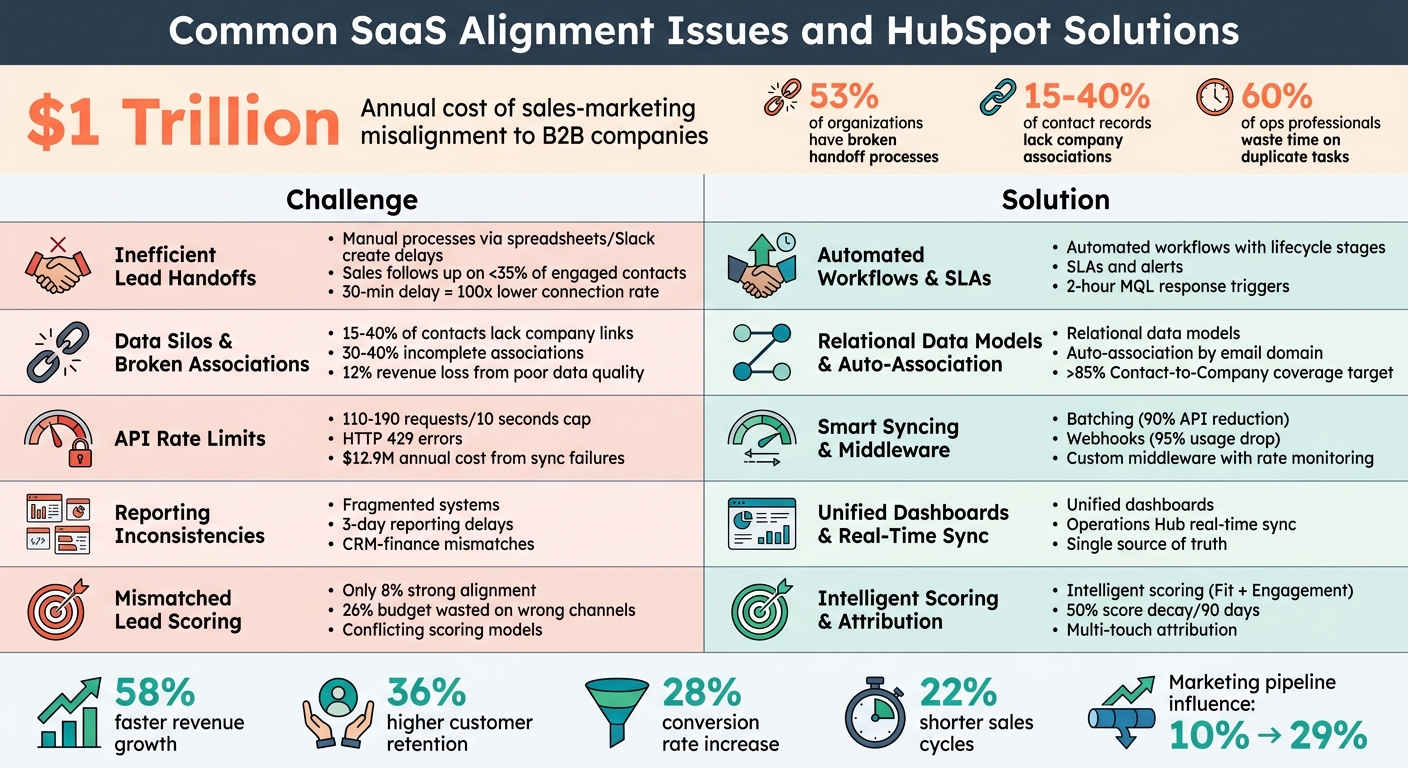
SaaS Sales-Marketing Alignment Challenges vs HubSpot Solutions
Lifecycle Misalignments and Inefficient Lead Handoffs
The Problem: Disconnected Lifecycle Stages
When marketing and sales teams define key stages like MQL (Marketing Qualified Lead) and SQL (Sales Qualified Lead) differently, leads often fall into a no-man’s land. For instance, marketing might qualify a lead after something as simple as downloading a whitepaper, while sales might expect more concrete signals - like a confirmed budget or a clear timeline. This mismatch creates friction from the get-go.
Here’s the reality: 53% of organizations report broken handoff processes, with sales teams following up on less than 35% of engaged contacts. And timing is everything - waiting just 30 minutes to follow up can reduce your chances of connecting by a staggering 100x. Using tools like Slack or spreadsheets for handoffs only makes things worse, introducing even more room for error and making it harder for marketing to track follow-ups.
A major culprit? Confusion between “Lifecycle Stage” and “Lead Status.” Lifecycle Stage reflects where a contact is in the buyer’s journey, while Lead Status focuses on the sales team’s actions. When these distinctions blur, the data becomes unreliable. For example, if sales reps manually move an SQL back to the “Lead” stage, it skews conversion rates and clouds the funnel’s true performance.
HubSpot’s approach to clearly separating lifecycle stages from lead statuses helps untangle this mess.
HubSpot Solution: Custom Lead Status Properties
HubSpot tackles these challenges by creating a clear divide between Lifecycle Stage and Lead Status. While Lifecycle Stage maps out the buyer’s journey (e.g., Lead, MQL, SQL, Opportunity), Lead Status tracks sales activities (e.g., New, Attempted to Contact, Connected, Working). This separation ensures both teams stay on the same page.
Automation is another game-changer. HubSpot workflows can automatically move contacts forward based on specific actions, like booking a meeting or visiting the pricing page multiple times in a short span. This eliminates manual errors and ensures leads don’t slip through the cracks. Companies can also set SLAs (Service Level Agreements) that trigger alerts if a rep hasn’t engaged with an MQL within two hours, keeping the pipeline moving. For reference, a healthy MQL-to-SQL conversion rate falls between 35% and 45%.
Take LRMG, for example - a talent technology leader that integrated its custom CRM with HubSpot Marketing and Sales Hub in March 2023. Within just 90 days, they added 2,293 new contacts, closed 325 deals, and sent over 843,000 emails - all with full attribution and ROI reporting. The key to their success? Cleaning up their data and automating the marketing-to-sales handoff instead of relying on spreadsheets.
HubSpot also supports a "Return-to-Nurture" workflow. If a rep marks a lead as “Bad Timing,” the system shifts the contact back into a nurturing sequence automatically, ensuring no lead goes cold. This automation not only prevents manual errors but also provides marketing with valuable feedback to refine lead qualification and targeting.
By addressing lifecycle and status management issues, HubSpot lays the groundwork for solving larger data integration challenges that often exacerbate misalignment between teams.
For SaaS companies looking to improve sales and marketing alignment, Vestal Hub offers tailored RevOps services. From custom HubSpot setups to advanced automation strategies, they help eliminate lifecycle misalignments and boost conversion rates.
sbb-itb-69c96d1
API Rate Limits and Real-Time Data Sync Challenges
The Problem: API Limitations in Multi-Tool Setups
When your SaaS tech stack includes multiple tools - like a BI platform, enrichment services, custom scripts, or a data warehouse - they all share a limited API quota. For instance, HubSpot's public OAuth apps are capped at 110 requests every 10 seconds, while private apps on Pro or Enterprise plans can handle up to 190 requests per 10 seconds. If all tools are using the same app credentials, they draw from a single quota pool, which can quickly become a bottleneck.
Hitting these limits leads to HTTP 429 errors, which stop data syncing in its tracks. One ecommerce company experienced a 7% drop in conversion rates during a peak sales period because their API queue backed up with over 1,000 delayed requests. For SaaS companies, this isn't just an operational hiccup - it can directly impact revenue. In fact, poor CRM data caused by sync failures costs organizations an average of $12.9 million annually.
The Search API poses even stricter limitations, allowing only 5 requests per second across an entire account. Large-scale exports or complex queries can easily hit this cap. And bidirectional syncs can make things worse by creating "vampire records" - infinite loops where changes in one system trigger updates in another, which then loop back, rapidly depleting your API quota.
"We spent two weeks reconciling HubSpot and Salesforce data before a board meeting. Two weeks. Just to agree on how many SQLs we generated last quarter."
- VP of Revenue Operations, B2B SaaS Company
When sales teams can't access updated deal stages or marketing teams lose track of campaign attribution in real time, alignment across departments breaks down. These challenges call for smarter ways to handle data, which HubSpot addresses through tailored integrations.
HubSpot Solution: Custom Integrations and Middleware
The answer isn’t throwing more API calls at the problem - it’s about working smarter. One key approach is batching. Instead of making 50 separate calls to update contacts, batch them into a single request. This can cut API usage by up to 90% and reduce latency by over 60%.
Another effective method is switching from polling to webhooks. Polling constantly checks for updates, draining your API quota, while webhooks notify you instantly when changes occur. Replacing 1,000 polling requests per hour with webhooks can reduce API usage by over 95%. With APIs now driving 57% of all dynamic internet traffic globally, efficient syncing is more critical than ever.
Custom middleware can act as the bridge between HubSpot and your other tools. It queues requests, monitors rate limit headers like X-HubSpot-RateLimit-Remaining, and adjusts call frequency dynamically to stay within limits. Middleware can also filter and reshape data before it reaches HubSpot, cutting unnecessary API calls by up to 45%. To avoid those "vampire record" loops, implement origin tagging - label each outbound write with a source identifier so that incoming webhooks can skip processing if they originated from the same system.
Vestal Hub, a company specializing in custom integrations, offers tailored middleware solutions for B2B SaaS companies. Their RevOps engineers design workflows that optimize data syncing, implement exponential backoff strategies to reduce repeated API failures by 60–80%, and set up alerts when usage nears 80% of the quota. By streamlining data architecture and building robust middleware layers, they help SaaS companies maintain real-time data accuracy, avoid sync delays, and keep sales and marketing teams on the same page - all without hitting API limits.
Incomplete Data and Object Association Gaps
The Problem: Data Silos and Reporting Limitations
HubSpot's system relies heavily on associations - the links connecting contacts, companies, deals, and tickets. When these connections are missing, records become isolated, leaving workflows and reports incomplete. The issue is that these broken associations don't generate error messages. Instead, automation simply skips over the disconnected records, leading to what experts refer to as "unnoticed failures."
"Broken associations don't throw errors. They just make things quietly stop working - and nobody notices until revenue is already lost."
- Peter Sterkenburg, HubSpot Solutions Architect, PortalPilot
In many HubSpot setups, 15-40% of contact records lack a company association. Additionally, 30-40% of records across databases suffer from incomplete associations. This creates significant blind spots. For example, if a deal isn’t linked to a contact, onboarding emails don’t go out. Similarly, when contacts aren’t tied to companies, territory assignment workflows exclude them. These "orphaned" records not only waste database capacity but also go untouched by sales teams.
The financial impact of these gaps is hard to ignore. Studies reveal that companies lose an average of 12% of revenue due to poor data quality, often stemming from small issues like broken associations. Leadership decisions based on pipeline reports that omit orphaned deals can lead to inaccurate forecasts. Even HubSpot's Breeze AI, which uses association graphs for deal summaries and forecasting, provides incomplete insights when associations are missing.
Fixing these association gaps is essential for accurate reporting and reliable workflows.
HubSpot Solution: Relational Data Models
The solution lies in understanding HubSpot's data hierarchy: Objects (tables), Records (rows), Properties (columns), and Associations (relationships). Just as APIs ensure smooth data flow, strong relational data models maintain consistency across the system. When importing or migrating data, the order of operations matters. Always import Companies first, followed by Contacts, then Deals, and finally Revenue objects. This prevents the creation of orphaned records.
"HubSpot is a relationship-driven CRM. The order you load data matters just as much as what data you load."
- Garrett Hunt, Founder, Huntscape
To prevent future gaps, activate HubSpot's native setting to automatically associate companies with contacts using email domains. For existing orphaned records, use the "Associate records" import feature with a CSV containing unique Record IDs to restore connections in bulk. Regularly monitor association coverage - the percentage of records linked to at least one other record. Strong benchmarks include >85% coverage for Contact-to-Company and >90% for Deal-to-Contact associations.
For more complex B2B setups, leverage association labels (available in Professional and Enterprise tiers) to add context to relationships. For instance, you can differentiate a "Decision Maker" from an "Influencer" on a deal. If standard objects can’t handle many-to-many relationships, such as tracking multiple facilities per company, custom objects can provide the necessary structure without creating "property sprawl".
Companies like Vestal Hub specialize in designing relational data models tailored for B2B SaaS environments. They create custom object architectures and automated workflows that ensure associations stay intact, so reports are accurate and workflows run smoothly without hidden failures.
Disconnected Systems and Reporting Inconsistencies
The Problem: Fragmented Reporting Across Systems
When sales, marketing, and finance teams rely on separate systems, it creates a chaotic reporting environment that hinders unified decision-making. Picture this: marketing runs campaigns in HubSpot, sales tracks deals in the CRM, and finance manages subscriptions in a completely different billing platform. Each team ends up crafting its own version of the truth, leading to "data debt" that magnifies departmental silos and confuses leadership about forecasts, pipeline health, and revenue accuracy.
"Revenue silos undermine growth. While sales celebrate closed deals, marketing struggles to justify ROI, and operations fights to make sense of scattered data across disparate systems."
- HubCentrik
A common issue arises when CRM data doesn’t match finance records. For instance, a deal marked "Closed-Won" in the CRM might not align with when billing starts or revenue is recognized. This misalignment creates friction, erodes trust in the data, and complicates collaboration. On top of that, 60% of operations professionals report wasting time on duplicate tasks because disconnected systems require manual updates.
The impact of fragmented systems is real. In early 2026, a B2B SaaS company working with Mpire Solutions faced severe delays due to managing data across separate platforms for marketing, sales, and onboarding. After consolidating these systems into a single source of truth and automating transitions, they achieved dramatic results: reporting time dropped from three days to just a few hours, conversion rates jumped by 28%, and the sales cycle shortened by 22%.
The key to fixing these issues? Consolidating data into one reliable system.
HubSpot Solution: Unified Dashboards and Automation
HubSpot steps in as the solution by serving as the single source of truth. With tools like Operations Hub, businesses can sync data in real-time between HubSpot and external systems like NetSuite, SAP, or custom databases. This eliminates the need for error-prone manual exports and imports, ensuring smoother operations.
Unified dashboards bring all key metrics together - from MQL volume and SQL conversion rates to deal influence and customer retention. This ensures every team accesses the same insights, fostering alignment across the revenue cycle. Automated triggers further enhance accuracy, streamlining funnel reporting. Companies that integrate their systems report 58% faster revenue growth and 36% higher customer retention rates compared to those stuck with disconnected tools.
Take Vestal Hub, for example. They’ve built unified data architectures that connect billing systems, product usage data, and CRM records into one cohesive reporting layer. Their custom integrations and workflows ensure seamless revenue data flow, empowering leadership to make decisions based on real-time, trustworthy insights.
Comparison Table: Challenges vs. HubSpot Fixes
| Challenge | HubSpot Solution | Expected Outcome |
|---|---|---|
| Reporting Misalignment | Unified Dashboards & Shared CRM | Consistent data; reliable finance reporting |
| Manual Data Entry | Automated Workflows | Fewer errors; 3x faster follow-ups |
| Fragmented Systems | Native Integrations (Operations Hub) | Smooth data flow across billing, product, CRM |
| Inconsistent Definitions | Standardized Lifecycle Stages | Clear handoffs; 58% faster revenue growth |
| Unclear Attribution | Native Attribution Reporting | Real-time visibility into campaign revenue |
Inconsistent Lead Scoring and Attribution Issues
The Problem: Mismatched Scoring and Attribution Standards
When marketing teams create lead scoring models without input from sales, it often leads to a major disconnect. Marketing might consider a lead "hot" based on actions like email opens or content downloads, while sales dismisses the same lead because they lack budget authority or aren’t actively looking to buy. This disconnect contributes to a broader issue: only 8% of companies report strong alignment between their sales and marketing teams, and 53% experience misalignment specifically during the lead hand-off phase.
Separate scoring models between marketing and sales only make things worse. Marketing often relies on engagement metrics - like webinar attendance or website visits - because they’re easy to track. But these metrics don’t always reflect the behaviors that lead to closed deals.
"When sales doesn't trust the scores, they ignore them and develop their own mental models. Now you have two competing systems for evaluating the same leads."
- Orbitforms
Another challenge is the lack of clarity in qualification standards. Terms like "decision-maker" or "active buying timeline" are often undefined, leading to inconsistent interpretations. One sales rep might see a VP of Marketing as a decision-maker, while another insists it has to be a C-level executive. This subjectivity causes friction and uneven follow-up efforts. And while conflicting scoring systems create problems, poor attribution tracking only adds to the confusion.
Inaccurate attribution can cost marketers 26% of their budget on ineffective channels. Without capturing the entire buyer journey - from their first website visit to each touchpoint leading to conversion - teams struggle to identify which campaigns drive revenue.
Another issue is the failure to account for score decay. For example, a lead who visited a pricing page six months ago shouldn’t be treated the same as someone who visited yesterday. However, many systems weigh all actions equally, inflating scores for leads who were once interested but have since gone cold.
HubSpot Solution: Intelligent Scoring Automations
HubSpot tackles these challenges with its Intelligent Scoring Automation system. This tool combines two key factors: Fit (firmographics like company size, industry, and role) and Engagement (behavioral signals like page views, email clicks, and downloads). By analyzing historical conversion data, HubSpot’s AI-powered scoring identifies the behaviors most likely to lead to revenue, ensuring the criteria align with actual outcomes.
To keep scores relevant, HubSpot includes automated score decay. For example, lead scores can drop by 50% every 90 days, ensuring sales teams focus on recent, high-intent actions rather than outdated engagement.
HubSpot also improves attribution by embedding multi-touch tracking directly into its CRM. It captures UTM parameters and records both first-touch and last-touch data, providing a complete view of the buyer journey. Teams can see how a lead moved from organic search to a webinar, then to a demo request, instead of relying on incomplete models like first-click or last-click attribution. This comprehensive tracking helps marketing teams prove ROI and allocate budgets more effectively.
A real-world example of this approach comes from Vestal Hub, which partnered with SEED, a SaaS company, in 2025. SEED struggled with lead quality, but by integrating advanced intent signals into HubSpot’s scoring system and automating lifecycle transitions, they achieved remarkable results. SEED doubled its size month-over-month, shortened sales cycles, and boosted its Average Contract Value (ACV). The secret? Combining product usage data, engagement metrics, and firmographic information into one automated scoring system that both sales and marketing trusted.
HubSpot also allows for negative scoring to filter out poor-fit leads. Points can be deducted for factors like competitor domains, student email addresses, or 30+ days of inactivity. This ensures sales teams focus only on genuine prospects.
"A successful HubSpot lead scoring setup is 80% strategy and only 20% tool configuration."
- Karin Tamir, RevOps Leader
The strategy behind the setup is critical. Before configuring scoring rules, it’s essential to get documented approval from both sales and marketing leaders on what qualifies as an MQL, SQL, or PQL. Specific triggers - like "visited pricing page three times in seven days" or "requested competitor comparison guide" - should be clearly defined. HubSpot’s automation ensures these definitions are consistently applied, eliminating the manual errors that often lead to reporting chaos.
HubSpot Marketing Operations: How to Align your RevOps Systems for Effective Go-to Market
Conclusion
The disconnect between sales and marketing isn't just about poor communication - it directly impacts revenue. When these teams work in isolation, SaaS companies struggle with fragmented lifecycle stages, clunky handoffs, scattered data, and unreliable scoring systems. This lack of alignment costs B2B companies a staggering $1 trillion every year in lost productivity and missed opportunities.
HubSpot addresses these challenges by creating a unified system that bridges the gaps. Its custom lifecycle stages clarify who owns each lead, while automated workflows eliminate the manual processes (like sending leads through Slack or spreadsheets) that often result in lead loss. Relational data models bring contacts, companies, and deals together into a single CRM timeline. On top of that, intelligent scoring combines firmographic and behavioral data, and multi-touch attribution pinpoints which marketing efforts drive revenue.
"If your system doesn't force alignment, it won't happen. Build a system that makes misalignment impossible."
- Adam Statti, RevPartners
The benefits of alignment are hard to ignore: teams experience 58% faster revenue growth, 36% better customer retention, and 32% annual growth. Marketing's influence on the pipeline also jumps from 10% to 29%. However, achieving this level of synchronization often requires technical expertise to build lifecycle automation, integrate systems, and design workflows that prevent revenue leaks.
FAQs
How do I define MQL and SQL so both teams agree?
To get on the same page about MQLs (Marketing Qualified Leads) and SQLs (Sales Qualified Leads), it’s crucial to define shared criteria. Start by building a Unified Funnel Definition - a process where sales and marketing teams collaborate to agree on what qualifies a lead at each stage.
Leverage tools like HubSpot’s shared CRM to apply these agreed-upon definitions in real-time. Set up workflows to automate lead status updates, ensuring both teams have access to consistent, up-to-date information. This approach minimizes confusion and keeps everyone aligned.
What’s the quickest way to fix broken HubSpot associations?
To fix broken HubSpot associations effectively, start by identifying and restoring the missing links between records, such as contacts and deals. These issues can quietly disrupt workflows, making it harder to spot them right away. Leveraging automation tools can help you quickly detect and repair these faulty connections, saving both time and effort while minimizing mistakes. Regularly reviewing the completeness of your associations is crucial to avoid recurring problems and keep your workflows running seamlessly.
How can I stop HubSpot API rate limits from breaking my syncs?
Managing HubSpot API rate limits effectively is crucial to maintaining smooth operations. To minimize disruptions, consider these strategies:
- Schedule bulk syncs during low-traffic periods: Timing large data transfers when activity is lower reduces the chance of hitting rate limits.
- Use asynchronous queuing with capped batch sizes: Keep batch sizes under 100 items per call to avoid overwhelming the API.
- Implement throttling mechanisms: Techniques like exponential backoff can help manage retries efficiently when limits are reached.
- Proactively monitor API usage: Set up automated dashboards to track usage and establish alert thresholds to catch potential issues early.
- Separate high-priority tasks from bulk processes: This ensures that critical updates aren’t delayed or blocked by bulk operations running into rate limits.
By combining these approaches, you can better navigate HubSpot’s API limits while keeping your workflows running smoothly.