

Get insights like this delivered to your inbox
Join 2,500+ GTM professionals. No spam, unsubscribe anytime.
Subscribe to NewsletterHubSpot integrations often look fine on the surface but may fail silently, leading to data issues, unassigned leads, and disrupted workflows. Without proper monitoring, these failures can cost businesses millions annually. This article outlines actionable steps to keep your integrations reliable, data accurate, and workflows smooth.
Key Takeaways:
- Real-Time Alerts: Set up webhook notifications to catch sync errors immediately.
- Monitor System Health: Use heartbeat checks and track webhook metrics like delivery success rate and retry rates.
- Data Consistency: Audit sync logs, track property fill rates, and create custom objects to log sync statuses.
- Automated Testing: Implement schema validation, regression checks, and mock services to prevent bugs.
- Unified Dashboards: Use centralized tools to monitor cross-platform data and identify patterns.
- API Management: Monitor API usage, avoid rate limits, and leverage batch endpoints for efficiency.
- Regular Audits: Conduct quarterly data sync reviews to fix mapping errors, duplicates, and outdated workflows.
- Documentation: Maintain detailed integration maps, field mappings, and sync rules for faster issue resolution.
By combining these practices with expert RevOps support, you can prevent silent failures, improve data accuracy, and ensure your integrations support scalable growth.
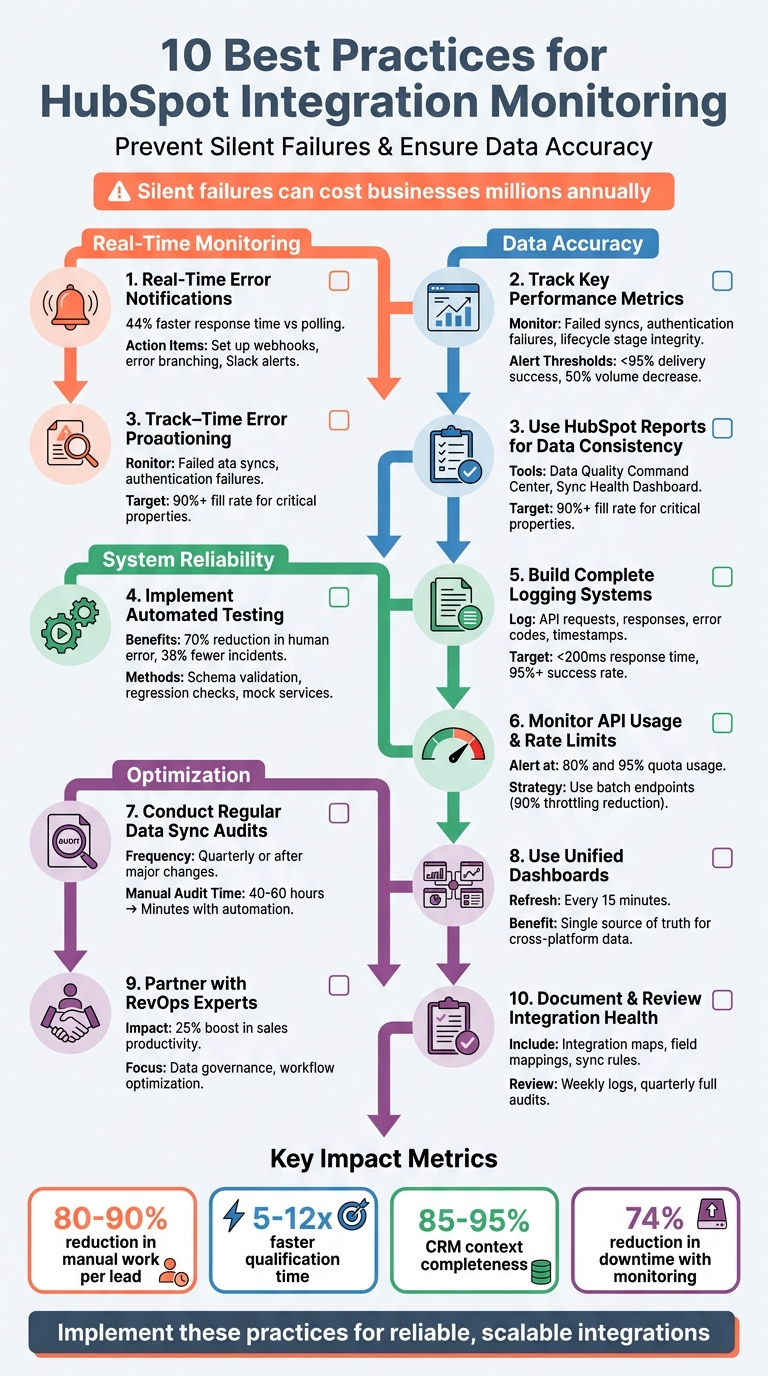
10 Best Practices for HubSpot Integration Monitoring
1. Set Up Real-Time Error Notifications
Real-Time Monitoring Capabilities
The first step in preventing integration failures is spotting them instantly. If the sync between HubSpot and your external systems breaks, you need to know right away. Real-time notifications help teams address issues before they grow into larger problems with HubSpot RevOps support that protects your revenue.
"Webhook failures are silent killers. They don't throw errors you can see. They don't crash your app. They just... stop working. And by the time you notice, the damage is done." - Webalert Team
HubSpot's webhook functionality is a game-changer here. It sends event data to your applications as soon as something happens, so you don’t have to rely on constant API polling. You can configure webhooks for key events like contact creation, property updates, or deletions. Additionally, for workflows that involve custom code actions, you can set up error branching. This creates a separate path for handling failures, triggering immediate responses like opening a high-priority ticket or sending a Slack alert. In practice, this method has been shown to cut customer response times by 44% compared to traditional periodic polling.
These real-time alerts are essential for ensuring your integrations remain reliable and functional.
System Reliability and Uptime
While real-time alerts are crucial, keeping your system running smoothly also requires monitoring for unexpected gaps in data flow. Heartbeat monitoring is one way to tackle this. It notifies you when expected events fail to show up - like when a daily subscription renewal webhook suddenly stops. You can also set up alerts for "zero events." For example, if an integration typically processes 100 records per hour but suddenly processes none, treat it as a critical issue.
To maintain uptime, focus on these four key webhook metrics:
- Delivery success rate: Alert if it drops below 95%.
- Event volume: Flag a 50% decrease.
- Average processing time: Warn if it exceeds 5 seconds.
- Retry rate: Escalate if it climbs above 10%.
For high-priority (P0) issues like sync outages, aim to resolve them within 4 hours and document the root cause within 24 hours. Critical alerts should go to highly visible channels like Slack or SMS, while lower-priority issues (P2 and P3) can be added to task queues for later resolution.
Data Accuracy and Consistency
To avoid silent failures that could corrupt your data, set up integrations to automatically generate support tickets in HubSpot's Service Hub when sync errors occur. These tickets should include detailed error logs and the affected object IDs. This approach centralizes error management, ensuring every issue is logged, assigned, and resolved systematically.
Another useful strategy is to create a custom object in HubSpot to track the history and status of every sync attempt. Label each record as either "Sync Success" or "Sync Failed". This gives you a clear, trackable view of how data flows through your systems and creates an audit trail you can rely on. Catching issues like payment or account activation errors early can prevent a flood of support tickets and keep users happy.
sbb-itb-69c96d1
2. Track Key Performance Metrics
Real-Time Monitoring Capabilities
Detailed metrics go beyond just flagging immediate errors - they provide a comprehensive view of sync performance. Keep an eye on failed sync attempts and authentication failures, which are often the culprits behind silent data discrepancies. These issues can result in records being present in one system but missing in another. While real-time monitoring is essential, periodic reviews are equally important to catch smaller issues before they snowball into bigger problems.
"A green sync status doesn't mean your integration is working. It means it's running. Those are different things." - RevBlack
Another critical area to monitor is lifecycle stage integrity. For example, if contacts bypass the SQL stage when transitioning from MQL to Customer, it could signal broken workflow logic or improper integration overrides. Many sync issues, especially in HubSpot-Salesforce integrations, operate silently. Even when the connector shows a "green" status, background processes like form submissions may be failing without warning.
Data Accuracy and Consistency
Metrics play a big role in maintaining accurate and actionable data. For instance, tracking property fill rates can reveal gaps in your data collection process. If a custom property shows less than a 20% fill rate, it may indicate that the property is either malfunctioning or unnecessary. Duplicate records are another key metric to monitor, as they can skew reports and lead to confusion within teams.
"Poor data quality is expensive - Gartner's research consistently puts the cost at millions per year for mid-to-large organisations." - Peter Sterkenburg, HubSpot Solutions Architect & Revenue Operations expert
Also, keep tabs on the completion rates for critical properties used in automation and reporting. For example, leveraging AI for lead qualification can significantly improve CRM context completeness, boosting it from 40–60% to 85–95%. This level of precision directly influences MQL-to-SQL conversion rates and enhances revenue forecasting.
System Reliability and Uptime
To ensure system reliability, measure Mean Time to Remediation (MTTR) - the time it takes your team to resolve sync errors. Establish clear SLAs, such as resolving P0 blocking issues within 4 hours and addressing P1 material issues within one business day. Regularly monitoring SLA response rates for lead routing can also help minimize downtime.
Create an alert taxonomy to manage issues by severity. For example, P0 alerts (sync failures) should trigger immediate notifications via Slack or email, while P3 hygiene issues can be grouped for monthly reviews. This tiered system helps avoid alert fatigue while ensuring critical problems are addressed promptly. Such measures build a foundation for reliable and scalable operations as your business grows.
Scalability and Optimization
Keeping an eye on API call volumes and usage trends is essential to avoid throttling as your tech stack evolves. Regularly reviewing API usage reports can help pinpoint areas for improvement, such as reducing manual work per lead. Automated workflows, for instance, can cut manual processing time from 10–20 minutes to just 1–2 minutes - a reduction of 80–90%.
| Metric | Before AI Automation | After AI Automation | Gain |
|---|---|---|---|
| Manual work per lead | 10-20 min | 1-2 min | 80-90% less work |
| Time to first qualification | 30-120 min | 2-10 min | 5-12x faster |
| CRM context completeness | 40-60% | 85-95% | +30 to +50 pp |
| Qualified response SLA hit rate | 50-70% | 80-95% | +20 to +30 pp |
Source: EasyTech Partners
3. Use HubSpot Reports for Data Consistency Checks
Data Accuracy and Consistency
When it comes to keeping your data accurate, HubSpot reports provide an extra layer of reliability by identifying even subtle inconsistencies.
The Data Quality Command Center in HubSpot is a centralized hub for spotting integration issues early. You can find it under Data Management > Data Quality, where it provides real-time summaries of duplicates, formatting errors, and property health across contacts, companies, and deals. This dashboard is especially helpful for catching errors that might otherwise go unnoticed as data moves between systems. Beyond just flagging errors, it also supports proactive steps like reviewing property fill rates, which we'll cover next.
One of the most practical tools here is property fill rate analysis, which helps identify integration issues. For your dashboards to remain trustworthy, business-critical reporting properties should have a fill rate of 90% or higher. Conducting a manual audit for a mid-sized HubSpot portal with 10,000–50,000 records can take 40–60 hours of dedicated effort, making automated reporting tools a real time-saver.
"HubSpot becomes the system of record before the system of rules is fully established. The result is reporting that technically works but can't be trusted." - Karin Tamir, RevOps Leader
HubSpot also offers specialized dashboards to make error detection more efficient. The Sync Health Dashboard monitors object types, last sync times, and common errors like picklist mismatches or validation conflicts. You can also use association mapping reports to spot orphaned records - such as contacts without associated companies or deals without linked contacts - issues that often arise after bulk imports. For regular updates, enable the Weekly Data Quality Digest, which sends a Monday morning summary at 8:00 AM highlighting property issues, duplicates, and formatting suggestions.
Another handy feature in HubSpot’s report builder is the "Trends > Anomalies" tool. This highlights irregularities in time-based reports, often signaling integration spikes or failures. Custom reports can also help you identify "stage jumpers", like contacts skipping from MQL to Customer without passing through the SQL stage - a sign of workflow logic issues. To minimize sync errors caused by inconsistent formatting, standardize open-text fields by switching them to dropdown menus. For example, replace variations like "USA" and "United States" with a single, consistent option.
4. Implement Automated Testing and Regression Checks
Data Accuracy and Consistency
Automated testing scripts are a game-changer, cutting down human error by as much as 70% when managing API communication. They also catch a similar percentage of integration bugs earlier than manual testing ever could. For example, developing tests to verify the integration’s search-before-write logic ensures the system checks for existing records - using email addresses or unique IDs - before creating new ones. This approach is key to avoiding duplicate contacts or companies during retries or manual replays.
Schema validation is just as important. Incorporating tools like OpenAPI or Swagger files into automated tests helps detect payload mismatches early in the development process. This proactive step prevents silent failures that could corrupt your data, leaving you with cleaner data and fewer surprises when the system goes live. Beyond maintaining data consistency, these tests also improve overall reliability by catching potential deployment issues.
System Reliability and Uptime
Automated regression checks after every deployment are essential for ensuring new updates don’t disrupt existing data flows. Teams that use CI/CD pipelines like Jenkins, CircleCI, or GitHub Actions report 38% fewer integration-related incidents over a year. By integrating testing frameworks like Postman/Newman or REST Assured directly into your deployment workflow, you can automate these tests with every code commit.
Mock services add another layer of reliability. Tools like WireMock or Mockoon allow you to simulate real-world scenarios, cutting test cycles by up to 50%. You can even configure tests to inject errors - such as 429 or 500 responses - to ensure your system handles them gracefully with features like exponential backoff.
Scalability and Optimization
For performance tuning, load testing with tools like JMeter is invaluable. It helps you identify bottlenecks before they impact users. Aim to keep response times under 200ms for 95% of requests and maintain an error rate below 1%. Combining unit, integration, and exploratory tests can reduce production bugs by 40%, ensuring your integrations remain reliable as your data volume scales.
5. Build Complete Logging and Alert Systems
Real-Time Monitoring Capabilities
Centralized logging plays a crucial role in keeping track of every detail in your integration - like API requests, responses, error codes, and timestamps - making troubleshooting faster and more efficient. This kind of logging doesn’t just help with fixing issues; it’s also a key part of staying on top of potential problems. Real-time monitoring through webhooks is especially effective, delivering event notifications in under five seconds. That’s 44% faster compared to the traditional method of periodic polling.
Using structured JSON logging adds another layer of reliability by including elements like request headers, IP addresses, and event IDs. This is essential for maintaining idempotency, which prevents duplicate records. A critical step you should never skip? Validating the X-HubSpot-Signature header using HMAC SHA-256. Skipping this has been linked to 74% of webhook security breaches.
System Reliability and Uptime
To keep your system running smoothly, make sure your webhook endpoints respond with a 200 OK status in under 200ms. This prevents timeouts and avoids triggering HubSpot's retry logic unnecessarily. A fast acknowledgment pattern can help here - verify requests quickly, enqueue the data right away, and process it asynchronously. This approach can reduce delays by up to 30%.
For handling temporary failures, implement exponential backoff (e.g., retrying after 1, 2, and 4 minutes) during 5xx errors or when hitting rate limits. If events keep failing, route them to a dead-letter queue for manual review. For critical issues like authentication failures, set up automated alerts through tools like email, Slack, or Microsoft Teams. You can also use HubSpot's error branching in workflows to redirect problematic records into a separate path. This path can automatically create support tickets or tasks, ensuring nothing slips through the cracks.
These strategies not only improve reliability but also ensure data stays accurate and aligned with your monitoring efforts.
Data Accuracy and Consistency
To support your monitoring and uptime efforts, focus on maintaining data accuracy. Aim for an API request success rate of 95% or higher, and act immediately if it drops below 90%. A helpful way to track this is by creating a custom object in HubSpot to log sync statuses - such as "Sync Success" or "Sync Failed" - for each record. This provides a clear, easily accessible sync history.
Weekly log reviews are another must. These reviews help you spot recurring issues or minor warnings before they snowball into bigger problems. Interestingly, over 30% of integration problems are tied to incorrect or expired API keys. To avoid this, verify and rotate your private app tokens regularly. By combining regular log reviews with proactive token management, you’ll keep your integration running smoothly and your data accurate.
6. Monitor API Usage and Rate Limits
Keeping a close eye on API usage and enforcing rate limits is essential for maintaining integration performance. These practices work hand-in-hand with error notification and logging systems to ensure everything runs smoothly.
Real-Time Monitoring Capabilities
Monitoring API activity in real time helps you catch disruptions early. Pay attention to key HTTP response headers like:
X-HubSpot-RateLimit-Daily: Tracks your 24-hour request limit.X-HubSpot-RateLimit-Remaining: Shows the number of calls you can still make within the current interval.X-HubSpot-RateLimit-Interval-Milliseconds: Indicates the duration of your rate limit window (usually 10,000 milliseconds for 10 seconds).
Using these headers proactively can lower error rates by 37%. To make tracking easier, create centralized dashboards with tools like Grafana, Datadog, or New Relic. These dashboards can display request patterns, peak activity times, and HTTP 429 errors. Set up alerts through Slack, email, or PagerDuty when usage reaches 80% and 95% of your quota. This two-step warning system gives you time to adjust before hitting hard limits. Organizations that adopt real-time monitoring and alerting have seen a 74% reduction in downtime.
System Reliability and Uptime
When you encounter HTTP 429 errors, apply exponential backoff with jitter. Start retries at 500 milliseconds, doubling the wait time with each attempt while adding randomness. This approach reduces excessive retries by 42%. Additionally, always check the Retry-After header from 429 responses to align your retry timing with HubSpot’s recommendations.
To cut down on API usage, replace constant polling with webhooks. For example, switching from 1,000 polling requests per hour to webhooks can slash API requests by over 95%. Another effective strategy is server-side caching with tools like Redis or Memcached, which can reduce outbound traffic and request counts by up to 75%.
Scalability and Optimization
Batch endpoints allow you to process up to 100 records per request, significantly reducing the number of API calls and lowering the risk of throttling by 90%. For agencies or SaaS providers managing multiple clients, using separate API credentials for each client ensures that one client’s high usage doesn’t impact the overall rate limit.
Daily error log reviews can also help. Teams that regularly audit logs reduce quota-related issues by about 28%. For heavy data migrations or bulk syncs, schedule these during off-peak hours to boost throughput by 35%. Predictive modeling can be another useful tool, helping you anticipate traffic spikes during major marketing campaigns. This allows you to spread requests more evenly and avoid service interruptions.
| Subscription Tier | Burst Limit (Per 10 Seconds) | Daily Limit (Per Account) |
|---|---|---|
| Free & Starter | 100 / app | 250,000 |
| Professional | 190 / app | 625,000 |
| Enterprise | 190 / app | 1,000,000 |
| With API Limit Increase | 250 / app | +1,000,000 per increase |
7. Conduct Regular Data Sync Audits
Data Accuracy and Consistency
Regular data sync audits are essential for keeping integrations reliable and ensuring accurate data flows. These audits can uncover hidden issues, like blocked writes caused by Salesforce validation rules. Such errors might not trigger visible alerts but can result in records vanishing from the target system.
Start by mapping out your entire integration setup. Document every connected app, its data flow direction, sync frequency, and purpose. Use tools like HubSpot's "Connected Apps" to check connection statuses, last sync timestamps, and error logs. Pay close attention to field mapping - fields must match one-to-one, and data types need to be compatible. For instance, syncing a Salesforce picklist with a HubSpot single-line text field can cause sync failures.
Establish a clear "source of truth" for each data type. This prevents conflicting systems from overwriting critical fields during sync operations. Regularly reviewing error logs is another key step for identifying and resolving issues quickly.
System Reliability and Uptime
To maintain system reliability, export data from HubSpot's Sync Health Dashboard and categorize issues like permissions errors, picklist mismatches, duplicates, or validation failures. While a manual audit for a mid-size HubSpot portal could take 40–60 hours, automated tools can cut this down to just a few minutes.
Peter Sterkenburg, a HubSpot Solutions Architect at NordScope, compares audits to routine car maintenance:
"Treat data audits like oil changes for your CRM. Even well-maintained portals accumulate cruft over time as properties are created, workflows evolve, and teams change."
Schedule these audits quarterly or after major changes, such as migrations or the implementation of new tools. During audits, review active workflows triggered by integrated data to ensure they function as intended. Test sample records before performing a full resync, verifying that mapped fields update correctly and duplicates aren't created.
Scalability and Optimization
Once audit results are in, focus on fixing critical issues first - like properties breaking workflows, duplicate records confusing sales teams, or mismatched data types affecting calculations. Set up real-time alerts for high-priority sync failures or workflow outages, routing them to Slack or email for quick resolution within a 4-hour SLA. HubSpot's Operations Hub can help clean and reformat fields, such as standardizing country names or phone numbers, to ensure consistency across platforms.
Properties with a fill rate below 20% are often good candidates for deletion or archiving, reducing unnecessary clutter. Implement validation rules to block incorrect or junk data at the entry point, preventing it from spreading to other systems. For complex setups that require ongoing optimization, consider working with RevOps specialists like Vestal Hub to maintain data quality across intricate integration architectures.
8. Use Unified Dashboards for Cross-Object Monitoring
Real-Time Monitoring Capabilities
Unified dashboards provide a streamlined way to monitor your integration ecosystem by consolidating data from platforms like HubSpot and Zendesk into one central view. This eliminates the hassle of jumping between systems and ensures you have a real-time snapshot of your operations.
"Unified RevOps dashboards function like an air traffic control system for SaaS growth. Instead of multiple teams radioing data separately, every channel converges into a control tower that coordinates when and how to act." - Oliver Prescott, Equanax
Thanks to automated refresh schedules, tools like Looker Studio can update data as frequently as every 15 minutes. This turns static reports into dynamic systems, enabling you to detect integration issues as they arise and identify patterns that might otherwise go unnoticed - like how Zendesk ticket resolution times might influence HubSpot customer renewal rates.
Beyond real-time visibility, maintaining data accuracy across connected systems is equally critical.
Data Accuracy and Consistency
To make the most of unified dashboards, it's essential to ensure clean and consistent data connections across objects like Contacts, Companies, Deals, and Tickets. For example, orphaned records - such as Deals without linked Contacts - can skew reporting and leave gaps in your insights . Standardizing field formats (like country names, phone numbers, and dates) can also help prevent segmentation errors .
Including validation reports in your dashboard is a smart way to cross-check record counts between HubSpot and other integrated systems. These reports can uncover hidden issues, such as records that fail to sync despite showing a green status. Additionally, tracking metrics like API call volume and error rates ensures a more comprehensive view of your system's health.
System Reliability and Uptime
Centralized dashboards play a key role in catching small sync errors before they escalate into major problems. By monitoring metrics like Mean Time to Remediation (MTTR) and the ratio of open to resolved sync errors, you can maintain better control over integration stability. Automated refresh intervals - ranging from 15 minutes to hourly - keep your data up-to-date, allowing for swift action when needed.
For issues like duplicate records, sync breaks, or workflow failures, set up alerts that notify team members via Slack or email. For high-priority problems such as sync outages, aim to resolve them within four hours and document the root cause within a day. This approach not only resolves immediate issues but also strengthens long-term system reliability.
Scalability and Optimization
As your integration setup becomes more intricate, unified dashboards are vital for maintaining oversight. They act as a single source of truth, helping RevOps leaders monitor lead velocity, pinpoint friction points, and ensure the revenue engine runs smoothly. This centralized approach supports both operational consistency and scalable growth.
For B2B SaaS companies with complex integrations, partnering with experts like Vestal Hub can ensure your dashboards deliver precise cross-object insights while sustaining system performance. Unified dashboards enable proactive monitoring and continuous improvement, laying the groundwork for long-term success in a dynamic operational environment.
9. Partner with RevOps Experts for Continuous Optimization
Teaming up with RevOps experts takes your integration performance to the next level by blending strategic oversight with technical know-how. This collaboration ensures your systems run smoothly and efficiently, while supporting your broader business goals.
Data Accuracy and Consistency
RevOps professionals tackle the common issue of data silos by assigning clear ownership for each data object. For instance, Salesforce might be designated as the master system for Accounts and Deals, while HubSpot manages marketing engagement. This approach prevents critical issues, like losing 40–50% of leads due to inconsistent data management.
"A properly architected Salesforce-HubSpot integration is non-negotiable for any B2B company serious about scaling. It's the difference between guessing which marketing activities drive revenue and knowing with certainty." - MarTech Do
They also use strategies like inclusion lists to sync only sales-ready leads (e.g., those at the MQL stage) and set up data governance committees. These committees - comprised of cross-functional teams - review and approve any changes to sync rules or field mappings. This prevents unplanned updates that could disrupt essential processes. Such measures ensure your HubSpot integrations remain reliable and effective.
System Reliability and Uptime
In one real-world example from March 2026, a SaaS startup with 40,000 contacts brought in RevOps manager Igwe Ola to fix a fragmented sales pipeline. By reducing 15 sales stages to 5 clear milestones and creating a master routing workflow, the company saw a 25% boost in sales productivity and a 15% increase in lead-to-opportunity conversion within just 90 days.
RevOps experts are also adept at spotting and resolving integration issues, like duplicate records or partial updates, that might otherwise go unnoticed. They routinely review sync error logs to catch problems such as validation rule failures or picklist mismatches. In mature HubSpot setups, they often find that 30–40% of active workflows are either redundant or broken, which can significantly hinder performance.
Scalability and Optimization
As businesses grow and their tech stacks expand, RevOps specialists guide the transition from native connectors to middleware for better orchestration. They also leverage tools like the Revenue Performance Model (RPM) to turn HubSpot into a powerful diagnostic system, tracking key metrics and conversion rates.
For B2B SaaS companies with intricate integrations, working with experts like Vestal Hub ensures your systems scale seamlessly. Their services focus on building a unified data architecture, creating intelligent workflows, and maintaining strong governance frameworks. These efforts help prevent the costly misalignment between sales and marketing - an issue that can cost B2B companies up to $1 trillion annually.
10. Document and Review Integration Health Regularly
Thorough documentation works hand-in-hand with real-time monitoring by providing a detailed view of your integration's health. Keeping your integration documentation up to date helps prevent expensive disruptions. Your documentation should cover key details like an integration map listing all connected apps, the data objects being synced (e.g., contacts, deals, companies), the sync direction (one-way or two-way), update frequency, and the business purpose for each connection.
Data Accuracy and Consistency
A strong documentation process begins with clear property descriptions. Use tools like HubSpot property settings to outline each property's purpose, its source of truth, and its deprecation schedule. For fields critical to revenue, such as lifecycle stage or deal stage, it's essential to document which system - HubSpot or another platform - serves as the master to avoid conflicts in bi-directional syncing. As Dustin Brackett, CEO of HIVE Strategy, aptly states:
"If your data is broken, everything else will be unreliable".
Assign ownership for each data object to ensure accountability. For instance, Marketing might manage lead source data, while Sales oversees lifecycle progression. Additionally, document field mapping and overwrite rules, specifying which external tools can update certain properties and whether they are permitted to overwrite existing HubSpot values. This level of detail supports the proactive strategies discussed earlier.
System Reliability and Uptime
Review integration logs and dashboards weekly, and conduct a full audit every quarter. Just as regular sync audits are crucial, maintaining detailed documentation ensures quicker resolution of issues. For example, manually auditing a mid-size HubSpot portal (10,000–50,000 records) can take 2 to 5 days, but automated tools can cut the diagnostic process down to less than 5 minutes.
Assign a specific RevOps team member to oversee sync health. As RevBlack emphasizes:
"If it's everyone's responsibility, it's no one's responsibility. One person on your RevOps team should check the error log weekly".
Categorize issues into three priority levels: Tier 1 (fix within 48 hours), Tier 2 (address this quarter), and Tier 3 (ongoing maintenance).
Scalability and Optimization
As your business grows, your documentation should adapt. Schedule quarterly reviews to clean up orphaned properties (those with a fill rate below 5%) and assess inactive workflows that haven't been updated in over 12 months but are still active. Regularly monitor API usage reports - available under Reports > Integrations > API Usage - to ensure custom integrations aren't exceeding rate limits, which could result in silent data loss.
For companies with complex integration setups, such as B2B SaaS businesses, partnering with experts like Vestal Hub can help align your documentation practices with your evolving needs. This approach supports a cohesive data structure and efficient workflows as your tech stack expands. By conducting regular document reviews and assigning clear responsibilities, you can maintain strong integrations and keep your systems running smoothly.
Conclusion
Active monitoring is the key to distinguishing integrations that actually work from those that just seem functional. As RevBlack aptly states:
"A green sync status doesn't mean your integration is working. It means it's running. Those are different things."
Without active monitoring in place, silent failures can creep in, causing data inconsistencies and disrupting workflows. Over time, this undermines lead routing, reporting accuracy, and overall operational integrity.
To combat these challenges, the strategies covered in this guide - like real-time notifications, API monitoring, automated testing, regular audits, and comprehensive documentation - are essential. These practices not only prevent costly breakdowns but also streamline processes. For example, automated monitoring can reduce manual effort per lead by 80–90% and cut qualification times from 30–120 minutes down to just 2–10 minutes, ensuring data accuracy and better forecasting.
Make it a habit to review your sync logs weekly and set up real-time alerts for critical errors. Focus on auditing one high-risk integration path at a time and clearly define the source of truth for each field to avoid data overwrites.
For B2B SaaS companies with complex integration setups, working with technical RevOps experts like Vestal Hub can make a big difference. They specialize in advanced solutions such as sophisticated error handling, automated retries for API rate limits, and custom integrations tailored to your business needs. By leveraging these partnerships alongside the monitoring practices discussed here, you can ensure your tech stack scales effectively. With only 30% of HubSpot implementations deemed successful, having expert guidance can transform your CRM into a dependable engine for growth.
FAQs
Which integration failures does HubSpot usually miss?
HubSpot frequently encounters integration challenges tied to sync errors. These can stem from issues like duplicate contacts, missing owner fields, authentication failures, or silent errors. Silent errors, in particular, often arise from retries, unclear owner syncs, or inconsistencies in data. Keeping a close eye on these problem areas is crucial to maintaining dependable integrations and preserving data accuracy.
What metrics should I alert on for webhooks and sync health?
To keep an eye on webhook and sync health, it’s important to set up alerts for a few key metrics. These include webhook failure rates, response status codes like 4xx or 5xx errors, request latency or delays, and the count of missed or undelivered webhook events. Tracking these indicators can help maintain reliable integrations and accurate data.
How can I prevent duplicates and bad overwrites in two-way syncs?
To keep your two-way HubSpot syncs running smoothly, it's important to tackle potential issues like duplicate data and ownership conflicts. Start by setting up controls to handle identity clashes and unclear ownership. You can use HubSpot workflow automation to manage duplicate contacts and prevent owner changes from causing confusion.
Additionally, implement smart strategies such as delta syncs (to only update changed data), webhook echo prevention (to avoid triggering unnecessary updates), and loop-free contention resolution (to prevent endless back-and-forth updates). Make it a habit to regularly audit your integration setup. This helps you catch and fix errors, ensuring your data stays clean and reliable throughout the synchronization process.