

Get insights like this delivered to your inbox
Join 2,500+ GTM professionals. No spam, unsubscribe anytime.
Subscribe to NewsletterWhen connecting HubSpot to your tools, you have two options: native integrations or custom API integrations. Native integrations are pre-built, quick to set up, and require no coding, making them ideal for standard workflows. Custom API integrations take longer to build but provide complete control over data flows, custom objects, and tailored workflows.
Key Points:
- Native Integrations: Easy to use, vendor-maintained, and fast to deploy (days to weeks). Best for simple, standard setups.
- API Integrations: Fully customizable but require expert technical consulting and more time (4–12 weeks). Best for complex data needs or unique business processes.
- Cost: Native options are low-cost or included in software licenses. APIs have higher upfront costs, starting at $1,500 and scaling with complexity.
Quick Comparison:
| Factor | Native Integrations | API Integrations |
|---|---|---|
| Setup Time | Days to weeks | 4–12 weeks |
| Ease of Setup | No coding required | Requires developers |
| Customization | Limited | Highly flexible |
| Maintenance | Handled by vendor | Requires ongoing upkeep |
| Cost | Low | Higher upfront investment |
Which to choose? Use native integrations for speed and simplicity. Opt for API integrations when your business needs advanced customization or handles complex data relationships.
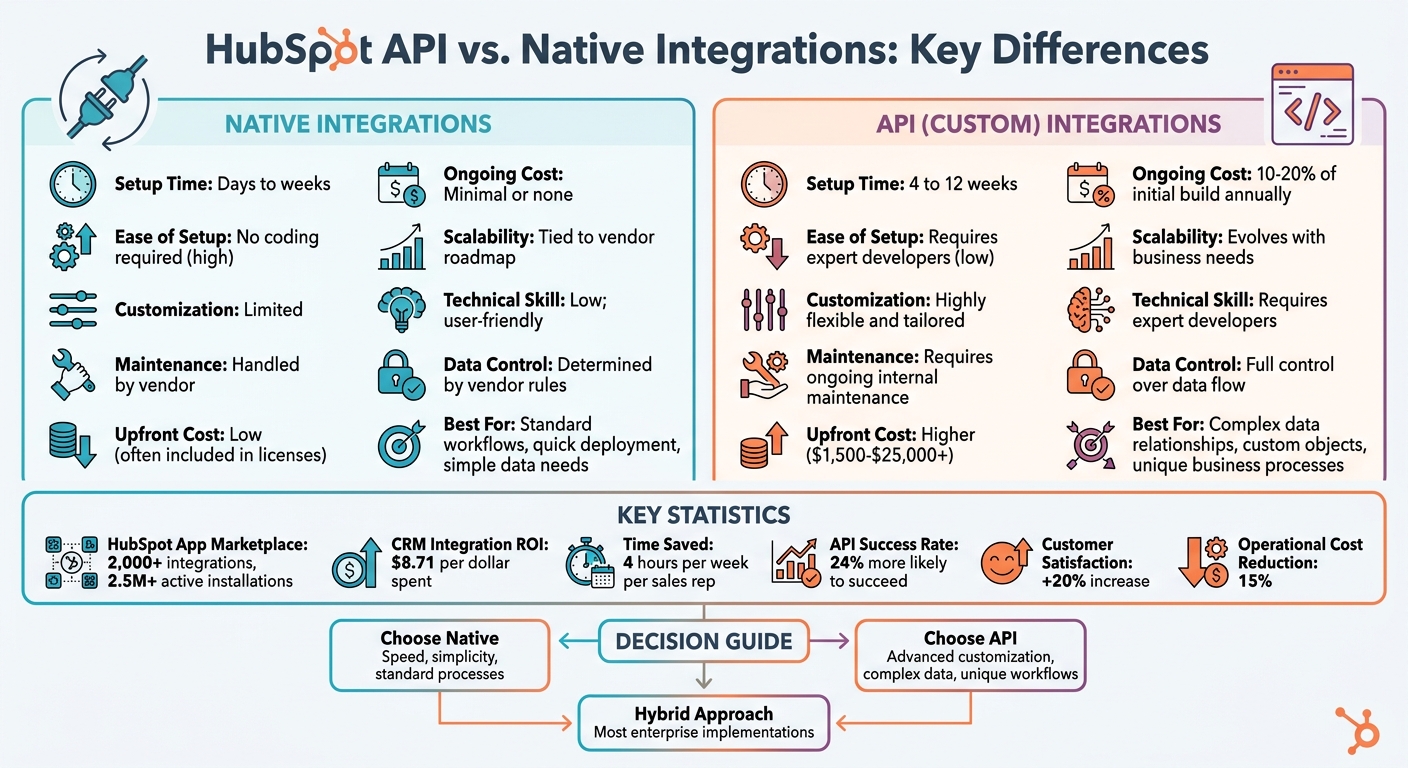
HubSpot Native Integrations vs API Integrations Comparison
Mastering HubSpot API: Pt. 1 Platform Integration with Custom Coded Actions. Operations Hub
sbb-itb-69c96d1
What Are Native Integrations in HubSpot?
Native integrations are ready-made connectors available in HubSpot's App Marketplace. They allow HubSpot to connect with tools like Salesforce, Slack, or QuickBooks. Think of them as plug-and-play solutions designed to make integrating systems fast and straightforward.
Under the hood, these integrations rely on APIs and webhooks, but you don’t need to worry about the technical details. The user-friendly interface lets you handle tasks like field mappings and sync settings with ease. For simple setups, you can be done in about 15–30 minutes. More involved integrations, such as those with e-commerce platforms, might take anywhere from 2 to 8 hours to configure.
One big perk? You don’t have to deal with maintenance. The software vendor or a third-party provider takes care of updates, security patches, and API compatibility. So, if HubSpot updates its API, your integrations stay functional without requiring extra effort from you. Now, let’s dive into the features that make these integrations so handy.
Features of Native Integrations
Native integrations come with built-in tools to simplify and automate processes. For example, they automatically map common data fields. If you connect Gmail to HubSpot, emails can be logged directly to the right contact records without manual effort. They also include safeguards to prevent duplicate data and minimize errors.
Setting them up is straightforward. All you need are admin permissions. HubSpot uses OAuth for authentication, so you simply log in, select the data you want to sync, and the integration takes care of the rest. Most of these integrations support bi-directional synchronization, meaning updates in one system are automatically reflected in the other.
As of 2026, HubSpot’s App Marketplace offers over 2,000 integrations, with more than 2.5 million active installations. Popular examples include Salesforce for CRM management, Zoom for meeting tracking, and QuickBooks for automating invoicing tasks.
Best Use Cases for Native Integrations
Native integrations shine when your workflows align with standard business processes. If you’re connecting widely used tools and don’t need complex data transformations, these connectors are a quick and efficient solution.
"Native connectors are the right choice when standard processes and data fields suffice." - Tyler Washington, Aptitude8
They’re particularly effective for tools like QuickBooks or Xero for accounting, basic e-commerce setups that fit HubSpot’s default product structure, and lead enrichment tools that auto-fill contact fields with company information. Studies show that integrated CRM systems can save sales teams around four hours per week per representative and deliver an ROI of $8.71 for every dollar spent.
These strengths highlight how native integrations offer simplicity compared to the more tailored flexibility of custom API solutions.
What Are HubSpot API Integrations?
HubSpot API integrations are custom-built connections that use HubSpot's APIs to enable seamless communication between HubSpot and other software systems. Unlike pre-built native connectors, these integrations give you complete control over how data flows and operates. They’re designed to fit the unique needs of your business processes.
"Custom integrations are purpose-built solutions that use HubSpot's APIs to create specific data flows, transformations, and business logic that native connectors cannot support." - Tyler Washington, Aptitude 8
Developing these integrations typically takes 4–12 weeks, depending on the complexity. While the upfront costs can be significant - enterprise-level projects often start at $15,000 - they provide unmatched flexibility. Companies using APIs are 24% more likely to succeed, with studies showing that integrations can boost customer satisfaction by 20% and reduce operational costs by 15%. Annual maintenance costs generally run about 15–20% of the initial investment.
Next, let’s examine how these integrations enable advanced data management and workflow customization.
What HubSpot API Integrations Can Do
HubSpot API integrations allow you to go beyond the limitations of native connectors, unlocking powerful capabilities for advanced data handling and workflow automation. With full access to all API endpoints, you can design solutions tailored to your specific needs.
One standout feature is the ability to create custom objects. These are perfect for managing non-standard data like subscriptions, property listings, equipment inventories, or event registrations. Custom objects can also be linked with HubSpot records like contacts, companies, or deals.
"Custom objects fundamentally alter integration architecture by creating new data relationships that native connectors cannot support." - Tyler Washington, Aptitude 8
Real-time data syncing is another advantage. Using HubSpot's Webhooks API, you can trigger immediate actions in external systems whenever specific events occur - like a deal closing, a form submission, or a contact property update. This eliminates the need for constant polling and helps conserve API rate limits.
API integrations also shine when connecting proprietary or legacy systems that lack native marketplace apps. They give you full control over data mapping, formatting, and the application of business rules during synchronization.
When to Use API Integrations
API integrations are the go-to solution when standard connectors can’t meet your requirements. For example, if you’re leveraging HubSpot custom objects, it’s a clear indicator that you need a more flexible system to manage specialized data relationships.
They’re also essential for industry-specific needs. For instance, healthcare organizations may need to ensure HIPAA compliance during data transfers, while financial institutions might require precise audit trails. If you’re forced to modify your business processes to fit the limitations of native connectors, it’s time to explore custom API solutions.
Additionally, API integrations are ideal for handling large-scale data operations or performing complex transformations before data enters HubSpot. While HubSpot’s Data Hub can automate some advanced tasks, scenarios like multi-step calculations, external API calls during synchronization, or conditional data routing often demand the flexibility of a custom API integration.
HubSpot API vs. Native Integrations: Main Differences
Let’s break down the key distinctions between native and API integrations, helping you align your integration strategy with your specific tech stack needs.
If you're after speed, native integrations are the way to go. They can be deployed in just days or weeks with a few clicks through the HubSpot App Marketplace. On the other hand, API integrations provide full control and flexibility, but they come with a longer timeline - typically 4 to 12 weeks of development, especially for advanced data transformations or custom business logic.
Maintenance is another major factor. Native integrations are low-maintenance since the vendor handles updates. In contrast, API integrations require ongoing upkeep, which can add 10%–20% to the initial project costs annually. This reflects the need to adapt to API updates and evolving business requirements.
Cost is where the differences become even more pronounced. Native integrations are often included with your existing software licenses, so there’s minimal additional expense. Custom API integrations, however, come with a higher upfront price tag. Simple projects may start at $1,500 to $3,000, while enterprise-level integrations can range from $6,000 to $20,000 or more. For ERP systems like NetSuite or SAP, costs can climb to $10,000–$25,000.
"The fundamental difference lies in flexibility versus speed to deployment." - Tyler Washington, Aptitude 8
Here’s a quick comparison to summarize these points:
Comparison Table: API vs. Native Integrations
| Factor | Native Integrations | API (Custom) Integrations |
|---|---|---|
| Setup Time | Days to weeks | 4 to 12 weeks |
| Ease of Setup | High; minimal coding required | Requires expert developers |
| Customization | Limited to pre-built fields | Highly flexible and tailored |
| Maintenance | Handled by vendor | Requires ongoing internal maintenance |
| Upfront Cost | Low; often included in licenses | Higher due to development resources |
| Ongoing Cost | Minimal or none | 10–20% of initial build annually |
| Scalability | Tied to vendor roadmap | Evolves with business needs |
| Technical Skill | Low; user-friendly | Requires expert developers |
| Data Control | Determined by vendor rules | Full control over data flow |
This comparison highlights the trade-offs between speed, cost, and control, helping you decide which approach best suits your business goals.
How to Choose the Right Integration Method
What to Consider When Choosing
Start by assessing your technical resources. If your engineering team is already stretched thin or if you don’t have in-house developers, native integrations are a more practical option. They’re straightforward, require minimal technical expertise, and can often be set up within hours or days. On the other hand, custom API integrations involve more complexity. These require skilled developers to handle coding, API management, and ongoing maintenance, which can add to your costs over time.
Another key factor is the complexity of your data. Native connectors work well for standard processes and default HubSpot objects. But if your business relies on more intricate data structures - like membership tiers, certification tracking, or managing multiple suppliers - custom API solutions are better suited to handle those unique relationships.
Finally, think about how much control and flexibility you need. Native integrations come with pre-set rules and field mappings defined by the vendor. While this can simplify setup, it might require you to adjust your workflows to fit their framework. If these limitations disrupt your operations, a custom API integration can give you the freedom to design tailored data transformations and workflows that align perfectly with your business needs.
For many businesses, these factors often lead to a mix of both integration types.
Using Both Native and API Integrations Together
Balancing quick deployment with the need for tailored solutions leads many companies to adopt a hybrid approach. Tyler Washington from Aptitude 8 highlights this strategy: "Most enterprise implementations require a hybrid approach that combines both native and custom integrations strategically".
Here’s how this can work in practice: Use native integrations for straightforward connections - like QuickBooks, Slack, or basic e-commerce platforms - where speed is critical. Then, bring in custom API solutions for more complex, business-critical needs, such as managing intricate custom object relationships or meeting specific industry compliance standards.
For projects that go beyond your internal capabilities, specialized services like Vestal Hub can handle the design and implementation. This ensures your hybrid strategy not only meets your current needs but also scales effectively as your business grows.
Conclusion
After weighing the capabilities and costs, the best integration strategy depends on your specific needs. Native integrations are ideal for quick setup and simplicity, while API integrations offer greater flexibility for handling complex data relationships.
Often, a hybrid approach works best - leveraging native connectors for routine tasks and API integrations for more specialized requirements. As Tyler Washington from Aptitude 8 puts it:
"The question isn't whether to integrate, but how to architect integrations that scale with your business growth while maintaining data consistency across all systems".
For businesses managing custom objects or intricate revenue operations, custom API integrations are often the way to go. Tools like Vestal Hub specialize in creating scalable solutions tailored to your needs, ensuring your tech stack evolves alongside your business.
Ultimately, there’s no one-size-fits-all formula. The goal is to build an integration strategy that supports your current workflows while staying flexible enough to adapt as your business grows.
FAQs
How do I know if my native integration limits are hurting my process?
If you're encountering delayed data syncs, missing fields, duplicated contacts, or constantly having to make manual corrections, native integration limits could be slowing you down. These issues can disrupt workflows, delay decision-making, and drive up operational costs. When these challenges become a pattern, it might be worth considering whether a tailored solution could better streamline your processes.
What data should I sync to HubSpot to avoid duplicates and bad reporting?
To keep your HubSpot data reliable and your reports accurate, focus on syncing only clean, accurate, and complete data. This includes key elements like contacts, companies, deals, and custom objects. Make sure your field mappings are set up correctly and implement deduplication rules to avoid redundant entries. Regularly auditing your data is also essential - it helps catch and fix any inconsistencies, ensuring your data stays organized and trustworthy.
What should I plan for to maintain a HubSpot API integration long-term?
To keep a HubSpot API integration running smoothly over time, it’s important to focus on consistent management. Start by getting familiar with HubSpot’s API ecosystem and ensuring you're using the right authentication methods, such as OAuth or private app tokens. Build your integration to handle potential issues like API call failures or mismatched data.
Regularly monitor the integration’s performance, set up error-handling processes, and be prepared to update your setup as HubSpot’s API or your business needs evolve. Staying proactive helps prevent problems like delayed data syncing or duplicated records, ensuring your integration remains reliable and efficient.