

Get insights like this delivered to your inbox
Join 2,500+ GTM professionals. No spam, unsubscribe anytime.
Subscribe to NewsletterWhen syncing data between HubSpot and other systems, you have two main options: HubSpot webhooks or event-driven middleware. Both enable real-time data movement but differ in complexity, reliability, and scalability.
- HubSpot Webhooks: Directly push updates to your system when events occur. Ideal for lightweight, real-time notifications, but limited by a strict 5-second timeout, lack of event ordering, and potential for duplicates.
- Event-Driven Middleware: Adds a processing layer to validate, transform, and queue events. Handles high volumes, retries, deduplication, and API limits effectively but requires more setup and maintenance.
Quick Comparison
| Feature | HubSpot Webhooks | Event-Driven Middleware |
|---|---|---|
| Delivery Model | Direct (Source → App) | Mediated (Source → Queue → App) |
| Timeout | 5 seconds | Decoupled; acknowledges instantly |
| Event Ordering | Not guaranteed | Enforced with buffering |
| Retry Control | Fixed (10 retries) | Fully configurable |
| Scalability | Limited by endpoint | High; uses queues and batching |
| Maintenance | Low initial setup | Ongoing effort required |
For simple, real-time updates, webhooks are sufficient. For complex workflows, high volumes, or systems with strict API limits, middleware provides more reliability and control.
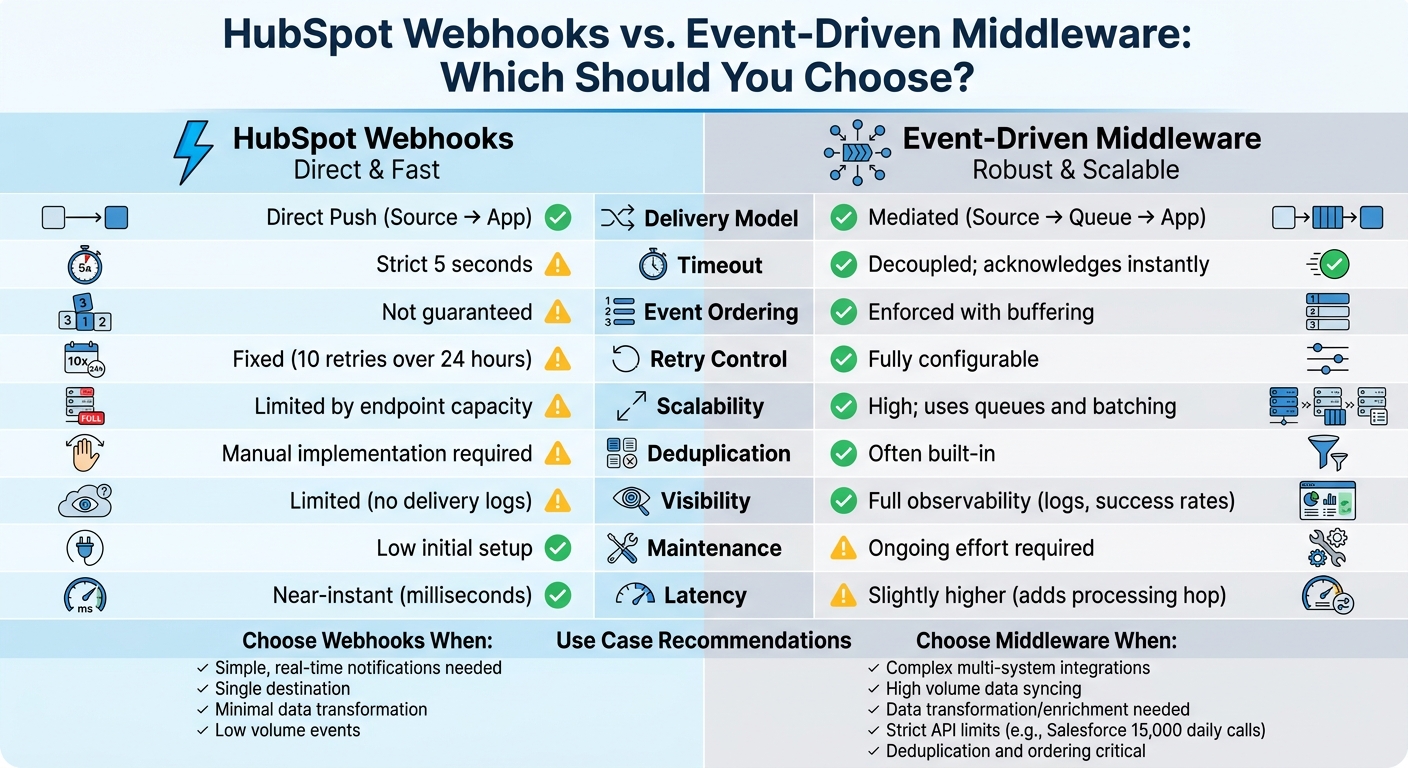
HubSpot Webhooks vs Event-Driven Middleware: Feature Comparison
Main Differences Between HubSpot Webhooks and Event-Driven Middleware
Data Flow and Event Processing Models
HubSpot webhooks operate using a direct push model. This means that whenever a change occurs in your CRM, HubSpot sends an HTTP POST request directly to your designated URL. On the other hand, event-driven middleware adds a processing layer between HubSpot and the destination system. Middleware often follows a "Fast ACK + Queue-first" approach: it acknowledges the event almost instantly (to meet HubSpot's 5-second timeout requirement) and then places the event in a queue for further processing.
This setup is crucial because HubSpot's timeout doesn't allow for complex tasks like data enrichment or schema transformations. Middleware separates the quick acknowledgment step from the more resource-intensive processing.
Another difference lies in how events are handled. HubSpot webhooks do not guarantee event ordering. For instance, if a contact's email address is updated multiple times in quick succession, the webhook notifications might arrive out of order. Middleware solves this by buffering and reordering events based on their occurredAt timestamps. It also automatically handles deduplication, making it more reliable for complex workflows.
These differences in processing lay the groundwork for how each approach handles scalability, which we'll explore next.
Scalability and Reliability
When it comes to managing high event volumes, the scalability of these two approaches diverges significantly. Direct webhooks can overwhelm your receiving server if it can't process incoming requests as fast as HubSpot sends them. This is a common issue, as highlighted:
"Most HubSpot-Salesforce syncs fail because webhooks fire faster than your server can write to Salesforce - creating duplicates, race conditions, and orphaned records."
Middleware counters this problem by buffering events in a queue (using tools like Redis, AWS SQS, or BullMQ) and processing them steadily. This ensures downstream systems - especially those with strict API limits like Salesforce's 15,000 daily calls - aren't overloaded.
HubSpot's built-in retry mechanism is also limited. It retries failed events a fixed number of times (10 retries over 24 hours) and lacks features like a dead letter queue (DLQ). Middleware, however, offers more flexibility. It can implement custom retry policies, exponential backoff, and DLQs to preserve failed events for manual review. Middleware also uses HubSpot's eventId to filter out duplicates, ensuring idempotency before events reach the target system.
| Feature | HubSpot Webhooks (Direct) | Event-Driven Middleware |
|---|---|---|
| Delivery Model | Direct Push (Source to App) | Mediated (Source → Queue → App) |
| Timeout | Strict 5 seconds | Decoupled; ACK immediately |
| Ordering | No guarantee | Enforceable via buffering |
| Deduplication | Manual implementation required | Often built-in |
| Retry Control | Fixed (10 retries / 24 hours) | Fully configurable |
| Visibility | Limited (no delivery logs) | Full observability (logs, success rates) |
Latency and Real-Time Performance
Timing is another key factor to consider. For speed, direct webhooks have the upper hand. They deliver event data within milliseconds, making them ideal for simple, time-sensitive tasks like triggering a Slack notification or sending a welcome email.
Middleware, however, introduces a slight delay as events pass through its queue. But this trade-off is often worth it, especially during high-volume spikes. For example, if multiple changes occur simultaneously on a contact (like updates to email, phone, and lifecycle stage), direct webhooks would trigger multiple API calls. Middleware can batch these updates into a single call, reducing API usage by up to 97% while maintaining consistency.
sbb-itb-69c96d1
HubSpot Webhooks: Strengths and Limitations
Strengths of HubSpot Webhooks
HubSpot webhooks shine when it comes to real-time responsiveness. They deliver event data almost instantly, making them perfect for tasks like syncing data or triggering workflows the moment something happens. This push-based setup means your system gets updates right away - no delays, no constant polling.
Another big plus: webhooks help reduce server load. Since they only trigger when data changes, there’s no need for repeated API requests. As Jack Coldrick, Solutions Engineer at HubSpot, puts it:
"The key difference is that with an API request you are proactively 'requesting' information from the system... With a webhook on the other hand you are notified by the system as soon as the data changes without having to continually make API requests."
HubSpot also builds in reliability and security. Webhooks automatically retry up to 10 times over 24 hours using exponential backoff, and they include features like HMAC SHA-256 signatures and timestamp validation to prevent replay attacks. Plus, they’re available across all HubSpot subscription tiers, even Free portals, making them accessible to businesses of all sizes.
Since webhooks only activate when changes occur, they’re efficient and naturally scalable, making them a solid choice for growing integration needs.
But while these strengths are impressive, there are some limitations to keep in mind.
Limitations of HubSpot Webhooks
One key limitation is the 5-second timeout. This means your endpoint has to acknowledge webhook delivery almost immediately, leaving no time for complex tasks like data enrichment or multi-step processes. Any heavy lifting needs to happen asynchronously after the initial response.
Another challenge is that event ordering isn’t guaranteed. For example, if a contact’s email address changes multiple times in quick succession, the notifications might arrive out of order . Add to this the at-least-once delivery model, and duplicate notifications become a common issue. To avoid mishaps like sending duplicate emails, you’ll need idempotent processing and timestamp-based logic using the occurredAt field.
The lightweight payloads also create extra work. Webhooks usually only include the object ID and the specific changed value . If you need the full record or more context, you’ll have to make follow-up API calls, which can quickly push you toward rate limits. On top of that, HubSpot offers limited visibility into delivery success or error logs. If retries fail, webhooks are often dropped silently, with no dead letter queue for manual recovery.
Lastly, filtering inefficiencies can flood your endpoint with unnecessary data. HubSpot doesn’t always allow filtering by "change source" at the subscription level , so you might receive webhooks for events triggered by imports, workflows, or even your own API calls.
These strengths and weaknesses set the stage for comparing webhooks to event-driven middleware, which is up next.
Event-Driven Middleware: Strengths and Limitations
Strengths of Event-Driven Middleware
Event-driven middleware is a powerful tool for managing complex workflows across multiple systems, far surpassing the capabilities of simple webhooks. For instance, imagine a deal closing in HubSpot. Middleware can simultaneously update billing, send Slack notifications, and initiate fulfillment processes - all without requiring these systems to directly interact with each other. This approach eliminates common issues like maintaining order and avoiding duplicate events.
One of its standout features is the ability to transform and enrich data. Middleware allows teams to map fields, convert data types, and apply conditional logic. For example, a single "lead created" event can be tailored to create a "Contact" in HubSpot and a "Lead" in Salesforce at the same time.
Reliability is another key advantage, thanks to features like automatic retries with exponential backoff, dead-letter queues, and idempotent processing. As San Karunanithy, Solution Architect, puts it:
"Good middleware is invisible when it works and invaluable when problems arise"
Middleware also smooths out event rates to avoid overwhelming systems, preventing retry storms. These reliability features not only simplify operations but also have a measurable financial impact. For example, CRM integrations offer an average ROI of $8.71 for every dollar spent. Moreover, effective integrations save sales teams significant time - up to 4 hours per week per representative. For a team of 20, that adds up to over 4,000 hours saved annually. On the flip side, manual data entry can cost firms between $125,000 and $300,000 per year for teams of 10 or more.
Limitations of Event-Driven Middleware
Despite its benefits, middleware comes with its own set of challenges. The most notable is its complexity and the ongoing effort required to maintain it. While initial setup might take just a couple of weeks, teams often spend an additional 2–3 hours weekly on tasks like debugging silent failures and updating retry logic for new destinations. Middleware also requires stateful infrastructure to handle deduplication, logging, and queued processing.
Cost is another consideration. iPaaS solutions like Zapier start at $73.50 per month for 2,000 tasks, while enterprise platforms like Workato and MuleSoft can cost $10,000 to $50,000 per year. Custom-built integrations can be even more expensive, with annual upkeep costs ranging from $50,000 to $150,000 per connector. As Meshes.io aptly notes:
"The teams who keep building in-house don't regret the initial build - they regret the years of upkeep that follow"
Security and technical expertise are also critical. Developers need to implement HMAC-SHA256 signature verification, manage OAuth token refreshes (which typically expire every 6 hours), and handle race conditions to ensure events are processed in the correct order. The stakes are high - webhook incidents take a median of 42 minutes to detect and 58 minutes to resolve, with downtime costing around $4,537 per minute. That adds up to an average incident cost of $794,000.
| Criteria | HubSpot Webhooks (Direct) | Event-Driven Middleware |
|---|---|---|
| Latency | Near-instant (milliseconds) | Slightly higher (adds a hop) |
| Reliability | At-least-once; manual retries | High; automated retries, DLQs |
| Scalability | Limited by endpoint capacity | High; uses queues and fan-out |
| Complexity | Low initial setup | High; requires queues and workers |
| Maintenance | High (per-integration quirks) | Low (centralized configuration) |
Understanding HubSpot's Webhooks
When to Use HubSpot Webhooks vs. Event-Driven Middleware
Choosing between HubSpot webhooks and event-driven middleware comes down to the complexity of your integration and the specific needs of your systems.
When to Use HubSpot Webhooks
Webhooks are perfect for simple, real-time notifications that don’t require heavy data processing. For example, you might use them to send a Slack notification to a sales rep when a deal closes or to trigger a welcome email when someone fills out a form.
One of the biggest advantages of webhooks is their efficiency. They operate on a push-based model, meaning they only activate when an event happens. This eliminates the need for constant API polling, which can save resources and ensure updates are delivered instantly.
Webhooks work best when:
- You’re dealing with a single destination.
- Minimal or no data transformation is required.
- You have the infrastructure to support them, such as Operations Hub Professional or Enterprise for workflow webhook actions, or a developer to configure the Webhooks API.
In short, webhooks shine in scenarios where the interactions are straightforward and the systems involved are limited. However, for more complex integrations involving multiple systems or advanced data processing, event-driven middleware is the better option.
When to Use Event-Driven Middleware
Event-driven middleware is the go-to solution for handling complex integrations that involve stateful processing, data transformations, or coordination across several systems. For instance, if a HubSpot event needs to update a data warehouse, sync with Salesforce, and trigger actions in a support tool all at once, middleware can manage these tasks seamlessly.
Another key benefit of middleware is its ability to maintain data integrity, especially in high-volume scenarios. Misal Azeem, Voice AI Engineer at CallStack.tech, explains:
"Most HubSpot-Salesforce syncs fail because webhooks fire faster than your server can write to Salesforce - creating duplicates, race conditions, and orphaned records. Build an event-driven sync using HubSpot webhooks → message queue → Salesforce API."
Middleware can also help avoid issues like exceeding Salesforce’s daily API limits. By batching updates instead of processing them in real time, middleware ensures systems stay synchronized without overloading downstream endpoints.
You’ll want to use middleware when:
- Data needs to be cleaned, normalized, or enriched before reaching its destination.
- HubSpot’s 5-second timeout is a limitation, as middleware allows for asynchronous processing.
- Deduplication logic is required to manage HubSpot’s "at-least-once" delivery guarantee.
- RevOps teams need a visual, less developer-intensive way to manage complex workflows.
For integrations that demand advanced processing, high-volume handling, and precise control, event-driven middleware provides the scalability and reliability needed to keep operations running smoothly.
How Vestal Hub Supports Advanced Middleware for HubSpot Integrations
Vestal Hub's Middleware Implementation Expertise
Vestal Hub addresses the common scalability and reliability challenges faced by many B2B SaaS companies with its advanced middleware solution. By creating centralized integration hubs, they eliminate the need for multiple isolated integrations, which are often prone to inefficiencies. These hubs come equipped with centralized logging, monitoring, and alerting systems, making it easier to manage integrations effectively.
But their middleware does more than just move data between systems. It includes a transformation layer that maps fields across different schemas. For example, whether you're syncing data from an ERP system to HubSpot or consolidating customer data from sources like Azure Data Warehouse, legacy CRMs, or proprietary tools, this layer ensures everything aligns into a unified format. This approach, often referred to as a Master Customer Record (MCR), guarantees that your team works with consistent and accurate data, no matter the source.
Another standout feature is their sync orchestration. Vestal Hub ensures records are synced in the proper sequence, avoiding errors caused by dependencies. They also prevent endless update loops by using techniques like origin tagging, write receipts, and idempotent upserts. As San Karunanithy, Solution Architect, aptly states:
"Good middleware is invisible when it works and invaluable when problems arise."
Why Choose Vestal Hub for Complex HubSpot Integrations
Vestal Hub doesn't just focus on technical precision; they also tackle the broader issue of data quality. Poor data quality can be extraordinarily costly - averaging $12.9 million annually for organizations. Alarmingly, 44% of companies estimate they lose over 10% of their annual revenue due to bad CRM data. Vestal Hub directly addresses these issues with advanced error recovery, rate limit optimization, and intelligent workflow design.
For example, HubSpot's layered rate limits, such as the account-wide cap of 5 requests per second for the Search API, are managed efficiently by Vestal Hub. They use token bucket rate limiters and batch up to 100 records per call to maximize API usage. Their "compare-before-write" logic minimizes unnecessary updates, saving API quota, while their approach to separating real-time and repair syncs ensures dropped events are caught and data inconsistencies are corrected.
For growing B2B SaaS companies, this means more than just smoother operations. Vestal Hub delivers a unified data architecture, custom API endpoints, and workflows that transform HubSpot from a disconnected tool into a central operational hub. And when issues inevitably arise with integrations, their system provides the visibility and recovery tools needed to keep business running smoothly.
Conclusion
Key Takeaways
Deciding between HubSpot webhooks and event-driven middleware boils down to understanding their strengths and the situations they’re best suited for. HubSpot webhooks shine when you need lightweight, real-time notifications. Their push-based model ensures data moves only when changes occur, eliminating wasteful polling and reducing unnecessary API traffic. This makes them perfect for triggering quick, straightforward actions.
That said, webhooks come with limitations. They don’t guarantee event order and use an at-least-once delivery method, which can lead to duplicates. When dealing with large volumes of data or integrating with systems that have strict API limits, middleware becomes a better choice. Middleware offers capabilities like retries, deduplication, and batching, which significantly reduce API call volume compared to syncing each event in real time. As Misal Azeem, Voice AI Engineer, explains:
"Most HubSpot-Salesforce syncs fail because webhooks fire faster than your server can write to Salesforce - creating duplicates, race conditions, and orphaned records".
In the end, your decision should align with your technical needs and business goals. For simple, low-volume integrations where speed is critical, webhooks are a solid option. But for more complex, multi-system integrations requiring audit trails, error handling, or custom data structures, middleware provides the reliability and control necessary for production environments.
Next Steps for B2B SaaS Companies
These insights provide a roadmap for improving your integration strategy. Start by assessing your current system. Are duplicate records, outdated data, or frequent sync failures causing headaches? Do you need to connect HubSpot to custom objects like subscriptions or entitlements that standard tools can’t handle? If so, middleware could be the key to solving these challenges.
For B2B SaaS companies looking to scale, Vestal Hub offers the expertise to build robust middleware solutions. Their services include centralized logging, intelligent sync orchestration, and recovery tools tailored to meet the demands of complex integrations. Whether you need custom API endpoints, conflict resolution for bidirectional syncing, or tools to unify data from multiple sources, Vestal Hub’s RevOps services can transform HubSpot from a standalone tool into a fully integrated operational hub.
FAQs
How do I handle HubSpot’s 5-second webhook timeout?
HubSpot webhooks come with a strict 5-second timeout that you can't change. To work within this limit, you should respond immediately with an HTTP 200 OK to confirm receipt of the webhook. After that, handle any intensive processing separately in the background. This method ensures you meet the timeout requirement while still processing the data effectively outside the webhook's response window.
How can I prevent duplicate or out-of-order webhook events?
To avoid duplicate or out-of-order webhook events, you can use idempotency keys to identify and filter out duplicates effectively. Additionally, validating webhook signatures helps confirm the authenticity of incoming events. For handling failures, implement retry backoff strategies and set up dead letter queues to manage events that repeatedly fail. If maintaining event order is critical, sequence events using timestamps or specific data in the payload. These steps help ensure consistent and error-free data processing.
When should I add middleware instead of using webhooks?
Middleware is a better choice than webhooks when your integration requires additional steps like processing, transforming, or queuing data before it reaches its final destination. It’s especially useful for managing complex tasks like handling retries to ensure reliable delivery, dealing with rate limits, or avoiding duplicate data. While webhooks are great for real-time updates, they can face challenges with scaling, security, and failure handling. Middleware provides the extra reliability needed for high-volume or more complicated integrations.