

Get insights like this delivered to your inbox
Join 2,500+ GTM professionals. No spam, unsubscribe anytime.
Subscribe to NewsletterRevenue forecasting is critical for making informed business decisions, especially for B2B SaaS companies. HubSpot simplifies this process by leveraging real-time CRM data to provide accurate, automated projections. Here’s what you need to know:
- Why It Matters: Accurate forecasts help companies manage hiring, budgets, and product strategies while avoiding cash flow issues. For example, Jacob Barnes of FlowSavvy used forecasts to expand his team by 15% in Q1 2025, aligning with an 18% growth in subscriptions.
- HubSpot’s Tools: HubSpot organizes deals into categories like Pipeline, Best Case, Commit, and Closed Won, using weighted revenue calculations for realistic projections. Tools like Sales Analytics and AI forecasting enhance accuracy and identify pipeline risks.
- Setup Essentials: Reliable forecasts require clean data. Focus on five key deal properties - Amount, Close Date, Deal Stage, Forecast Category, and Deal Owner - and align deal stages with buyer milestones.
- Improving Accuracy: Regularly update probabilities based on historical data, enforce data entry standards, and track key metrics like slippage rates and pipeline coverage ratios. AI tools can further refine predictions by analyzing historical trends.
HubSpot’s structured approach to forecasting helps businesses make better decisions, reduce errors, and stay ahead of risks.
A Master Class in How to Use Forecasting Tools in HubSpot
sbb-itb-69c96d1
Setting Up HubSpot for Revenue Forecasting
To forecast revenue effectively, you need to set up HubSpot correctly. This involves organizing your deal pipelines, assigning probabilities based on historical data, and linking everything to forecast categories. Skipping these steps can compromise the accuracy of your forecasts. At the core of this setup are five key deal properties: Amount, Close Date, Deal Stage, Forecast Category, and Deal Owner. Make sure these fields are completed for all open deals, aiming for more than 90% completeness. With these basics in place, you’ll have a solid foundation for reliable forecasting.
Structuring Deal Pipelines and Stages
Your deal stages should align with buyer milestones, not internal sales activities. For example, instead of naming a stage "Sent Email" or "Had Discovery Call", use buyer-focused actions like "Technical Qualification Completed" or "Budget Confirmed".
"Deal stages should reflect buyer milestones. Activities should be tracked separately as tasks or logged engagements." - Evenbound
Keep your pipeline concise - ideally 6 to 8 stages. Too many stages can create confusion and lead to inconsistent reporting. Each stage must have clear exit criteria, ensuring deals only advance when specific buyer actions are completed.
Here’s an example of how a manufacturing company might structure its pipeline using buyer-driven milestones:
| Pipeline Stage | Probability | Exit Criteria (Buyer Action) |
|---|---|---|
| New Opportunity | 10% | Initial inquiry received |
| Technical Qualification | 25% | Engineering requirements documented |
| Needs Assessment | 40% | Scope of work signed off by buyer |
| Initial Quote Delivered | 55% | Pricing presented to stakeholders |
| Final Quote / Review | 85% | Procurement/Legal review started |
| Closed Won | 100% | Contract signed |
Use HubSpot's "Required Properties" feature to enforce data entry at critical stages. For example, when a deal reaches "Qualified", reps should be required to input the Deal Amount and Close Date before moving it forward.
Setting Deal Probabilities and Forecast Categories
HubSpot’s default probabilities are just a starting point. For accurate forecasts, calculate probabilities based on your 12-month conversion rate to "Closed Won" and adjust accordingly.
"Forecast math depends on this discipline: If Proposal closes at 52% historically, do not assign 70% because it 'feels right.'" - Cinthya Bolaños Zamora, HubSpot Expert
Review and update probabilities every 90 days to reflect changes in the market, product offerings, or seasonal trends.
Next, map each stage to one of HubSpot’s four forecast categories: Pipeline, Best Case, Commit, or Closed Won. This ensures accurate roll-ups into your revenue projections.
| Forecast Category | Expected Win Rate | Typical Stage Alignment |
|---|---|---|
| Commit | 90%+ | Negotiation / Contract |
| Best Case | 30-50% | Proposal / Evaluation |
| Pipeline | 10-25% | Qualification / Discovery |
| Closed Won | 100% | Contract signed |
Enable the "Automate forecast categories" option in HubSpot settings. This creates a workflow that automatically updates a deal’s category when its stage changes, minimizing manual errors.
Be strict about your "Commit" category - it should only include deals with a confirmed procurement timeline, a documented close plan, and an identified decision-maker. Overly optimistic categorization can inflate forecasts and lead to missed goals.
Lastly, decide how HubSpot should calculate your forecasted deal amounts: either as a "Weighted amount" (Amount × Probability) or the "Total amount" (full deal value). The weighted approach is more conservative and accounts for risk, making it a popular choice among B2B SaaS companies. With the right probabilities and categories in place, your forecasting dashboards will provide reliable and actionable revenue insights.
Building Revenue Dashboards in HubSpot
Once your pipelines are set up, the next step is creating dashboards that turn raw deal data into actionable revenue insights. These dashboards build on the deal properties and forecast categories you’ve already configured. A well-constructed dashboard should instantly answer three key questions: Where do we stand today? What revenue can we expect? What risks need attention? The aim is to move away from static spreadsheets and build a dynamic, real-time dashboard that updates as deals progress.
Creating Weighted Pipeline and Quota Reports
Start with a Weighted Pipeline Forecast report. This report calculates projected revenue by multiplying each deal’s value by the win probability of its current stage. The result? A more realistic and cautious estimate of future revenue.
Next, set up a Quota Attainment report to track "Closed Won" revenue against your targets. To make this work, assign "Forecastable Revenue" goals to individual sales reps in HubSpot. Without these targets, you can’t measure the gap between actual performance and your goals. Display these two metrics side by side: weighted pipeline shows potential revenue, while quota attainment reflects what’s already been achieved.
Incorporate Forecast Categories to add a bottom-up reality check. Use a Pipeline Coverage Ratio metric, which divides the total pipeline value by your revenue target. A healthy ratio typically ranges from 3:1 to 5:1. If your ratio falls below 2:1, it’s a red flag that you may not have enough opportunities to meet your goals. Keep an eye on other risk indicators like Slippage Rate (deals with close dates pushed multiple times), Stale Deals (no activity for over 30 days), and Overdue Deals (close dates in the past). For example, deals without activity for 30+ days are 80% less likely to close.
"Poor data quality and poor forecast accuracy are the same problem wearing different hats." - Peter Sterkenburg, HubSpot Solutions Architect & Revenue Operations Expert
Adding Real-Time Data and AI Forecasting
Once you’ve established your weighted pipeline and quota reports, take things further by integrating real-time data and AI-driven insights. HubSpot’s Breeze AI can analyze historical trends and deal signals to predict revenue outcomes. You can enable AI projections by navigating to Sales > Forecast > Analyze. To get reliable results, the system requires at least 12 months of clean closed-won data. Once trained, it can reduce forecasting errors by 20–50%.
Add an AI Prediction column alongside your other forecast metrics. Comparing AI projections with rep commitments can reveal discrepancies. For instance, if AI predicts $500,000 but your reps have committed to $750,000, it’s worth investigating the deals behind those numbers. AI is especially helpful for forecasting when deals will close, not just if they’ll close, which can prevent revenue from unexpectedly shifting between quarters.
Make sure to configure your forecast settings to use Weighted Amount (Amount × Deal probability) instead of Total Amount. This approach aligns with how most B2B SaaS companies calculate forecasts and provides a more realistic outlook. Enable the "Automate forecast categories" option so deals automatically move between categories (Pipeline → Best Case → Commit) as they change stages.
For additional deal insights, tools like PandaDoc can track document engagement. For example, you can see when a legal team views a contract, offering concrete proof that a deal is progressing.
Finally, establish a weekly forecast cadence to keep everything current. Lock a pipeline snapshot every Monday, have reps update their forecast categories by Wednesday, and hold a leadership review on Friday. This routine ensures your dashboard reflects up-to-date information, not outdated assumptions. Plus, when quota attainment depends on clean CRM data, sales reps are motivated to keep their records accurate - reinforcing the data hygiene crucial for dashboard reliability.
Maintaining Clean Data for Accurate Forecasts
If you want reliable dashboards, you need reliable data. Poor data quality is a costly problem, with organizations losing an average of $12.9 million annually because of it [18, 19]. To make matters worse, 53% of sales teams admit their CRM data quality is lacking. The bottom line? Forecasting issues often start with bad data, not bad processes. Fix the data, and your forecasting accuracy improves immediately, no matter the methodology you’re using. A strong data foundation is the bridge between setup and execution, ensuring precise projections.
Enforcing Data Entry Standards and Running Audits
One way to clean up your data is by enforcing mandatory deal stage conditions in HubSpot. For instance, make sure fields like "Deal Amount" and "Close Date" are filled before deals can move from "Qualified" to "Proposal" [17, 1]. This prevents sales reps from advancing deals based on optimism rather than concrete facts. Companies that implement these requirements often see a 20–30% boost in forecast accuracy.
Another quick fix? Replace free-text fields with dropdowns, radio buttons, or checkboxes. Free-text inputs lead to inconsistencies - one rep might write "Q2 2026", while another types "April-June", making data aggregation a nightmare. Standardized inputs eliminate this problem right at the source.
Regular audits are also crucial. Conduct quarterly reviews to identify properties with fill rates under 20%. These low-fill-rate fields may need to be removed or improved. Additionally, flag deals with close dates that have been pushed multiple times - these are statistically less likely to close and need extra scrutiny during forecast calls. Automate workflows to identify "stale" deals - those with no activity for over 30 days or past-due close dates - to keep your pipeline accurate and avoid inflation [20, 1].
| Property | Why It Matters for Forecasting | HubSpot Implementation Best Practice |
|---|---|---|
| Amount | Drives weighted forecast math and coverage ratios | Require when a deal enters "Qualified" or later stages |
| Close Date | Determines which period revenue falls into | Track "pushes" to spot slippage patterns |
| Deal Stage | Drives probability in weighted forecasts | Reference clear exit criteria for each stage |
| Forecast Category | Aggregates data for bottom-up roll-ups | Make it a required update during weekly cadences |
| Deal Owner | Allows for roll-ups by team or territory | Auto-assign via workflow to prevent "orphan" deals |
By setting clear data entry standards and performing regular audits, you’ll be laying the groundwork for more trustworthy revenue forecasts.
Tracking ARR and MRR with Line Items
Clean data is just the start. Tracking recurring revenue with detailed line items takes forecasting to the next level, especially for B2B SaaS companies. Without line items, sales reps often estimate deal amounts based on gut instinct, which can lead to inflated projections. For example, one-time fees might get lumped in with recurring revenue, throwing off your numbers. Line items solve this by breaking down revenue into specific products or services, ensuring totals align with your actual offerings.
HubSpot’s Sales Hub Enterprise makes this process easier by tracking MRR (Monthly Recurring Revenue) movements using four key properties: Recurring Revenue Amount, Recurring Revenue Deal Type (New, Renewal, Upgrade, Downgrade), Inactive Date, and Inactive Reason. These properties allow you to monitor five critical MRR categories:
- New MRR: Revenue from brand-new customers.
- Expansion MRR: Increases from upgrades.
- Contraction MRR: Decreases from downgrades.
- Churn MRR: Revenue lost from customer departures.
- Existing MRR: Revenue from unchanged renewals.
Companies using HubSpot’s full revenue tracking suite often see a 20–30% improvement in forecast accuracy.
Line items also bring automation into the mix. For example, when you add a line item with a defined term (like 12 months), HubSpot can automatically create a renewal deal 12 months after the original deal closes. This reduces manual errors and ensures renewals aren’t missed. To keep things consistent, make sure your team knows whether the "Deal Amount" property tracks MRR, ARR (Annual Recurring Revenue), or Total Contract Value (TCV).
At Vestal Hub, we’ve seen firsthand how a clean data foundation and standardized processes can transform revenue forecasting in HubSpot. With the right setup, you can ensure your forecasts are as accurate as possible.
Advanced Revenue Forecasting Techniques
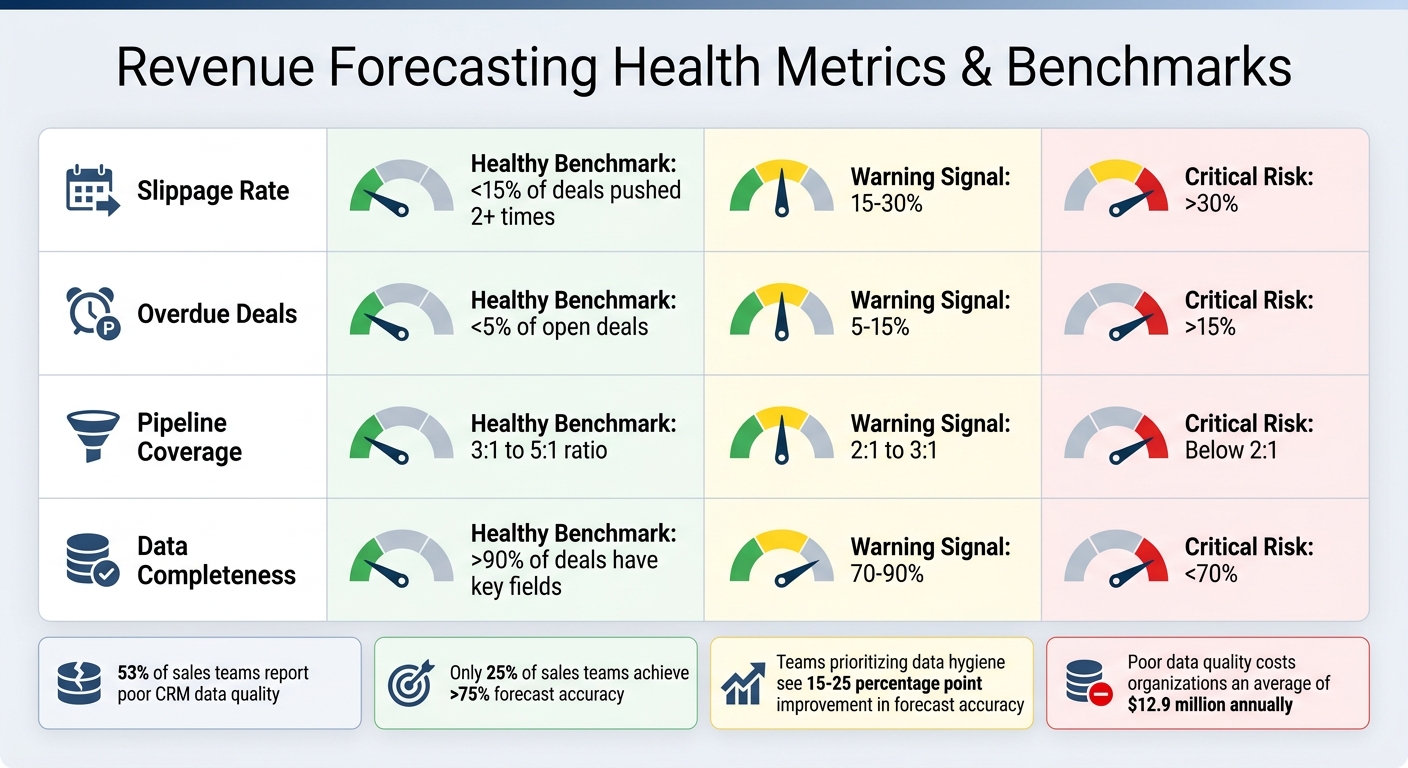
Revenue Forecasting Health Metrics and Benchmarks for B2B SaaS
Once you've established a solid data foundation, fine-tuning your approach with advanced techniques can significantly improve forecast accuracy. With only 25% of sales teams achieving more than 75% accuracy in their forecasts, it’s clear that deeper insights are critical. Two key areas - custom properties and proactive risk detection - can make all the difference, and HubSpot is particularly well-suited for these strategies.
Using Custom Properties and Reports
HubSpot’s default forecasting relies on "Amount" and "Close Date" fields. However, Super Admins can expand this by creating up to four additional custom forecast types using custom currency and date properties. For instance, your team might want to forecast based on "Services Amount" or track renewals using a "Renewal Date" instead of the original close date. These customizations allow for more tailored and relevant forecasting.
For multi-year contracts, calculated properties can automatically combine "First Subscription ARR" and "Subsequent Subscriptions ARR" to generate an accurate "Forecast ARR" for each deal. This removes the guesswork and ensures your projections reflect the real contract value. By integrating these custom properties into your dashboards, you gain a comprehensive view that enhances decision-making.
Another useful tactic is adding a "Close Date Pushes" property. This tracks how often a deal’s close date has been delayed. Deals with three or more pushes can be flagged as high-risk. Additionally, custom fields can act as a verification step, ensuring only deals with clear buyer signals move forward.
To evaluate your forecasting accuracy, consider tracking Mean Absolute Error (MAE). By comparing forecasts to actual closed-won revenue at specific intervals, you can identify recurring issues, such as consistent over-forecasting in certain quarters, and adjust your strategy accordingly. These custom metrics provide a foundation for spotting and addressing forecast risks.
Spotting and Reducing Forecast Risks
Beyond custom reporting, risk detection techniques are essential to maintaining forecast accuracy as deal conditions evolve. HubSpot’s deal funnel report can help by showing the percentage of deals in each stage that ultimately close as "Won". Adjusting stage probabilities quarterly ensures your weighted pipeline reflects reality. For example, if only 40% of deals in the "Proposal" stage close but a 60% probability is applied, it inflates your pipeline.
You can also automate workflows to flag stagnant deals - those with no activity for over 45 days - or deals that exceed the average time spent in a stage for successful deals. These inactive deals can distort your weighted forecasts and inflate coverage ratios. A healthy pipeline should have fewer than 15% of deals pushed multiple times and less than 5% of open deals with overdue close dates.
HubSpot’s AI-assisted projections (available in Professional and Enterprise tiers) further enhance accuracy. By analyzing historical trends, deal velocity, and engagement signals, these projections provide a data-driven forecast alongside manual inputs from reps. This feature works best when backed by at least 12 months of clean historical data and consistent activity tracking.
Finally, standardizing what qualifies as a "Commit" deal can prevent inaccuracies. Define clear buyer milestones, such as "procurement timeline set" or "budget confirmed", that must be met before a deal is marked as "Commit". This ensures forecasts are based on solid, validated criteria rather than overly optimistic assumptions.
| Metric | Healthy Benchmark | Warning Signal | Critical Risk |
|---|---|---|---|
| Slippage Rate | <15% of deals pushed 2+ times | 15-30% | >30% |
| Overdue Deals | <5% of open deals | 5-15% | >15% |
| Pipeline Coverage | 3:1 to 5:1 ratio | 2:1 to 3:1 | Below 2:1 |
| Data Completeness | >90% of deals have key fields | 70-90% | <70% |
For teams managing complex revenue models, Vestal Hub offers tailored HubSpot solutions, from custom reporting to intelligent workflows. These tools can transform forecasting into a precise, data-driven process, removing the guesswork and delivering actionable insights.
Conclusion
This guide has shown how HubSpot turns raw CRM data into actionable revenue insights. At the heart of revenue forecasting lies a strong and well-maintained data foundation. As Peter Sterkenburg, HubSpot Solutions Architect, aptly says:
"Forecasting is a data quality problem before it's a process problem. Fix the data foundation and your methodology becomes more accurate".
Given that 53% of sales teams report poor CRM data quality and only 25% achieve greater than 75% forecast accuracy, there's a clear opportunity to improve.
Start with the five key properties - Amount, Close Date, Deal Stage, Forecast Category, and Deal Owner - and ensure stage-specific validations are in place. Build a pipeline that reflects clear buyer actions. Then, choose a forecasting method that aligns with your sales motion.
Keeping your data clean isn’t a one-time effort - it’s an ongoing process that directly impacts forecast accuracy. Regular data hygiene practices are essential. Automate workflows to flag deals inactive for 14 days, monitor close date changes, and maintain a healthy pipeline coverage ratio (ideally between 3:1 and 5:1). Revisit and adjust stage probabilities quarterly based on actual conversion rates instead of relying on HubSpot's default settings. Teams that prioritize basic data hygiene often see their forecast accuracy improve by 15–25 percentage points.
For B2B SaaS companies with more complex revenue models, Vestal Hub offers advanced HubSpot setups and intelligent workflows designed to scale forecasting infrastructure. Their expertise ensures that your forecasting remains both adaptable and precise.
FAQs
Which forecast method should I use in HubSpot: weighted amount or total amount?
The choice boils down to what you need and how precise you want your projections to be. The weighted amount adjusts deal values according to their likelihood of closing, giving you a more realistic picture of potential revenue. On the other hand, the total amount just adds up all deal values, which can inflate revenue estimates if many deals are unlikely to close. For well-structured pipelines, the weighted amount is often the better option since it factors in deal risk and delivers insights you can act on.
What’s the minimum data I need before using HubSpot AI forecasting?
To make the most of HubSpot AI forecasting, you'll need to provide at least two key pieces of information: the deal amount and the close date. These details are essential for generating accurate forecasts and dependable predictions for specific time periods.
How do I choose buyer-milestone deal stages that improve forecast accuracy?
To get better at forecasting, start by setting up clear and measurable deal stages. These stages should represent actual revenue milestones rather than vague activities. For example, align them with the buyer's journey, such as stages like qualification or proposal.
Each stage should also have a probability assignment that reflects how likely it is for the deal to close. This adds clarity and helps you gauge the health of your pipeline.
Lastly, make it a habit to regularly review and adjust these stages using real sales data. This ensures your process stays relevant and provides dependable insights into your pipeline.