
Get insights like this delivered to your inbox
Join 2,500+ GTM professionals. No spam, unsubscribe anytime.
Subscribe to NewsletterHubSpot APIs empower SaaS revenue teams to automate workflows, sync data, and streamline operations. These RESTful tools integrate CRM data with other systems like billing platforms, product usage databases, and customer event trackers. Key benefits include faster lead qualification, real-time updates, and improved revenue tracking. Here's what you need to know:
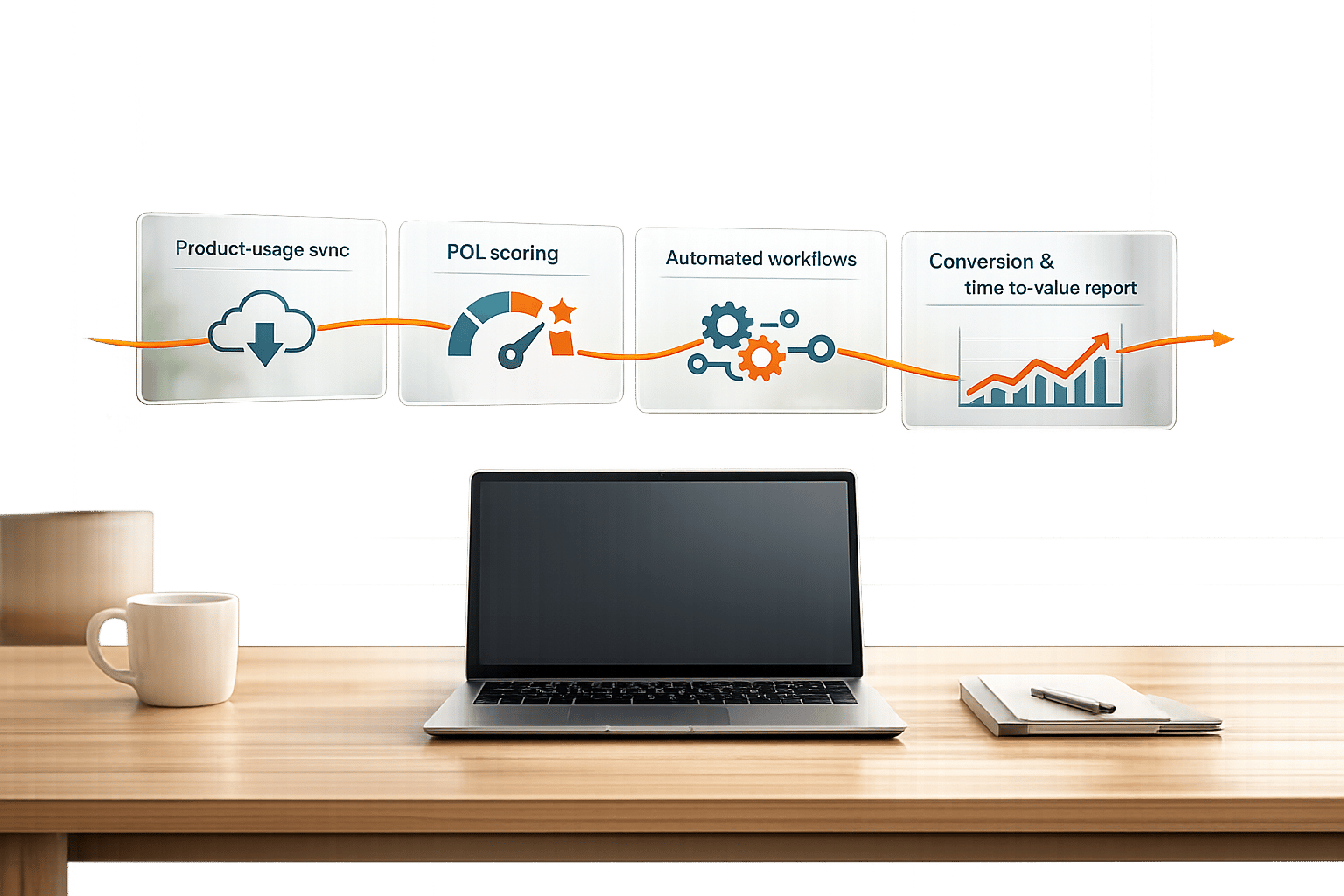
- Product Usage Data Sync: Identify Product-Qualified Leads (PQLs) by mapping user behavior to CRM properties or custom objects.
- Financial Data Integration: Sync billing platforms (e.g., Stripe) with HubSpot for accurate revenue metrics like MRR and ARR.
- Automated Lead Management: Create and assign deals automatically based on triggers like sign-ups or billing events.
- ERP Integration: Sync order and inventory data to enhance fulfillment processes.
- Lead Enrichment: Use external APIs to add firmographic and technographic data to leads in real-time.
HubSpot API Use Cases for SaaS Revenue Teams
Syncing Product Usage Data for Product-Qualified Leads
Revenue teams often map application events to HubSpot Contact/Company properties or use Custom Objects for more complex scenarios to identify Product-Qualified Leads (PQLs). The Search API (POST /crm/v3/objects/contacts/search) allows querying the CRM for specific thresholds, such as identifying contacts who’ve logged in more than 10 times in a week. This makes it easier to spot PQLs based on user behavior.
Webhooks play a key role by providing real-time notifications when user properties change. For example, when a user hits a milestone that qualifies them as a PQL, sales reps are notified instantly, eliminating the need for manual list-building. Keep in mind that the Search API limits results to 10,000 records per query, so you’ll need to implement pagination for larger datasets.
By integrating product usage data, teams can create unified contact data models. This approach has been shown to cut activation time by 30% when unified sales and service playbooks are implemented within the CRM. To keep records up to date, use PATCH /crm/v3/objects/contacts/{contactId} for updates and ensure deduplication logic is in place, as HubSpot webhooks deliver events in batches of around 100. This integration simplifies revenue workflows.
Two-Way Financial Data Syncing with Billing Platforms
Adding financial records to the mix provides a complete view of revenue. By syncing data bi-directionally between HubSpot and billing platforms like Stripe, teams can track the entire customer lifecycle - from opportunity creation to recurring revenue. This enables accurate calculation of SaaS metrics like Monthly Recurring Revenue (MRR) and Annual Recurring Revenue (ARR) directly within HubSpot by pulling subscription details and billing cadences.
"A customer's subscription status needs to stay consistent between HubSpot and Stripe. Changes in either system automatically update the other, keeping your teams aligned and your automation reliable." - Karin Tamir
This integration allows sales teams to compare weighted pipeline forecasts (deal amount × probability) with actual subscription revenue for better projections. Real-time syncing also triggers automated actions, like initiating a renewal sequence when a payment is processed. To implement this, define ownership of data domains - billing systems should manage invoices, while HubSpot handles lifecycle stages. Use the updated_gte parameter to retrieve only recently changed records via API. This integration ensures smoother revenue operations.
Automated Lead Routing and Deal Creation
Once data is integrated, automating lead management becomes essential for timely sales follow-ups. The POST /crm/v3/objects/deals endpoint can automatically create deal records based on external triggers like sign-ups or billing events. Lead assignment is handled during creation by updating the hubspot_owner_id property or later via PATCH /crm/v3/objects/deals/{dealId}.
To streamline processes, include associations in the initial POST request. For instance, you can link new deals to existing contacts (Association Type ID 5) or companies (Association Type ID 3) in a single step.
For SaaS teams, the POST /crm/v3/objects/line_items endpoint ensures that products are automatically associated with deals, keeping revenue data accurate. When creating records via the API, always use the internal ID of a deal stage or pipeline instead of its label to avoid errors. This automation enhances workflow efficiency.
ERP and Inventory Data Integration
The HubSpot API can also integrate with ERP systems to sync order details and inventory data, making fulfillment processes more efficient. Using the POST /crm/v3/pipelines/{objectType} endpoint, RevOps teams can automate the stages orders move through, ensuring consistent processes across departments. While deal, ticket, and custom object pipelines can support up to 100 stages, order pipelines are capped at 30 stages.
When defining order stages via the API, the probability metadata must fall between 0.0 (Closed Lost) and 1.0 (Closed Won). For audits, use the validateReferencesBeforeDelete parameter to prevent orphaned records, and leverage the API’s audit endpoints (/audit) to track changes made to pipeline stages. This is especially useful for troubleshooting automated routing logic. These capabilities simplify revenue workflows.
Lead Enrichment Using External APIs
Enriching lead data with external APIs can refine targeting strategies. HubSpot workflows can call external services to add firmographic and technographic details - like company size, industry, or technology stack - in real-time. This is achieved through webhook-based integrations, where HubSpot sends contact data to an enrichment service, which then returns additional fields.
The enriched data is updated in HubSpot using the PATCH /crm/v3/objects/contacts/{contactId} endpoint. To ensure seamless synchronization, securely store refresh tokens to avoid frequent re-authorization. HubSpot API burst limits range from 110 to 190 requests per 10 seconds depending on your plan, with daily limits between 250,000 and 1,000,000 calls.
For teams managing multiple CRMs, consider using a unified CRM API. This approach maintains consistent object schemas and reduces the need for custom OAuth logic for each provider. It’s a scalable solution that minimizes technical complexity as your integration needs grow, keeping workflows efficient.
sbb-itb-69c96d1
Best Practices for Implementing HubSpot APIs
Planning and Scoping API Integrations
The first step in working with HubSpot APIs is identifying which ones you need - whether it's CRM, Marketing, CMS, or Service. Early on, map out your external fields, including any Custom Objects and key associations.
Authentication is a cornerstone of any integration. For multi-account setups, use OAuth 2.0. If you're building something for internal use, go with Private App Tokens. Always define the minimum permissions your integration needs, such as crm.objects.contacts.read, and configure these scopes in your app settings before starting the OAuth process.
HubSpot's technical limitations should guide your planning from the get-go. For instance, use cursor-based pagination to handle large datasets. Decide whether your use case requires real-time updates via the Webhooks API or if batch processing is more appropriate. Batch endpoints, like /crm/v3/objects/contacts/batch/update, can save up to 80% of your API quota.
Test everything in a HubSpot developer sandbox before touching production data, or book a technical call for expert guidance on your integration architecture. Log all API requests, responses, and errors to simplify debugging. Use exponential backoff to handle 429 (Too Many Requests) errors gracefully, and only request the specific data properties you need instead of pulling entire objects. Stay informed about changes by subscribing to the HubSpot developer changelog, which typically provides a 90-day notice for breaking updates.
Finally, ensure secure token handling and data encryption to protect your workflows.
Data Security and Compliance
Security is all about proper token management. Store credentials in secure tools like AWS Secrets Manager or HashiCorp Vault. If you're serving multiple customers, associate tokens with their specific HubSpot portal IDs to prevent accidental data crossovers.
"The gap between a working integration and a production-ready one usually comes down to how well you handle tokens." – HubSpot Developer Blog
Follow the Principle of Least Privilege (PoLP) by using the minimum required scopes. This can reduce your attack surface by as much as 75%. For added protection, enable multi-factor authentication (MFA) for team members managing integration settings. MFA can block 99.9% of automated account takeover attempts. OAuth-based systems are also 30% less likely to experience breaches compared to traditional username/password setups.
Encrypt data both in transit (using TLS 1.2 or higher, ideally TLS 1.3) and at rest (using AES-256). This not only aligns with GDPR and CCPA but also reduces the likelihood of major security incidents by 60%. For webhook integrations, validate payloads using the x-hubspot-signature header, and use strict regex patterns or JSON Schema validation to prevent vulnerabilities like SQL injection and XSS attacks.
Rotate OAuth tokens regularly and use a proper refresh workflow to maintain secure access. In environments with multiple servers, tools like Redis with a locking mechanism (e.g., Redlock) can prevent simultaneous token refreshes. Centralized logging is another must-have to capture request details like timestamps, IP addresses, and response codes, helping with real-time anomaly detection.
Once your security measures are in place, focus on monitoring and optimizing API performance for a smooth integration experience.
Monitoring and Optimizing API Performance
Keeping your integration reliable means staying on top of performance. Monitor rate limit headers like X-HubSpot-RateLimit-Daily-Remaining and X-HubSpot-RateLimit-Interval-Milliseconds to avoid hitting quotas. Set alerts when you reach 80% and 95% of your daily limit to prevent disruptions.
Use timestamps, such as updatedAt, to sync only modified records. This can cut down payloads and bandwidth by over 75%. Replace polling with webhooks to reduce requests by more than 95% while improving data freshness by 70%. If you encounter 429 errors, apply exponential backoff with randomized jitter to lower repeated failures by 60–80%.
Optimize your data payloads by using field-level tracking and partial entity PATCH requests instead of full PUT requests. This approach can reduce bandwidth usage by 54%. For static metadata or frequently requested properties, caching solutions like Redis can deliver sub-millisecond response times compared to over 100 milliseconds for remote calls. For larger payloads (over 100KB), compress them with Gzip to reduce transfer sizes by up to 70%.
Schedule bulk data syncs during low-traffic times to boost throughput by 35%. For webhook notifications, ensure your system responds with an HTTP 200 status within 200 milliseconds to avoid timeouts and duplicate retries. Aim for median response times under 250 milliseconds for critical endpoints and keep error rates (4XX, 5XX) below 0.5%.
Mastering HubSpot APIs with Postman: Comprehensive Demo
HubSpot API Endpoints for SaaS Use Cases
HubSpot API Endpoints for SaaS Revenue Teams: Features and Requirements
Picking the right API endpoint can make or break your revenue operations workflow. HubSpot's API is built to handle CRM records for over 194,000 customer accounts, and the endpoints you choose will determine whether your integration runs efficiently or hits rate limits.
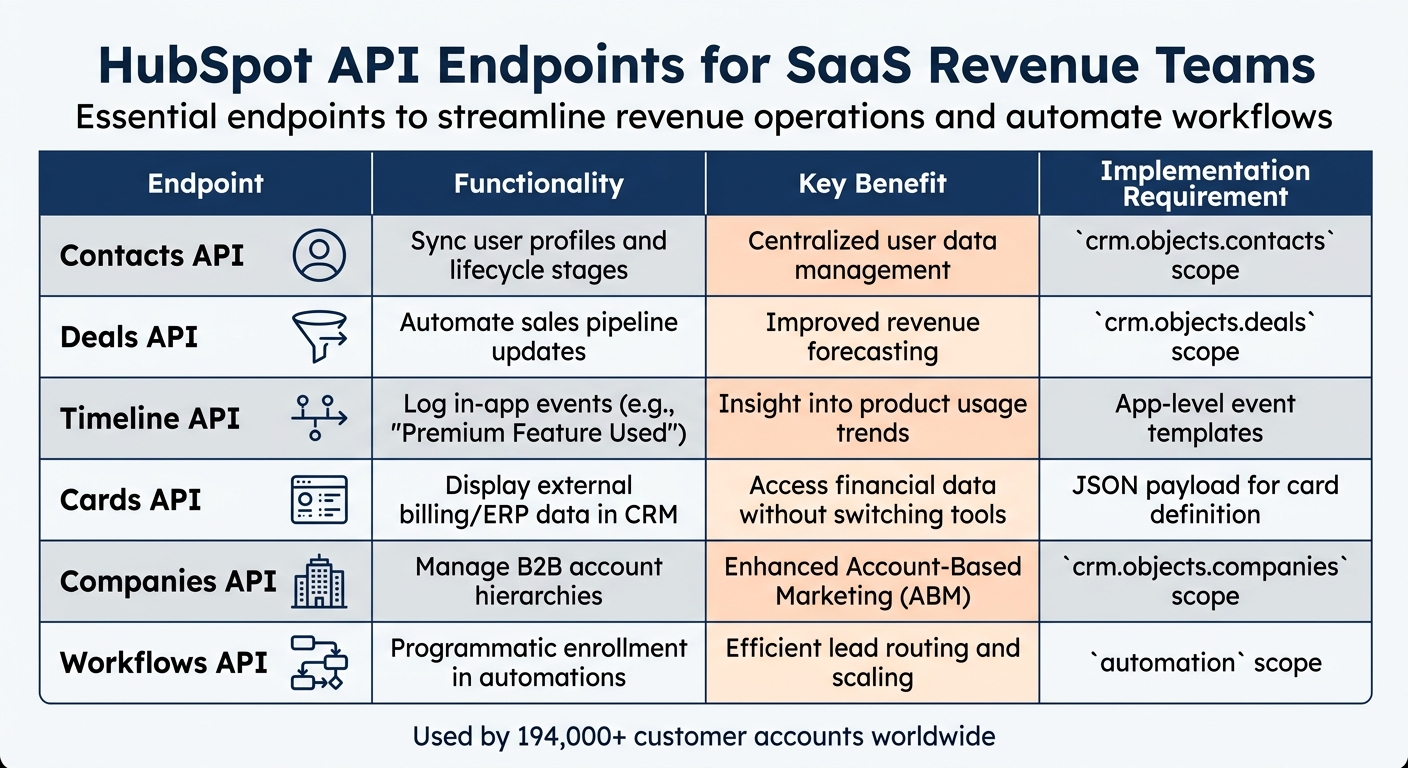
Here’s a breakdown of the essential HubSpot API endpoints designed specifically for SaaS revenue teams. These endpoints streamline processes like syncing data, tracking user activity, and automating workflows. Check out the table below for a quick overview:
| Endpoint | Functionality | Key Benefit | Implementation Requirement |
|---|---|---|---|
| Contacts API | Sync user profiles and lifecycle stages | Centralized user data management | crm.objects.contacts scope |
| Deals API | Automate sales pipeline updates | Improved revenue forecasting | crm.objects.deals scope |
| Timeline API | Log in-app events (e.g., "Premium Feature Used") | Insight into product usage trends | App-level event templates |
| Cards API | Display external billing/ERP data in CRM | Access financial data without switching tools | JSON payload for card definition |
| Companies API | Manage B2B account hierarchies | Enhanced Account-Based Marketing (ABM) | crm.objects.companies scope |
| Workflows API | Programmatic enrollment in automations | Efficient lead routing and scaling | automation scope |
To ensure smooth integration, it’s crucial to consider endpoint-specific performance and authentication practices.
Performance and Rate Limits
HubSpot accounts come with varying API rate limits based on their subscription level. Here’s what you need to know:
- Free and Starter Accounts: 100 requests per second, up to 100,000 daily.
- Professional Accounts: 200 requests per second, up to 500,000 daily.
- Enterprise Accounts: 400 requests per second, up to 1,000,000 daily.
Key Endpoints for Advanced Use Cases
-
Search API (
/crm/v3/objects/{type}/search): This endpoint is a game-changer for incremental data syncing. Instead of pulling all records and filtering locally, uselastmodifieddateto fetch only updated records. Keep in mind the 10,000-record limit per query and implement cursor-based pagination withaftertokens. - Associations API: For B2B teams, this endpoint is critical. When creating a deal, link it immediately to the relevant Contact (Type ID 3) and Company (Type ID 5). This ensures relational data integrity and a seamless CRM experience.
Authentication Best Practices
- Use Private Apps for internal integrations and OAuth 2.0 for multi-tenant applications.
- OAuth access tokens expire after six hours, so be sure to include refresh token logic in your system.
- To protect against unauthorized data injection, validate webhook signatures using the
x-hubspot-signatureheader.
These endpoints and practices lay the groundwork for building efficient, scalable integrations tailored to SaaS workflows. By leveraging them correctly, you can optimize data flow and maintain CRM integrity.
Conclusion
Integrating HubSpot APIs takes your revenue operations to a whole new level. By transforming your CRM from a static tool into a responsive growth engine, these APIs allow you to instantly adapt to customer behavior. For SaaS revenue teams, this evolution is game-changing - it eliminates manual processes like data entry and form filling, replacing them with automated systems that track product usage, sync billing data, and trigger timely sales outreach when users engage with key features.
The numbers speak for themselves: automated API integrations can save teams 15–20 hours per week and increase qualified leads by an impressive 451%. But the real value lies in creating unified datasets that enable seamless collaboration between sales, marketing, and customer success teams.
"A seamless connection between product data and GTM systems underpins true product-led growth."
The secret to success is combining the right integration tools. Use APIs for tailored customization and two-way data syncs, webhooks for instant event triggers, and Reverse ETL to push advanced insights - like health scores - directly into HubSpot. This hub-and-spoke model breaks down data silos and provides the operational efficiency your team needs to scale effectively. Together, these tools deliver the agility and precision that generic setups simply can't match.
To make the most of these integrations, it’s essential to plan carefully. Define ownership of systems early on - billing platforms for invoices, HubSpot for GTM engagement - to ensure data integrity and avoid sync issues. When implemented strategically, API integrations become a powerful edge over competitors.
This is where Vestal Hub comes in. With expertise in designing and implementing robust API solutions, they help SaaS revenue teams streamline their operations and drive sustainable growth.
FAQs
Should we use custom objects or contact properties for product usage data?
When it comes to managing product usage data in HubSpot, custom objects often outperform contact properties, particularly when dealing with large or complex datasets. Custom objects offer a more scalable solution for tracking detailed usage data while also enabling automation and robust reporting capabilities.
While contact properties might work for straightforward, low-volume data, they can quickly become cluttered and inefficient as the dataset grows. For high-frequency data, custom objects provide better organization, improved performance, and the ability to scale effectively.
How do we prevent HubSpot and Stripe from overwriting each other’s data?
To keep HubSpot and Stripe from overwriting each other's data, set up a bidirectional sync with built-in safeguards. Use features like controlled update rules, unique identifiers, and synchronization controls. These measures help avoid problems like infinite loops, duplicate records, and data conflicts, ensuring the integration runs smoothly.
What’s the best way to avoid HubSpot API rate limits in production?
Avoid hitting HubSpot's API rate limits in production by following these strategies:
- Use exponential backoff for retries: Instead of retrying failed API calls immediately, implement a gradual delay between attempts. This reduces the risk of overwhelming the system.
- Monitor API usage in real-time: Set up automated dashboards to track your API consumption. This allows you to spot potential issues before they escalate.
- Batch or schedule heavy operations: Plan resource-intensive tasks during off-peak hours to minimize the impact on API limits.
- Prioritize critical API calls: Focus on essential requests over bulk operations to ensure key functionality remains unaffected.
These steps help maintain smooth integrations while staying within HubSpot's rate limits.