

Get insights like this delivered to your inbox
Join 2,500+ GTM professionals. No spam, unsubscribe anytime.
Subscribe to NewsletterHubSpot APIs can help you turn messy, scattered customer data into actionable insights. Here's a quick breakdown of what this guide covers:
- Streamline API usage: Reduce API calls by 90% using batch endpoints and optimize payload sizes by over 75% with delta synchronization.
- Real-time updates: Use webhooks to push data instantly without hitting rate limits, cutting response times by up to 60%.
- Custom objects for SaaS: Model complex data like subscriptions or workspaces with HubSpot's custom objects and associations.
- ETL workflows: Extract, transform, and load data efficiently using HubSpot's APIs while avoiding duplicate records or validation errors.
- Error handling: Implement retries, caching, and property formatting to manage rate limits and prevent integration failures.
Whether you're syncing product usage data, managing bi-directional integrations, or activating warehouse data for reporting, this guide walks you through the steps to make HubSpot a central hub for your business operations.
Mastering HubSpot API: Pt. 1 Platform Integration with Custom Coded Actions. Operations Hub
sbb-itb-69c96d1
HubSpot API Fundamentals
HubSpot API Rate Limits by Product Tier
HubSpot has transitioned from legacy API keys to two modern authentication methods: OAuth 2.0 for multi-tenant apps and Private App tokens for single-account integrations. OAuth uses a three-token flow, with access tokens that expire every 30 minutes, requiring regular token refreshes. OAuth is ideal for apps interacting with multiple HubSpot accounts, while Private Apps offer a persistent token tailored for single-account use.
API Authentication and Rate Limits
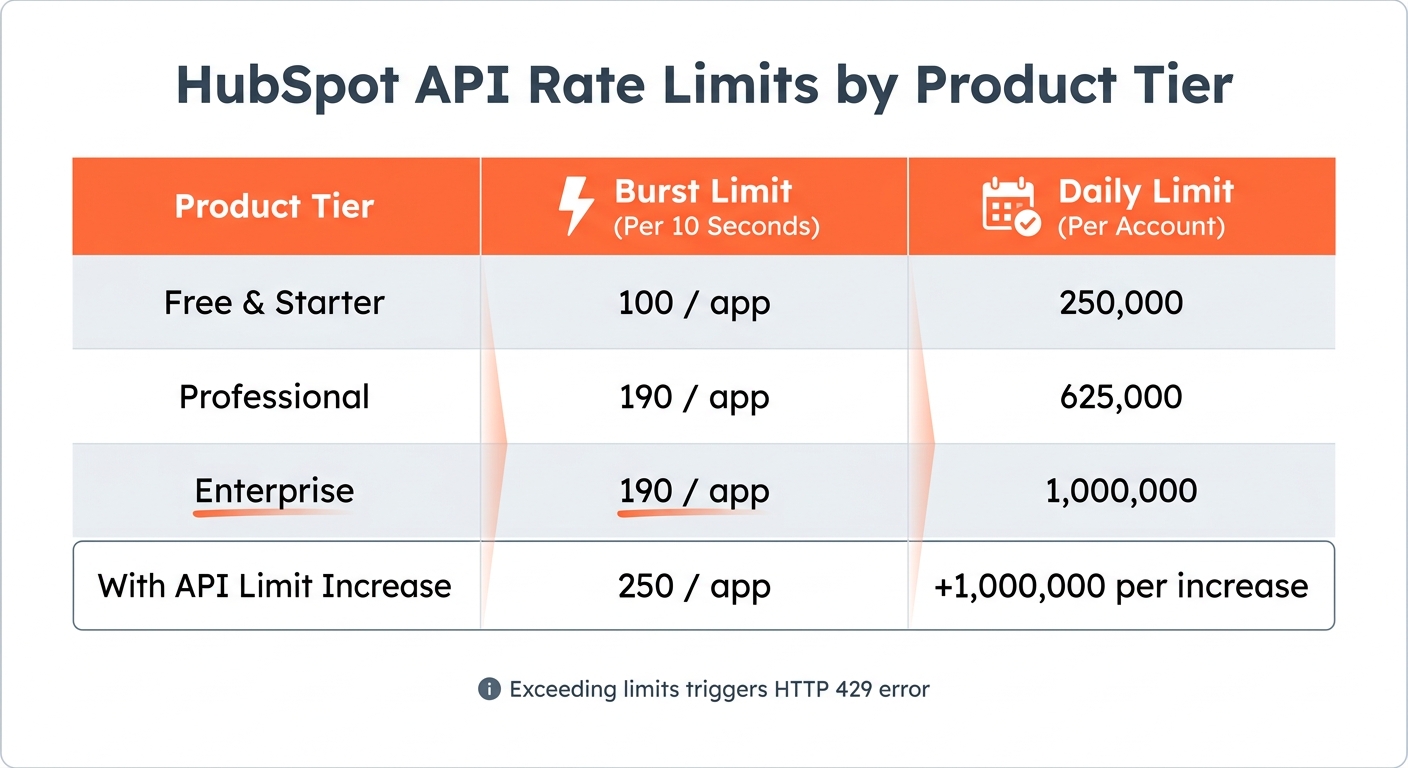
HubSpot enforces strict rate limits to manage API usage. These include a burst limit (requests allowed per 10 seconds) and a daily limit (total requests per 24 hours). For instance:
- Professional accounts: 190 requests per 10 seconds with a daily cap of 625,000.
- Enterprise accounts: 190 requests per 10 seconds with a higher daily cap of 1,000,000.
Exceeding these limits triggers an HTTP 429 error. To maintain Marketplace certification, error rates must stay under 5% of total daily traffic.
Token Management and Security
To avoid 401 Unauthorized errors, calculate token expiration using the expires_in value and refresh tokens about five minutes before they expire. In multi-server setups, use distributed caching tools like Redis with locking mechanisms (e.g., Redlock) to prevent simultaneous token refreshes.
For security, never store tokens in plain text. Instead, use AES-256 encryption or a secrets manager like AWS Secrets Manager. When implementing OAuth flows, include a non-guessable state parameter to protect against Cross-Site Request Forgery attacks. For webhooks, validate the X-HubSpot-Signature-v3 header with your client secret using a constant-time comparison to prevent timing and replay attacks.
Monitoring and Optimizing API Usage
HubSpot provides response headers to help track your API usage:
X-HubSpot-RateLimit-Daily-Remaining: Shows the remaining daily request quota.X-HubSpot-RateLimit-Remaining: Indicates how many requests are left in the current 10-second window.
To reduce API call volume, leverage batch endpoints. For example, instead of making individual requests, you can batch process up to 50 contacts in a single call, reducing average latency from 1,200 ms to under 400 ms. When encountering HTTP 429 errors, use exponential backoff with jitter to prevent request collisions.
| Product Tier | Burst Limit (Per 10 Seconds) | Daily Limit (Per Account) |
|---|---|---|
| Free & Starter | 100 / app | 250,000 |
| Professional | 190 / app | 625,000 |
| Enterprise | 190 / app | 1,000,000 |
| With API Limit Increase | 250 / app | +1,000,000 per increase |
Key Endpoints for Data Transformation
Once authentication and rate limits are under control, HubSpot's APIs offer powerful tools for transforming and managing data.
-
Search API (
/crm/v3/objects/{object}/search): Filter records using operators likeGT(greater than),HAS_PROPERTY(non-empty fields), orCONTAINS_TOKEN(specific string matches). For example, you can retrieve deals worth over $10,000 or contacts updated in the past 24 hours. -
Batch Upsert API (
/crm/v3/objects/{object}/batch/upsert): Create or update up to 100 records in one request using unique identifiers like email addresses or external database UUIDs. TheobjectWriteTraceIdparameter provides a detailed 207 Multi-Status response, showing which records succeeded or failed. - Associations API: Maintain relationships between objects, such as linking a Deal to its parent Company or associating a Contact with multiple Tickets.
-
Properties API (
/crm/v3/properties/{objectTypeId}): Retrieve property schemas and internal names to ensure accurate data mapping that aligns with HubSpot's requirements. - Webhooks: Enable real-time external processes without consuming API limits.
With these endpoints, you can streamline workflows and ensure efficient data handling within HubSpot.
Data Transformation Techniques with HubSpot APIs
Once authentication is set up, the real work begins: turning raw data into insights you can act on. HubSpot's four-layer data structure - objects, records, properties, and associations - provides the foundation for creating workflows that match your business needs.
Custom Object Modeling and Associations
While HubSpot’s standard CRM objects like Contacts and Companies are great for straightforward use cases, more complex operations - like those in B2B SaaS - often require something extra. That’s where custom objects come in. They’re ideal for representing many-to-many relationships or data that doesn’t fit neatly into predefined categories. For instance, a SaaS company might use a "Subscription" custom object to track multiple billing cycles for each customer or a "Support Ticket Category" object to better manage service requests beyond the default ticket structure.
"We build custom objects for one reason - we know that data is the engine of every business. A CRM that can't accurately represent all kinds of business data won't hold up as a CRM for long." – Dylan Sellberg, Product Manager for Custom Objects, HubSpot
Before diving into custom object creation, it’s a good idea to review your data model in the Data Management settings. This step helps you visualize existing associations and avoid property sprawl - a scenario where unnecessarily large numbers of custom properties (think 200+ when 40 would do) can lead to performance issues and reporting challenges. Keep in mind, once you define a schema via POST /crm/v3/schemas, the internal API names are permanent and can’t be changed later. HubSpot Professional accounts allow up to 150,000 custom object records per object, while Enterprise accounts can handle up to 2,000,000.
The v4 Associations API also introduces association labels, which add clarity to relationships between records. For example, you can distinguish roles like "Decision Maker" or "Billing Contact." Batch operations allow up to 2,000 associations in a single API call [27, 31].
Implementing ETL Processes
ETL (Extract, Transform, Load) workflows are essential for syncing data between HubSpot and external systems. Here’s how it works:
- Extract: Use the CRM Search API (
/crm/v3/objects/{object}/search) to pull records based on specific filters. For example, you could extract deals worth over $10,000 or contacts updated in the last 24 hours. - Transform: Map external data to HubSpot’s property formats. For instance, store currency values as integers (in cents) to avoid rounding errors.
- Load: The Batch Upsert API (
/crm/v3/objects/{objectTypeId}/batch/upsert) simplifies the process by letting you create or update up to 100 records in one request using a unique identifier, such as a database UUID [23, 21]. This eliminates the need for a multi-step "search-then-update" process and reduces the chance of duplicate records. To read records by custom ID, usePOST /crm/v3/objects/{objectTypeId}/batch/readwith theidPropertyparameter.
Real-Time Data Transformations with Webhooks
For immediate updates, webhooks are your go-to tool. They trigger real-time data transformations based on specific HubSpot events, ensuring your data stays relevant without overloading API rate limits. However, HubSpot enforces a strict 5-second timeout for webhook responses [34, 37]. To meet this requirement, return a 200 OK status immediately and offload heavier tasks to background queues like Redis or AWS SQS [36, 37, 39].
Security is critical. Always validate the X-HubSpot-Signature-v3 header using HMAC SHA-256 and constant-time comparison methods (e.g., crypto.timingSafeEqual in Node.js) to protect against timing and replay attacks [36, 37]. Reject requests with a timestamp (X-HubSpot-Request-Timestamp) older than 5 minutes.
Because HubSpot uses "at-least-once" delivery, duplicate events may occur. Use the eventId from the payload to ensure each event is processed only once [34, 36, 39]. The occurredAt timestamp can help you sequence events to avoid overwriting newer data. To prevent infinite loops, filter events by the changeSource field and ignore those triggered by your integration (source: INTEGRATION or API). Lastly, limit subscriptions to specific object types and properties (e.g., contact.propertyChange for "email") to reduce noise and save resources [34, 35].
Companies using webhook-driven automations have reported cutting customer response times by 44% compared to traditional polling methods.
Data Formatting and Mapping Best Practices
Getting data formatting right is crucial to avoid errors that can cost time and money. Did you know that mismatched currency and datetime formats account for over 75% of rejected entries in migration audits conducted by SaaS consultancies? The good news? Most of these issues can be avoided by following a few straightforward practices.
Handling Property Types and Custom Date Formats
HubSpot's API has specific requirements for property formats, and any mistakes here will lead to validation errors. For date properties like closedate, the system accepts either ISO 8601 format (YYYY-MM-DD) or Unix timestamps in milliseconds. However, timestamps must align to midnight UTC. If you're using JavaScript, adjust your timestamps with dateObject.setUTCHours(0, 0, 0, 0) before calling .getTime() to avoid "INVALID_LONG" errors. For datetime properties that include time, stick with ISO 8601 strings like 2026-04-25T19:20:30.45Z or Unix millisecond timestamps.
Boolean values should be formatted as true or false. Avoid using variations like "YES/NO" or "1/0", as these won't work. When dealing with multi-select checkboxes, format values as semicolon-separated strings without spaces (e.g., ;VALUE1;VALUE2). This ensures new selections append rather than overwrite existing ones.
"Property internal names in HubSpot are permanent. That makes naming conventions an architectural decision, not a style preference." – Peter Sterkenburg, HubSpot Solutions Architect, PortalPilot
Always use internal property names for API integrations instead of display labels. While display labels can be edited by users, internal names remain fixed after creation. Before creating new properties, search for existing ones to avoid performance issues or reporting complications. Adopting a structured naming convention - like [object]_[category]_[descriptor] (e.g., contact_marketing_lead_source) - can make properties easier to manage. Adding type suffixes such as _date or _flag is also helpful, especially for tools like HubSpot's Breeze AI, which relies on property names to interpret data context. By getting formats and mappings right, you ensure HubSpot stays reliable as the hub for your unified data strategy.
With property formatting in place, the next step is ensuring smooth data synchronization across systems.
Bi-Directional Data Synchronization
Defining property formats is just the beginning. Keeping data consistent across systems requires careful synchronization to avoid issues like infinite loops, duplicate records, or data conflicts. A field ownership matrix can help by clearly defining which system "owns" specific fields. For instance, HubSpot might manage lifecyclestage, while an external app handles usage_metrics.
Using origin tagging is another smart move. Tag outbound updates with a custom property (e.g., _sync_source) to track their origin. When a webhook arrives, check if the change came from your system and skip processing if it did. To prevent duplicate updates, cache recent writes (record ID, field, and value) for a short time and suppress matching inbound webhooks. Also, leverage unique identifier properties - HubSpot allows up to 10 per object - to match records across systems. Avoid relying only on email addresses or HubSpot's internal IDs.
Since webhooks operate on an "at-least-once" delivery model, some events might be missed or duplicated. To address this, set up a reconciliation cron job that periodically retrieves records where lastmodifieddate > last_sync_timestamp. This ensures you catch any missed updates and resolve data discrepancies. Timestamp-based delta synchronization can also reduce payload sizes and bandwidth usage by over 75%. If you're working with HubSpot's lifecyclestage property, remember it generally only progresses forward. To move it backward, you’ll need to clear the current value first via the API.
Teams that use structured mapping documentation experience 50% fewer deployment delays compared to those relying on unorganized notes. Maintain a detailed schema mapping table that includes internal names, data types, and specific transformation rules for each field. Middleware solutions can also help, reducing operational defects by up to 35%.
Practical Examples of Data Transformations
Building on the earlier discussion about API formatting and synchronization, let’s dive into real-world examples of how advanced data transformation techniques can streamline workflows and tackle the challenges posed by data silos with technical RevOps support.
Reverse ETL for Reporting
Reverse ETL involves transferring data from HubSpot into external reporting tools like data warehouses or business intelligence platforms. This process often combines webhooks for real-time data triggers with custom code actions to transform data before exporting it. For instance, when HubSpot records are updated, webhooks instantly push the data to an external endpoint. Meanwhile, custom code actions can aggregate and prepare data - such as consolidating deal revenues - so it's ready for analysis.
To ensure smooth operation, middleware plays a critical role by handling tasks like deduplicating events, retrying failed calls, and resolving conflicts. For added security, validate the x-hubspot-signature header to block replay attacks. Use tools like Redis to store HubSpot eventId values with a 24-hour time-to-live (TTL), avoiding duplicate event processing. Since HubSpot retries failed webhooks up to 10 times over 24 hours, your endpoint must be able to handle duplicate events without creating errors.
"Most HubSpot-Salesforce syncs fail because webhooks fire faster than your server can write to Salesforce - creating duplicates, race conditions, and orphaned records." – Misal Azeem, Voice AI Engineer
Batch syncing every 5 minutes can cut down API calls by as much as 97%. This is crucial when working with external systems that impose strict API limits - Salesforce, for example, caps daily API calls at 15,000. To manage rate limits effectively, implement exponential backoff strategies (e.g., wait 2 seconds, then 4 seconds, then 8 seconds) when encountering "429 Too Many Requests" errors. Finally, to avoid race conditions, use a "last write wins" approach, comparing HubSpot’s lastModifiedDate with the destination system’s timestamp.
Next, let’s explore how custom code actions within HubSpot workflows can push these transformation capabilities even further.
Custom Code Actions in HubSpot Workflows
Custom code actions allow you to write Node.js or Python scripts directly within HubSpot workflows, enabling transformations that go beyond standard workflow capabilities. These scripts run on AWS Lambda, with a maximum timeout of 20 seconds and 128 MB of memory. To return results, the script must invoke the callback() function.
"Custom coded workflow actions are one of the most powerful features in HubSpot, and one of the least documented." – San Karunanithy, Solution Architect
To use this feature, you’ll need an Operations Hub Professional or Enterprise subscription. Data is passed into the script via the event.inputFields object and returned through outputFields, which can feed into subsequent workflow actions. For security, store API keys and tokens as HubSpot "Secrets" instead of embedding them directly in your code.
Popular use cases include:
- External enrichment: Query APIs like Clearbit to append firmographic data during enrollment.
- Cross-object aggregation: Calculate metrics like total revenue at the account level.
- Weighted assignment: Route leads based on criteria like region, source, and lead score.
- Date calculations: Compute business days until a contract expires.
To keep workflows efficient, set explicit timeouts (e.g., 15 seconds) for external HTTP requests using libraries like Axios. Use try-catch blocks to handle errors gracefully and return clear error states (e.g., isSuccess: false) so workflows can branch based on success or failure. Keep in mind that HubSpot truncates console logs in workflow history at around 4KB, so focus on logging key details like status codes or record counts instead of full API responses.
Error Handling and Best Practices
Handling errors effectively is key to ensuring data transformations remain reliable and efficient. Even the best systems encounter issues, but with the right strategies, you can minimize disruptions and keep processes running smoothly.
Efficient Filtering and Query Parameters
How you structure API queries can make or break your system's performance. For example, exceeding HubSpot's burst or daily limits triggers HTTP 429 (Rate Limit) errors. To avoid this, consider using Batch APIs, which can reduce API calls by as much as 90%. For datasets larger than 10,000 records, the CRM Imports API is a better option, as it bypasses synchronous rate limits entirely.
HTTP 400 (Validation Errors) often occur when internal property names don't match or when trying to write to read-only system properties like createdate. To prevent this, extract the property schema using GET /crm/v3/properties/{objectType}. This step lets you verify internal names and identify readOnlyValue attributes before making requests, saving you from costly errors.
"Overcomplicating record transformation leads to higher error rates–Gartner reports show data quality error costs averaging $12.9 million per organization each year." – Grady Andersen, MoldStud Research Team
Reducing data transfer is another way to improve performance. Filtering properties using the properties query parameter can cut data transfer by nearly 60%. If you encounter HTTP 502/504 (Gateway Timeouts), adjust by reducing batch sizes and limiting the number of returned properties to ease processing loads.
To manage rate limits, monitor response headers like X-HubSpot-RateLimit-Remaining and X-HubSpot-RateLimit-Interval-Milliseconds. These headers help you dynamically adjust request frequency. If a 429 error occurs, implement retries with incremental delays (e.g., 1 second, 2 seconds, 4 seconds) and randomization to avoid synchronized retry collisions. This approach can cut failure rates by 60–80%.
Building Scalable Integration Architectures
Optimizing API queries is just one piece of the puzzle. A scalable integration architecture ensures your system can handle increasing data loads without breaking down. A great way to achieve this is by decoupling with message queues like RabbitMQ, AWS SQS, or Apache Kafka. These tools regulate outbound requests and enable durable retries, preventing the "thundering herd" problem where multiple clients overwhelm the API at once.
Another effective strategy is replacing repetitive polling with webhook subscriptions. Webhooks allow you to receive data changes instantly, cutting API consumption by up to 95%. Focus your webhooks on monitoring only the property changes you care about to reduce payload size and processing time. HubSpot will retry failed webhook notifications up to 10 times over 24 hours if your service times out or returns a 4xx/5xx error.
For batch operations, use the objectWriteTraceId parameter to get a 207 Multi-Status response. This response shows which records succeeded and which failed, so you can retry only the failed ones instead of reprocessing the entire batch. Limit retries to 3–5 attempts to balance resilience with efficiency.
Staging raw data in a storage layer like Azure Data Lake Storage (ADLS) before transformation is another smart move. At about $10–$20 per terabyte per month for the Hot tier, this approach lets you reprocess data without hitting API rate limits and provides an audit trail for tracking changes.
"Option 1, where data flows from HubSpot into Azure Data Lake Storage (ADLS) before being transformed and loaded into Azure SQL, is generally the stronger long-term choice because it scales better, is easier to maintain, and provides a built-in audit trail." – Danny Nguyen, Microsoft External Staff
Structured JSON logging is essential for uncovering hidden errors that might otherwise be masked by client libraries. Always test your error-handling logic and rate-limit triggers in a HubSpot sandbox environment before deploying to production. Teams that monitor usage proactively and implement real-time alerts have reduced downtime by 74%.
Conclusion
Advanced API data transformation with HubSpot creates a reliable framework that enables your B2B SaaS business to grow without hitting operational roadblocks. The methods outlined here - like batch processing that can cut API calls by up to 90% and webhook-driven real-time synchronization - are designed to tackle the common challenges that scaling companies face.
On top of these efficiency improvements, transitioning from standard CRM objects to custom models for subscriptions, entitlements, and workspaces ensures HubSpot accurately mirrors your business operations. Pair this with reverse ETL to activate warehouse data, and your teams can take action on customer health scores or product-qualified leads directly within the CRM.
"Most mature HubSpot SaaS integrations use all three: APIs for structure and control, webhooks for immediacy, and Reverse ETL for intelligence at scale".
These techniques tie back to earlier discussions on managing APIs and webhooks effectively.
Shifting from fragmented integrations to a unified hub-and-spoke data architecture not only maintains data integrity but also reduces operational errors by up to 35%. By implementing field-level selection - cutting data transfer by nearly 60% - and caching mechanisms that boost response times by 60–80%, you’re not just improving speed; you're reducing the risk of costly data inaccuracies.
For B2B SaaS companies juggling data from billing, product, and CRM systems, these strategies are a game-changer. If you need help with custom integrations, lifecycle automation, or advanced reporting, Vestal Hub specializes in solving these RevOps challenges, turning HubSpot into a powerful growth engine.
Start small: test one transformation in your sandbox and scale from there. The difference between basic integration and gaining a competitive edge lies in the precision and execution of these core strategies.
FAQs
When should I use webhooks vs batch APIs in HubSpot?
Webhooks are perfect for real-time, event-driven updates. For example, they can notify your systems instantly whenever a contact is created or updated. This makes them a great choice for triggering workflows or sending alerts the moment something happens.
On the other hand, batch APIs shine when it comes to handling periodic, large-scale data transfers. They're ideal for tasks like syncing extensive datasets or performing bulk updates during off-peak hours. This approach helps optimize performance and ensures you stay within API rate limits.
How can I prevent duplicate records and sync loops between HubSpot and my app?
To keep your HubSpot integration running smoothly and avoid issues like duplicate records or endless sync loops, there are a few strategies you can use:
- Idempotency keys: These help prevent processing the same event multiple times, ensuring that repeated events don’t create duplicate data.
- Webhook signature validation: By verifying webhook signatures, you can confirm that incoming requests are legitimate and not tampered with.
- Asynchronous event-driven sync layer: Building a system to process updates asynchronously allows you to handle changes efficiently without triggering loops.
- External IDs: Use these for matching records instead of relying on fields that can change, like email addresses. This ensures consistency and avoids mismatches.
By implementing these approaches, you can preserve data integrity and keep your integration free from unnecessary complications.
What’s the safest way to handle HubSpot OAuth tokens across multiple servers?
When working with HubSpot OAuth tokens across multiple servers, security should be your top priority. The best approach is to store tokens securely outside of your application code. Use environment variables or secret management tools to keep them safe.
To avoid token expiration issues, implement token caching and set up automatic refresh mechanisms. This ensures that your application can maintain uninterrupted access to HubSpot's services.
For transmitting tokens, always include them in the request body rather than the URL parameters. This reduces the risk of exposure in logs or browser histories. Additionally, verify that SSL/TLS encryption is active for all data exchanges to protect sensitive information during transmission.
Carefully managing the token lifecycle is equally important. Regularly review and update tokens as needed to maintain secure and reliable integrations with HubSpot.