
Get insights like this delivered to your inbox
Join 2,500+ GTM professionals. No spam, unsubscribe anytime.
Subscribe to NewsletterHubSpot API integrations are vital for B2B SaaS tools to sync seamlessly with other applications. With over 228,000 paying customers globally, HubSpot's CRM platform is a key player in the market. However, building and maintaining integrations can be complex, often requiring expert technical consulting due to challenges like authentication, rate limits, and data integrity issues. Here's what you need to know:
- Authentication: Use OAuth 2.0 for secure token management. Automate token refreshes and encrypt sensitive credentials.
- Rate Limits: HubSpot enforces strict API limits (e.g., 100 requests per 10 seconds). Optimize calls with batching, paging, and delta syncs.
- Data Quality: Prevent conflicts by defining sync rules, mapping data accurately, and testing thoroughly.
- Security: Validate webhooks, encrypt tokens, and use TLS 1.2+ for secure communication.
- Maintenance: Monitor API usage, refresh tokens periodically, and audit security regularly to avoid disruptions.
Mastering HubSpot API: Pt. 1 Platform Integration with Custom Coded Actions. Operations Hub
sbb-itb-69c96d1
Authentication and Security Best Practices
When building HubSpot integrations, security isn't just a feature - it's the core of everything. With 80% of security breaches involving exposed credentials and 43% of data leaks tied to compromised API credentials, proper authentication from the start can prevent major issues later on, or you can work with technical RevOps experts to ensure your stack is secure.
Understanding OAuth 2.0 Authentication
HubSpot has transitioned from static API keys to OAuth 2.0, and it's easy to see why. OAuth 2.0 uses three types of tokens: a single-use Authorization Code for token exchange, a short-lived Access Token (valid for 30 minutes), and a long-term Refresh Token that generates new access tokens without requiring repeated logins.
A key change in HubSpot's v3 OAuth endpoints is how sensitive parameters like client_id and client_secret are handled. Instead of including these in URL query parameters, they must be sent in the request body using application/x-www-form-urlencoded format. This keeps them out of server logs, reducing the risk of exposure. As the HubSpot Developer Blog puts it:
The gap between a working integration and a production-ready one usually comes down to how well you handle tokens.
To avoid 401 errors, refresh tokens automatically 5 minutes before they expire. If you're working in a multi-server environment, implement distributed locking (e.g., Redis with the NX option) to prevent race conditions during token refreshes.
Token security also depends on how you configure scopes.
Configuring OAuth Scopes and Security Policies
Request only the specific scopes your integration needs. Instead of asking for broad access, opt for granular scopes like crm.objects.contacts.read. This limits potential damage if a token is leaked. Following this principle of least privilege can reduce data exposure risk by up to 75%.
One nuance to keep in mind: access tokens reflect the scopes your app requested, not the user’s interface permissions. For example, a user restricted to viewing only their own contacts in HubSpot can still authorize a crm.objects.contacts.read scope that allows your app to access all contacts in the account. Use the optional_scope parameter for non-essential features to ensure your app can be installed even in accounts without access to advanced tools like Content Hub Enterprise.
Never store tokens in plain text. In production, encrypt tokens at rest using AES-256 and store encryption keys separately in a secrets manager such as AWS Secrets Manager or HashiCorp Vault. For simpler setups, environment variables can work, but ensure they’re never exposed in version control.
Once your scopes are set, additional security measures help ensure end-to-end protection.
Implementing Additional Security Controls
Validate all incoming webhooks. When HubSpot sends data to your endpoint, use the X-HubSpot-Signature-v3 header to verify the request. This involves calculating an HMAC SHA-256 hash of the request details using your app’s client secret. Reject requests older than 5 minutes to block replay attacks. Use constant-time comparison methods (like Node.js' crypto.timingSafeEqual()) to prevent attackers from guessing the correct signature through timing attacks.
Always communicate over TLS 1.2 or higher to drastically reduce the risk of man-in-the-middle attacks. Disable outdated protocols like SSL 3.0 and TLS 1.0/1.1 in your client configurations. During the OAuth handshake, use the state parameter by generating a unique nonce, storing it server-side (e.g., in Redis), and validating it upon user redirection.
Input validation is just as critical as authentication. Validate all incoming data using schemas like JSON Schema to block SQL injection and cross-site scripting (XSS) attacks - these account for 45% of data breaches. When logging, capture metadata such as timestamps and status codes, but avoid storing sensitive information like PII, authorization headers, or raw API payloads.
Planning and Designing Your Integration
Careful planning is essential to avoid data quality issues that can lead to costly errors.
Defining Business Objectives and Scope
Start with a discovery phase to thoroughly outline both technical and business needs. This includes mapping data flows, selecting a source of truth, and identifying key objects like Contacts, Companies, Deals, or Custom Objects. Bring together a cross-functional team from IT, sales, marketing, and customer support to establish user roles and business rules. Remember, this process isn't just about the technical side - it's about addressing the core problem your integration aims to solve.
Define synchronization triggers early on. Will the sync be driven by webhooks, scheduled tasks, or specific user actions? Decide on the API types you'll use (like REST or GraphQL) and the necessary authentication methods. Document every mapping decision, transformation script, and field assumption in a single source of truth. As Periti Digital puts it:
Data mapping is the "intellectual heavy lifting" of any integration project.
Structured mapping documentation can significantly speed up deployment, cutting delays by up to 50%. For a production-grade HubSpot integration, complex setups often demand 7 to 12 weeks of initial engineering time. By eliminating ambiguity upfront, you can stay on track and meet your timeline.
Once you've set clear objectives, the next step is to map data flows and define sync rules.
Mapping Data and Sync Rules
A well-organized mapping process is the backbone of a reliable integration. Start by auditing both systems to identify standard and custom properties, resolve any naming inconsistencies, and confirm data types. Create a schema mapping table that outlines each source property, its corresponding HubSpot field, internal names, data types (like string, number, or boolean), and any transformation rules. Use primary keys such as HubSpot Record IDs, email addresses, or custom external IDs to link entities across systems and avoid duplication.
Establish clear ownership for each field to determine which system takes precedence in case of data conflicts. For bidirectional syncs, consider using origin tags (e.g., a custom property like _sync_source) to track where changes originate and prevent sync loops. Pay close attention to currency and date formats - mismatched formats are responsible for over 75% of rejected entries in migration audits. Standardize these formats using ISO 8601 timestamps for dates and consistent character encoding.
To reduce API call volume and stay within rate limits, take advantage of HubSpot's batch endpoints, which allow up to 100 records per call. Always test your mapping logic in a HubSpot sandbox environment before making production-level changes. Sampling a small percentage of records (1–2%) during testing can lower error rates by as much as 63%.
Evaluating Existing Solutions in HubSpot Marketplace
Once your integration blueprint is ready, explore the HubSpot Marketplace for existing solutions. These can help you weigh cost and efficiency against your specific needs. Native integrations are often quicker to implement and are maintained by the provider, which is especially useful given HubSpot's frequent platform updates. On the other hand, custom integrations require more time and ongoing maintenance.
| Feature | Marketplace Integration | Custom API Integration |
|---|---|---|
| Development Time | Immediate to a few days | 7–12 weeks |
| Maintenance | Handled by provider | Handled by internal team |
| Cost | Subscription-based | Higher initial and ongoing costs |
| Control | Limited to provider features | Full control over logic and data |
Choose a custom integration if you need specific business logic, advanced data transformations, or support for legacy systems without pre-built connectors. Certified marketplace apps are held to a high standard, with an error response rate of less than 5% of daily requests. Custom solutions should aim to meet or exceed this reliability benchmark. As Truto emphasizes:
Every hour your senior engineers spend maintaining a HubSpot integration is an hour they're not building your core product features.
For particularly complex integrations, working with specialists like Vestal Hub can ensure your project meets both customization and reliability needs, all while keeping your core engineering team focused on what matters most.
Optimizing API Performance and Managing Rate Limits
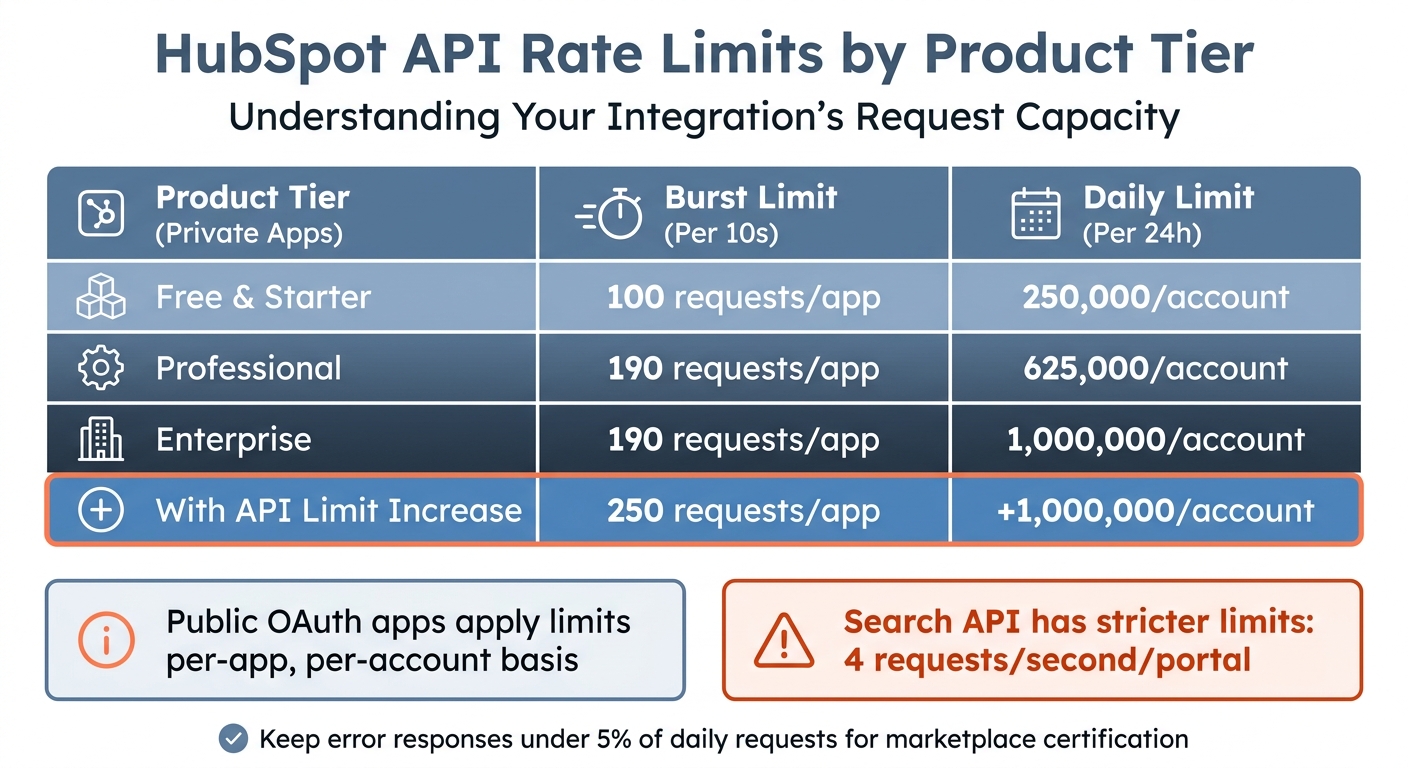
HubSpot API Rate Limits by Product Tier
Once your integration is up and running, keeping your API performance in check is key to maintaining reliability. Mismanaging rate limits can lead to failed syncs, delays, and a poor user experience. With the right strategies, you can avoid these pitfalls and ensure smooth operations.
Understanding HubSpot's API Rate Limits
HubSpot enforces two main types of rate limits: a burst limit of 100 requests per 10 seconds and a daily cap that depends on the account tier. For private apps, the daily cap ranges from 250,000 requests for Free and Starter accounts to 1,000,000 for Enterprise accounts. Public OAuth apps apply these limits on a per-app, per-account basis - so each portal installing your app gets its own independent 10-second bucket.
You can monitor your usage in real time by checking HTTP response headers like X-HubSpot-RateLimit-Remaining and X-HubSpot-RateLimit-Daily-Remaining. However, the Search API has stricter limits (4 requests per second per portal) and doesn’t return standard rate limit headers, so you’ll need to plan accordingly. Exceeding the limits repeatedly can result in temporary suspension or blacklisting of your integration. HubSpot’s Developer Documentation also advises keeping error responses under 5% of your total daily requests - this is especially important for marketplace apps aiming to maintain certification.
| Product Tier (Private Apps) | Burst Limit (Per 10s) | Daily Limit (Per 24h) |
|---|---|---|
| Free & Starter | 100 / app | 250,000 / account |
| Professional | 190 / app | 625,000 / account |
| Enterprise | 190 / app | 1,000,000 / account |
| With API Limit Increase | 250 / app | +1,000,000 / account |
Batching, Paging, and Filtering Requests
To reduce API calls, take advantage of batch endpoints. For example, HubSpot’s batch endpoint /crm/v3/objects/contacts/batch/read allows you to process up to 100 records in a single request. This can cut your API calls by as much as 90% compared to querying individual records, while also reducing average latency from 1,200ms to under 400ms.
When working with large datasets, use paging with the limit and after parameters. If you encounter 504 timeout errors, lower your limit from 100 to 50 or even 25. Additionally, use the properties query parameter to request only the fields you need - this can reduce data transfer size by nearly 60%. Implement delta synchronization by tracking updatedAt timestamps to fetch only modified records, cutting bandwidth usage by over 75%.
For real-time updates, replace frequent polling with webhooks. This switch can lower your request consumption by more than 95%. For instance, Carter McKay of PivIT Global reduced API requests from 2,627 to just 1 - a 98% improvement.
These methods set the stage for implementing robust queueing and throttling mechanisms.
Implementing Queueing and Throttling Mechanisms
To manage peak loads effectively, build on reduced API call strategies by incorporating queueing and throttling. When you receive a 429 error, use exponential backoff with jitter to stagger retries. For example, retry intervals could follow a pattern like 1s, 2s, 4s, and 8s. This approach can reduce repeated request failures by 60% to 80%. Always check the Retry-After header in 429 responses to determine the exact wait time.
For larger-scale integrations, consider a message queue architecture using tools like RabbitMQ or AWS SQS. Background workers can process messages at a controlled rate (e.g., 5 requests per second), keeping you within the burst limit. Such systems have shown up to 50% better throughput in environments with strict call limits. As Ruben Burdin, Founder of Stacksync, explains:
Implementing asynchronous queues or exponential backoff remains the best approach to avoid hitting those 429 responses.
Caching can also play a significant role. Use tools like Redis or Memcached for static data, such as property definitions. This can reduce API requests by up to 75%, with Redis serving data in under 1ms compared to 100ms or more for remote API calls. Finally, set up monitoring tools like Datadog or Prometheus to alert you when API usage reaches 80% or 90% of your daily quota. Organizations that adopt proactive monitoring have reported a 74% reduction in downtime.
Ensuring Data Quality and Sync Reliability
Even the best integration can become a problem if it syncs bad data. Poor data quality is a costly issue, with organizations losing an average of $12.9 million annually. In fact, 44% of companies estimate they lose over 10% of their yearly revenue because of poor-quality CRM data. The solution? Set clear standards from the start and validate all data before it reaches production.
Establishing Clean Data Structures
A well-designed integration depends on clean, reliable data. Start by creating a data standards document that defines property formats, naming conventions, and required fields. For example, you might specify that contact names use Title Case, phone numbers follow the E.164 format, and dates adhere to ISO 8601 timestamps (e.g., 2025-06-01T12:00:00Z) to avoid time zone confusion. This document becomes your guide to avoiding data decay as your integration grows.
To avoid duplicate sync loops in bidirectional setups, include a source identifier on every outbound write and maintain a cache of recent writes to suppress echo webhooks. Clearly define field ownership to avoid overwrites; for instance, HubSpot might control "lifecycle stage", while your external app manages "usage metrics." This clarity is especially critical when both systems are updating data simultaneously.
Make write operations idempotent, meaning they produce the same result even if applied multiple times. This way, accidental re-delivery doesn’t corrupt your data. Track key data quality metrics using a dashboard - aim for a duplicate rate under 2% and an email completion rate above 95%.
Testing and Validating Data Flows
Always test your data flows in a HubSpot sandbox environment before touching production. Many failures stem from unrealistic test data, so make sure your test sets include edge cases, special characters, and a variety of data types. Teams that combine unit tests (70%), integration tests (30%), and exploratory tests experience 40% fewer production bugs.
Before transferring large amounts of data, validate small subsets - 1–2% of records - to catch mapping errors early. Use JSON schema validation to ensure incoming and outgoing data structures match the expected formats. Incorporate automated regression testing into your CI/CD pipeline to detect defects early and reduce production issues.
To prevent unauthorized data injection, validate webhook signatures using the X-HubSpot-Signature header. Set performance benchmarks with a target response time of under 200ms for 95% of requests to ensure a smooth user experience.
Once testing is complete, ongoing monitoring becomes the backbone of maintaining data quality.
Monitoring and Maintenance
After building strong data structures and running thorough tests, continuous monitoring is key to maintaining sync reliability. Set up structured logging to capture timestamps, request/response payloads, and HTTP status codes. Surprisingly, 50% of teams fail to use logs effectively, which leads to longer resolution times. Regularly review integration logs to identify failures and expired tokens. Use HubSpot’s API usage endpoint to track call volume, error rates, and remaining quota in real time.
Automate alerts for when daily API request quotas hit 80% to avoid throttling. Keep your error rate under 0.5% - this is the standard for reliable integration systems. Since webhooks operate on "at-least-once" delivery, pair them with periodic reconciliation jobs to catch any missed updates. As Truto wisely points out:
Real-time is not the same as instant. Between CRM event delivery, your internal message queue, retries, and rate-limit backoff, "real-time" usually means seconds, sometimes minutes.
Schedule weekly sync log reviews and quarterly audits to evaluate configurations and dependencies. Monitor median response times for critical endpoints, keeping them below 250ms. However, the 99th percentile latency is a better indicator of user impact during peak loads.
Maintaining and Evolving Integrations Over Time
Building an integration is just the beginning. Keeping it functional and effective requires regular upkeep as HubSpot updates its features, APIs change, and business priorities shift.
Monitoring Integration Health
Once you've optimized API performance, the focus shifts to ongoing monitoring to maintain integration stability. Start by leveraging HubSpot's "API call usage" page (found under Development > Monitoring) to track real-time usage across all your apps. Keep an eye on headers like X-HubSpot-RateLimit-Daily-Remaining and X-HubSpot-RateLimit-Interval-Milliseconds to fine-tune request pacing and avoid hitting rate limits.
Set up automated alerts for anomalies, such as a sudden 50% increase in response times or a 20% spike in error rates. Make sure to log key details - like raw request and response data, timestamps, HTTP methods, and correlation IDs - to troubleshoot asynchronous calls and uncover hidden issues.
When errors do occur, use exponential backoff with jitter for handling 429 or 5xx errors. For example, retry with delays of 1 second, 2 seconds, then 4 seconds. If you're working in multi-server environments, tools like Redis can help with distributed caching for token management, preventing race conditions during token refreshes. As the HubSpot Developer Blog aptly puts it:
The gap between a working integration and a production-ready one usually comes down to how well you handle tokens.
Conducting Regular Security Audits
Security isn't something you address once and forget. It's a continuous process. Organizations that perform biannual security reviews report 40% fewer breaches compared to those that don’t. With 43% of data breaches tied to compromised API credentials - often undetected for an average of 18 days - routine audits become critical.
Rotate API keys and access tokens every 30 to 90 days. Review OAuth scopes quarterly to ensure compliance with the Principle of Least Privilege. Also, verify that your webhook handlers check HubSpot's HMAC SHA-256 signatures to block spoofing attempts.
Centralized logging tools like the ELK stack or Splunk can help you monitor API interactions, logging details such as timestamps, IP addresses, and response codes. Since 95% of security incidents are linked to inadequate event log monitoring, this step is essential. Always test security updates in a HubSpot sandbox environment before deploying to production.
| Audit Component | Recommended Frequency | Key Objective |
|---|---|---|
| API Permission Review | Quarterly | Remove unnecessary access and enforce least privilege |
| Key/Token Rotation | Every 30–90 Days | Reduce risks from leaked credentials |
| Log Analysis | Continuous/Real-time | Detect unauthorized access or unusual patterns |
| Code Review | Periodic/Per Release | Find vulnerabilities from poor coding practices |
| Third-Party Vetting | Ongoing | Ensure vendors comply with GDPR/CCPA |
Consistent audits not only enhance security but also prepare your integration for adapting to new business needs.
Partnering with Certified Experts for Complex Needs
As your integration demands become more advanced - like developing custom middleware, implementing predictive revenue models, or creating intricate cross-object reporting dashboards - partnering with experts can save time and reduce risks. Sophisticated integrations often require specialized skills in API architecture, data modeling, and RevOps workflows that might go beyond your internal team's expertise.
For example, Vestal Hub focuses on technical RevOps for B2B SaaS. They build custom HubSpot integrations, automate lifecycle processes, and create advanced reporting systems that grow with your business. Whether you're managing multiple platforms, designing custom CRM interfaces, or working on OpenAI-powered workflows, collaborating with certified professionals ensures your integrations remain secure, scalable, and aligned with best practices. This approach helps your integrations keep pace with both your business and HubSpot's evolving ecosystem.
Conclusion
Building a HubSpot API integration that stands the test of time takes more than just connecting systems - it demands a focus on security, reliability, and long-term stability. The difference between a simple connection and a robust, production-ready integration often hinges on how you approach authentication, manage rate limits, and prepare for unexpected challenges.
Start by planning thoroughly. Before writing any code, outline your data structures, define clear business goals, and familiarize yourself with HubSpot's rate limits. It’s worth noting that over 60% of integration projects face delays or disruptions because of poor documentation or overlooked rate constraints. These setbacks are avoidable with the right preparation.
Next, prioritize security and performance. If you haven’t already switched to OAuth 2.0 or Private App tokens, now is the time - legacy API keys are deprecated and can expose your data to unnecessary risks. In fact, organizations using token-based authentication report 40% fewer breaches tied to credential leaks. To optimize API usage, batch requests (up to 100 records per call), apply exponential backoff for error handling, and use webhooks instead of relying on constant polling.
Finally, don’t underestimate the importance of ongoing maintenance. Reliable integrations require consistent care. Issues like poor error handling and missed token refresh cycles are responsible for 30% of integration failures and downtime. Regular monitoring, audits, and testing in a sandbox environment ensure your integration remains effective as both your business and HubSpot evolve.
FAQs
How do I choose between webhooks and scheduled syncs?
When deciding between webhooks and scheduled syncs for HubSpot API integrations, consider how quickly you need updates.
- Webhooks are perfect for real-time updates. They trigger workflows or alerts instantly whenever data changes, making them ideal for time-sensitive tasks. Plus, they’re event-driven, which means they help cut down on API usage.
- Scheduled syncs, on the other hand, work better for less urgent needs. These refresh data at set intervals, like hourly or daily, and are a simpler choice for handling large datasets or tasks that don’t require immediate updates.
The best option depends on whether you prioritize speed or stability in your integration.
What’s the safest way to store and rotate HubSpot OAuth tokens?
Storing tokens securely is crucial to protecting sensitive information. The best practice is to use secure, encrypted environments for storage, such as encrypted databases or secret management tools. Avoid keeping tokens in static code or unprotected locations, as this increases the risk of exposure.
To maintain security, automate token refresh processes before they expire, regularly check their validity, and ensure your system can handle errors without compromising data. Additionally, leveraging OAuth v3 endpoints enhances security by minimizing the exposure of sensitive data during requests.
How can I prevent duplicates and sync loops in a bidirectional sync?
To prevent duplicates and sync loops during a bidirectional HubSpot sync, you can rely on strategies like:
- Webhook filtering: This helps you ignore updates triggered by your own system, avoiding unnecessary processing.
- Delta sync: Focus only on recent changes, reducing the workload and improving efficiency.
- Conflict resolution: Establish clear rules to handle data discrepancies effectively.
- Loop prevention logic: Tag updates originating from your system to ensure they aren’t reprocessed.
By using these methods together, you can create a more seamless integration and steer clear of endless sync issues.