
Get insights like this delivered to your inbox
Join 2,500+ GTM professionals. No spam, unsubscribe anytime.
Subscribe to NewsletterWant to track how marketing drives revenue? HubSpot's tools make it easier to connect the dots between your campaigns and sales outcomes. Here's how you can build effective revenue attribution models in just five steps:
- Understand Your Sales Cycle: Map out your sales process and key customer interactions to identify what drives conversions.
- Pick an Attribution Model: Choose from single-touch or multi-touch models like Linear, U-Shaped, or Full Path based on your sales cycle length.
- Clean Your CRM Data: Ensure accurate data by fixing missing deal amounts, resolving duplicates, and standardizing inputs.
- Set Up Attribution Reports: Use HubSpot’s reporting tools to distribute credit across touchpoints tied to revenue.
- Use Insights to Improve: Analyze reports to refine your marketing strategy and budget allocation.
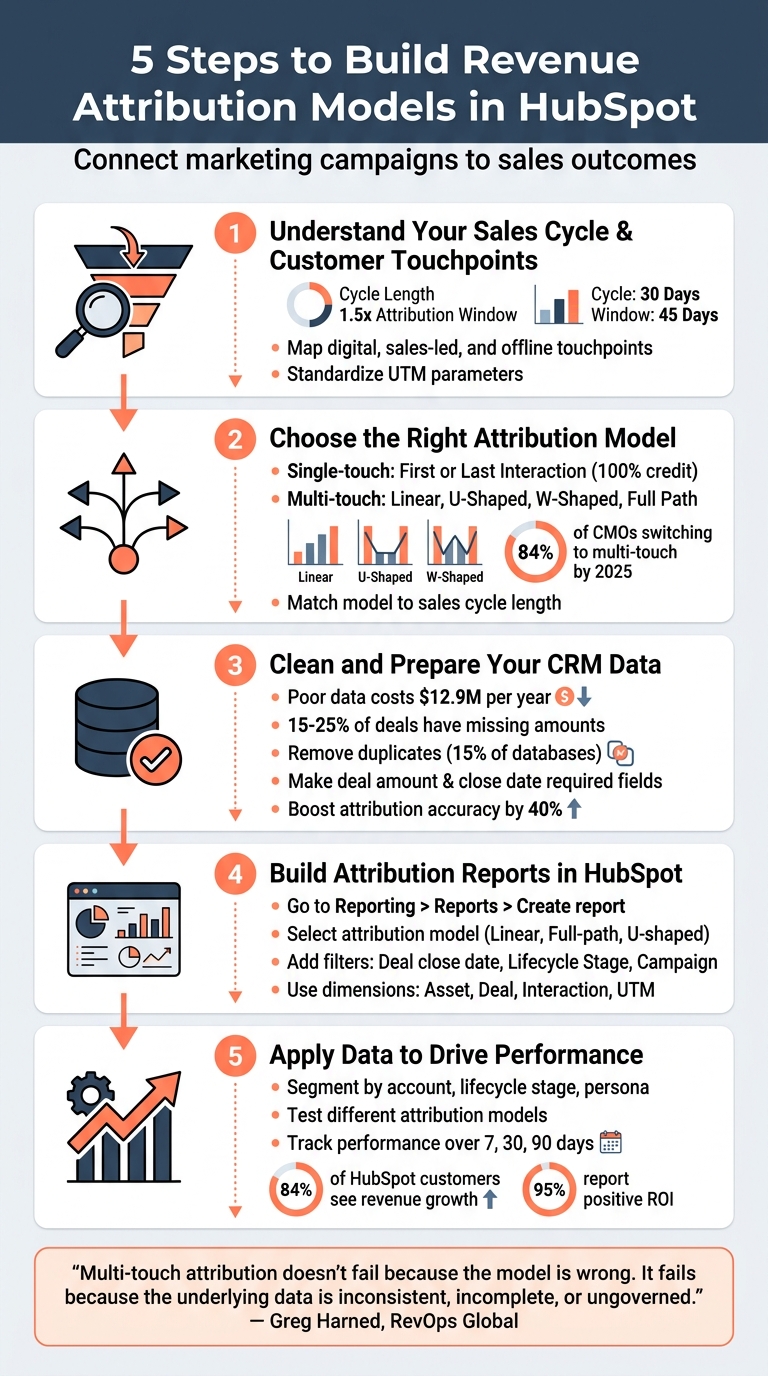
5-Step Process to Build Revenue Attribution Models in HubSpot
How To Create Attribution Reports In HubSpot (Tutorial 2025)
sbb-itb-69c96d1
Step 1: Review Your Sales Cycle and Customer Touchpoints
Before selecting an attribution model, you need a clear picture of your sales cycle and the interactions that genuinely drive conversions. As the saying goes, "Attribution is only as good as the data you track". Start by digging into your sales process and understanding your customers' behavior.
Calculate Sales Cycle Length
Use tools like HubSpot Sales Hub to measure how long it takes to close deals and analyze the duration of each sales stage. Determine the average time from the first interaction to a closed-won deal. Then, break this data down by lead source, deal size, and sales rep to uncover which channels lead to faster conversions. Spot bottlenecks, and set your attribution window to 1.5 times the average cycle length. For example, if your sales cycle averages six months, set your window to nine months.
"Using default 30-60 day windows when your sales cycle spans 9 months undercredits early-stage marketing touchpoints. Set attribution windows to 1.5x your average sales cycle length." – Understory
Once you've done this, map out every touchpoint that influences your customer's journey.
Identify Key Customer Touchpoints
Create a list of all interactions prospects have with your business. For digital marketing, this includes ad clicks (from platforms like Google, LinkedIn, or Meta), visits to high-intent pages (like pricing or case studies), form submissions, and CTA clicks. Sales-led interactions might include connected calls, meetings, product demos, and personalized email exchanges. Don’t forget nurture activities, such as automated workflows, email campaigns, and webinars. High-intent actions like "Demo Requested" or "Pricing Page View" often signal a shift from awareness to consideration.
Offline interactions - like trade show scans, in-person meetings, or phone calls - should also be tracked. You can log these manually or sync them using tools like the HubSpot Custom Behavioral Events API. To ensure accurate data, standardize UTM parameters across campaigns.
Determine Your Attribution Needs
Choose an attribution model that aligns with your sales cycle. For shorter cycles (3–6 months), a U-shaped model is ideal, as it emphasizes lead generation and awareness. Longer cycles (6–9 months) benefit from a W-shaped model, which gives credit to three key milestones: first touch, lead creation, and deal creation. For sales cycles lasting 9–12 months or more, full-path attribution provides a more complete view of the buyer journey.
| Sales Cycle Length | Recommended Attribution Model | Primary Focus |
|---|---|---|
| Fast Cycle (B2B) | W-Shaped | High-influence points (Contact/Deal Create/Won) |
| 3–6 Months | U-Shaped | Top-of-funnel and lead conversion |
| 6–9 Months | W-Shaped | First touch, lead creation, and deal creation |
| 9–12+ Months | Full-Path | Holistic view of the entire buyer journey |
| Long / B2B SaaS | Linear | Holistic view across all nurturing touchpoints |
For sales cycles with many dormant contacts, consider a time decay model, which gives more credit to recent interactions - especially useful for upselling or cross-selling. Keep in mind that tracking revenue attribution often requires a Marketing Hub Enterprise subscription, as Marketing Hub Professional focuses on "Contact Create" attribution.
Step 2: Select Your Attribution Model
Once you've outlined your sales cycle and touchpoints, the next step is choosing the right attribution model. This decision determines how credit for revenue is distributed across your marketing and sales activities. HubSpot offers three types of attribution reports: Contact Create (top-of-funnel), Deal Create (middle-funnel), and Revenue Attribution (bottom-of-funnel).
When it comes to attribution models, you can choose between single-touch and multi-touch approaches. Single-touch models like First Interaction and Last Interaction assign all credit to one point in the customer journey. On the other hand, multi-touch models - such as Linear, U-Shaped, W-Shaped, Full Path, and Time Decay - spread credit across multiple interactions. In fact, 84% of CMOs are expected to switch to multi-touch attribution by 2025.
"Multi-touch attribution is unique because it takes all touchpoints into consideration and then assigns credit to each of those touchpoints based on the amount of influence it had." – Kristen Baker, HubSpot
Key Considerations for Attribution Models
Before diving into the various models, keep a few things in mind:
- HubSpot Access Levels: Contact Create Attribution is available with Marketing Hub Professional and Enterprise, while Deal Create and Revenue Attribution require Marketing Hub Enterprise.
- Sampling for Large Operations: If a deal is tied to more than 100,000 interactions, HubSpot uses sampling to maintain performance.
Attribution Model Options
Here’s a breakdown of the main attribution models and how they distribute credit:
- First Interaction: Assigns 100% of the credit to the first touchpoint.
- Last Interaction: Credits the final touchpoint before conversion.
- Linear: Spreads credit equally across all touchpoints, providing a balanced view.
- Time Decay: Gives more weight to recent interactions, with a 7-day half-life in HubSpot. For example, an interaction 8 days before conversion gets half the credit of one occurring 1 day before.
- U-Shaped: Focuses on the first touch and lead creation, while also accounting for middle interactions.
- W-Shaped: Highlights three key milestones - first touch, lead creation, and deal creation - making it ideal for shorter sales cycles.
- Full Path: Distributes credit across four milestones (first touch, lead creation, deal creation, and last touch) while also factoring in middle interactions.
- J-Shaped and Inverse J-Shaped: These less common models allocate credit differently, such as emphasizing either the first or final touchpoint.
"No single model captures every dimension of a B2B deal: different models answer different questions and are best used in combination." – Phil Stott, Hypha
Comparing Attribution Models
The table below highlights how these models distribute credit, their ideal sales cycles, and their primary use cases:
| Attribution Model | Credit Distribution | Best Sales Cycle | Primary Use Case |
|---|---|---|---|
| First Interaction | 100% to the first touchpoint | Less than 30 days | Brand awareness and early-stage discovery |
| Last Interaction | 100% to the final touchpoint | Less than 30 days | Pinpointing high-intent conversion channels |
| Linear | Equal credit to all touchpoints | 30–90 days | Gaining a comprehensive view of nurturing-heavy processes |
| Time Decay | Weighted toward recent touchpoints | 3–6 months | Re-engagement campaigns or upselling |
| U-Shaped | 40% to first touch, 40% to lead creation, 20% to middle | 3–12 months | Focused on lead generation and nurturing |
| W-Shaped | 30% each to first touch, lead creation, and deal creation; 10% to middle | 6–18 months | Tracking pipeline and opportunity creation |
| Full Path | 22.5% to four main milestones, 10% to middle | 6–18 months | Revenue tracking across the entire sales journey |
Getting Started
To avoid losing revenue credit, ensure your HubSpot settings have "Auto-associate Contacts to Deals" turned on. If you're still refining your CRM data, start with simpler models like Linear or U-Shaped. Once your data becomes more robust, you can explore advanced models. HubSpot's "Compare Model" feature is a great tool to visualize how credit shifts across channels based on the model you apply.
Step 3: Clean and Prepare Your CRM Data
Now that you've chosen your attribution model, it’s time to focus on your CRM data. Clean, accurate data is the backbone of reliable reporting. Poor data quality is no small issue - it costs organizations an average of $12.9 million per year. When it comes to revenue attribution, even minor data gaps can throw off your ROI calculations. For instance, 15% to 25% of open deals in many HubSpot portals have missing or $0 amounts, which skews forecasts and revenue projections.
Check Data Accuracy
Start by auditing your deal amounts and close dates. Run a pipeline report to identify deals with missing or $0 amounts. To avoid this issue in the future, go to Settings > Objects > Deals > Pipelines and make "Deal amount" and "Close date" required fields using the "Edit properties" feature. This simple adjustment can improve forecast accuracy by 20% to 30%.
"The reports look clean. The dashboards are polished. But the data feeding them is full of holes, inconsistencies, and outright fiction. And HubSpot won't tell you - it just reports what it has." – Ricardo Martinez, CRM by RSM
Another key step is resolving duplicate records. Duplicates often make up 15% of a database, inflating contact counts and fragmenting activity history, which leads to incomplete attribution. Use HubSpot’s deduplication tool or third-party apps like Insycle or Dedupely to merge records with matching emails. To stay ahead of this, schedule monthly audits to identify and clean up "stale" records, such as contacts inactive for over 90 days. You can either requalify these contacts or remove them from active lists.
Once your data is accurate, move on to confirming record associations.
Confirm Record Associations
For revenue attribution reports to work, every deal must be tied to at least one contact. This is because the report relies on tracking the interactions of those contacts. Activate the "Auto-associate Contacts to Deals" feature to ensure these links are maintained. Additionally, sales activities - like calls, meetings, and emails - must be linked to both contact and deal records to be included in attribution calculations.
Pay special attention to contacts labeled with "Offline Sources" or "Direct Traffic" as their original source. In many HubSpot portals, 25% to 40% of contacts fall into these categories, creating attribution gaps where the original source is unknown. These gaps often result from missing UTM parameters or integrations that don’t pass source data. Use HubSpot’s tracking URL builder to standardize utm_source, utm_medium, and utm_campaign naming conventions.
Set Data Entry Standards
Accurate data entry is critical for clear revenue attribution. Establish clear guidelines for updating lifecycle stages and managing deal properties. Sales and marketing teams should collaborate to define lifecycle stages like MQL and SQL to avoid "lifecycle stage chaos", where inconsistent updates throw workflows into disarray. To maintain consistency, centralize lifecycle stage updates within a single workflow.
Reduce the use of open-text fields wherever possible. Instead, opt for dropdowns, checkboxes, or radio buttons to standardize data entry and minimize formatting errors. Adding help text to key properties can guide users toward correct inputs. Assign a dedicated data steward to oversee data quality and document rules for naming conventions and lifecycle stages. Keeping your data clean can boost marketing attribution accuracy by 40%.
| Data Issue | Impact on Attribution | Recommended Fix |
|---|---|---|
| Missing Deal Amounts | Understated pipeline and incorrect ROI | Make "Amount" a required field at the Proposal stage |
| Duplicate Contacts | Inflated conversion rates and split activity history | Use HubSpot's deduplication tool or Insycle |
| Incorrect Close Dates | Revenue attributed to the wrong month/quarter | Use "Deal Stage Conditions" to verify dates before closing |
| Unlinked Records | Marketing efforts not connected to revenue | Enforce contact/company associations on all deals |
Step 4: Set Up Attribution Reports in HubSpot
Now that your data is cleaned and organized, it’s time to transform it into actionable revenue insights by setting up attribution reports.
Build an Attribution Report
To get started, go to Reporting > Reports > Create report in HubSpot, and select Attribution report from the left sidebar. You’ll have three options: use a pre-built template by searching for “Attribution,” create a custom report by selecting your data source (like Revenue), or use Breeze AI by entering a clear prompt.
For your reports to work properly, ensure each deal meets these conditions: it’s marked as Closed-won, linked to a contact, and includes values for Amount, Create date, and Close date. If any of these are missing, the deal won’t appear in your revenue attribution reports. When setting up the report, choose an attribution model to define how credit is distributed. Options include Linear, Full-path, or U-shaped models. For example, the Full-path model is great for analyzing marketing and sales collaboration, as it assigns 22.5% of the credit to each key stage: first interaction, lead creation, deal creation, and last interaction.
Once your model is selected, fine-tune the report by applying filters and dimensions to zero in on the insights you need.
Add Report Filters and Dimensions
Dimensions decide how your data is structured. HubSpot provides four main categories:
- Asset (e.g., title, type)
- Deal (e.g., close date, owner, pipeline, type)
- Interaction (e.g., source, type, position)
- UTM parameters (e.g., campaign, medium, source)
Your attribution model will influence which dimensions to emphasize. For first-touch models, prioritize Interaction Source and Asset Type to understand how leads initially find your brand. Last-touch models, on the other hand, benefit from focusing on Deal Dimensions and bottom-funnel Interaction Types. If you’re working with multi-touch models like U-shaped, W-shaped, or Full-path, highlight Interaction Position to see how credit is distributed throughout the customer journey.
Filters are equally important. Use the Filters tab to set a Deal close date range, so your report only includes revenue from deals won within a specific timeframe. To track how contacts progress through the funnel (e.g., from MQL to SQL or Customer), add Lifecycle Stage filters. For campaign ROI analysis, focus on Campaign and UTM dimensions. If you want to separate acquisition efforts from expansion efforts, use the Deal Type filter to differentiate between "New Business" and "Existing Business".
Prioritize Revenue Metrics
Make revenue your primary metric to ensure your insights directly tie back to financial outcomes rather than vanity metrics. For accurate attribution, confirm that sales activities and marketing emails are properly linked to contact and deal records. Keep in mind that only marketing emails sent to a contact’s primary email address are attributed, and one-to-one sales emails are tracked only if they receive a reply.
In Settings > Tracking & Analytics > Attribution, enable all relevant interaction types, such as "Media plays" or "Marketing event", as some may be disabled by default. For websites not hosted on HubSpot, developers should add a setContentType code snippet to pages. This ensures they’re categorized correctly in reports rather than appearing as “Pages without asset type”. Once everything is set, save your report to your dashboard or export it for further use.
Step 5: Use Attribution Data to Improve Performance
Attribution reports only make a difference when you use them to make smarter marketing and revenue decisions.
Break Down Reports by Segment
Segmenting your attribution reports can uncover patterns you might otherwise miss. For B2B companies, account-based attribution is especially useful. By consolidating multiple contact interactions into a single company record, you can see how marketing impacts high-value accounts as a whole, rather than focusing on individual leads.
You can also filter by lifecycle stage to figure out which marketing or sales activities are most effective at moving prospects through the funnel. For instance, try running a "Deal revenue by landing page" report and filter it by persona. This can help you identify content assets that consistently play a role in the journeys of your most profitable customers. With this level of detail, you can double down on what works and cut what doesn’t.
Test Different Attribution Models
Experimenting with different attribution models can offer valuable insights. HubSpot’s "Compare model" feature lets you see how revenue credit shifts across channels when switching between models like First-Touch (initial awareness) and Last-Touch (final conversion). This side-by-side view helps you understand which channels are driving early interest and which are closing deals.
Multi-touch models, like Full-Path, tell the entire story by crediting every stage of the buyer’s journey. Industry data shows that 84% of CMOs plan to adopt multi-touch attribution by 2025 to better reflect the complexity of B2B buying journeys. Testing these models allows you to fine-tune your budget allocation based on your goals - whether it's building brand awareness, generating leads, or speeding up deal closures. These insights also help you keep track of which channels are consistently performing well.
Track Performance Over Time
Tracking performance over time is key to spotting trends and optimizing your efforts. Set baseline metrics and monitor changes over 7, 30, or 90 days to uncover seasonal patterns and identify the best-performing channels during specific times of the year. For example, tracking "Deal Velocity by Source" can show you which marketing channels or touchpoints are helping to speed up your sales cycle.
According to data, 84% of HubSpot customers see revenue growth, and 95% report positive ROI with multi-touch attribution. To ensure your data remains accurate, conduct monthly audits. Look for issues like offline touchpoints, duplicate contacts, or disconnected ad accounts, as these can distort your results. Also, make sure your UTM parameters are consistent. Regular monitoring turns attribution from a static report into an ongoing tool for driving revenue growth.
Using these detailed attribution insights ensures every marketing dollar is working toward growing your revenue effectively.
Conclusion
Creating revenue attribution models in HubSpot involves five key steps: understanding your sales cycle and customer interactions, selecting the best attribution model, ensuring your CRM data is clean, setting up attribution reports, and turning those insights into actionable decisions. These steps are interconnected, and skipping any of them can weaken your overall approach.
At the heart of this process lies one critical factor: dependable data. As Greg Harned, Founder & CEO of RevOps Global, explains: "Multi-touch attribution doesn't fail because the model is wrong. It fails because the underlying data is inconsistent, incomplete, or ungoverned". Without standardized UTM parameters, accurate contact-to-deal links, and regular data audits, your reports may end up with inflated numbers that decision-makers won’t trust.
Selecting the right attribution model is another essential piece. First-touch models highlight which channels generate awareness, while multi-touch models - like W-Shaped and Full Path - reflect the complexity of B2B buying journeys. But choosing a model is just the start; the real value comes from applying those insights to guide impactful decisions.
FAQs
What HubSpot subscription do I need for revenue attribution?
To access revenue attribution in HubSpot, you'll need a subscription to Marketing Hub Enterprise. This plan includes tools for linking your marketing activities to revenue and offers various attribution models, which are crucial for precise analytics and forecasting.
How do I choose the right attribution window for my sales cycle?
To pick the best attribution window, think about how long your sales cycle typically lasts and the time frame during which marketing efforts impact conversions. If your sales cycle is brief - just a few days to a week - a shorter attribution window works well. On the other hand, if your sales cycle stretches over several months, you'll need a longer window to account for all the key interactions.
Take a close look at your historical data to understand patterns, and experiment with different attribution windows to see which one aligns best with your sales process. This approach ensures you're capturing the full impact of your marketing efforts.
Why aren’t some closed-won deals showing in my attribution report?
Closed-won deals might not show up in your attribution report if HubSpot’s models can't assign credit because of missing or incorrectly tracked touchpoints. Additionally, deals that lack connections to relevant interactions or are closed outside the tracking window might be left out. To improve accuracy, make sure all interactions are properly tracked and tied to deals, and double-check that the required data was captured throughout the process.