
Get insights like this delivered to your inbox
Join 2,500+ GTM professionals. No spam, unsubscribe anytime.
Subscribe to NewsletterReal-time data syncing ensures updates between systems happen almost instantly, eliminating delays caused by traditional batch processes. For SaaS companies, this means sales teams can act on the latest CRM data, improving efficiency and reducing missed opportunities. Poor data quality costs companies millions annually, so implementing real-time syncing with HubSpot RevOps support can have a direct impact on revenue.
Key Takeaways:
- Why It Matters: Outdated CRM data can cost businesses over 10% of their annual revenue.
- Steps to Prepare: Deduplicate and standardize data, define field ownership, and establish a single source of truth.
- Syncing Methods: Use webhooks for CRM events, WebSockets for bidirectional updates, or Change Data Capture (CDC) for database-level efficiency.
- Conflict Resolution: Use strategies like Last-Write-Wins, field-level merging, or advanced tools like CRDTs to prevent data loss.
- Security Practices: Validate webhook signatures, use OAuth 2.0, and encrypt data to protect sensitive information.
Real-time syncing isn’t just about speed - it’s about accuracy, reliability, and ensuring your teams always work with the most current data. By following these practices, SaaS companies can streamline operations and improve customer experiences. To discuss your specific architecture, you can book a technical call.
Introduction to Stacksync | Effortless Real-Time Data Sync and Workflow Automation
sbb-itb-69c96d1
What to Consider Before Implementing Real-Time Data Syncing
Before jumping into real-time syncing, you need to decide which system takes priority when data conflicts arise. For example, if a contact's phone number differs between HubSpot and Salesforce, which one is correct? Without resolving questions like this upfront, syncing can worsen existing data problems instead of fixing them.
Preparation is key. Start by conducting a full deduplication and standardization audit in both systems. This involves cleaning up duplicate contacts, ensuring picklist values are consistent (e.g., aligning "USA" with "United States"), and standardizing data formats in both tools. If you skip this step, any existing data issues will simply spread across systems.
Another critical step is defining field-level ownership. For instance, HubSpot might manage "Lifecycle Stage", while your SaaS app controls "Product Usage Metrics". Create a simple matrix to document which system owns what. This avoids issues like "vampire records", where systems endlessly overwrite each other.
"The core objective is to establish a single source of truth. If a contact's phone number differs between HubSpot and Salesforce, which system prevails? The audit forces you to answer these questions and establish data governance rules before the sync introduces automated conflicts." – MarTech Do
Lastly, ensure your teams agree on business definitions before mapping any fields. Marketing and sales must align on what constitutes an MQL, SQL, and Opportunity Stage. Use "gatekeeper" lists (e.g., Lifecycle Stage = MQL) to ensure only sales-ready leads move between systems. This prevents unnecessary clutter in your CRM. Poor data quality can be costly - companies lose an average of $12.9 million annually due to bad data, with 44% reporting revenue losses exceeding 10%.
Establishing a Source of Truth
A source of truth is the one system that holds the definitive, up-to-date version of each data type. Decide which system owns each type of data.
For many B2B SaaS companies, HubSpot often serves as the source of truth for marketing leads, contact engagement, and lifecycle stages. Meanwhile, your product database might manage usage metrics and in-app behavior, and your billing system might handle subscription and payment data. The key is to document and enforce these boundaries through sync rules.
A common default rule is "Prefer HubSpot Unless Blank." This approach treats HubSpot as the master record while allowing other systems to fill in gaps. For example, if HubSpot has a contact's email and Salesforce has their job title, both values are retained without overwriting each other.
Only sync fields that are essential to your workflows. Every additional field increases complexity, API usage, and the risk of conflicts. As Adam Statti from RevPartners advises:
"If it's not supporting your GTM process, don't sync it. Junk fields = junk data".
Focus on mapping fields that are critical for cross-functional workflows or reporting.
One technical safeguard to implement is origin tagging. Add a source identifier (like _sync_source) to every outbound write. When an inbound webhook arrives, check this tag. If the change originated from your own system, ignore it. This prevents infinite update loops between systems.
With conflict rules and ownership sorted out, the next step is to map your data flows in detail.
Mapping Data Flows and Sync Requirements
Once you've defined your master data, document the exact paths each data element follows. This mapping process forms the backbone of a reliable real-time sync strategy.
Start by identifying sync directionality for each workflow. One-way syncs are ideal for consolidating reporting or migrating data, while two-way syncs are necessary when both systems actively update the same records. For instance, sales reps might update contact details in HubSpot while your product tracks usage metrics. Most companies use a mix of both.
You'll also need to address schema differences between platforms. HubSpot uses a nested properties object for custom fields, while Salesforce relies on flat PascalCase fields. To ensure smooth syncing, add transformation rules to normalize data formats. For example, HubSpot's properties.email might need to map to Salesforce's Email__c.
Don't overlook HubSpot's API rate limits during planning. Public OAuth apps are limited to 110 requests every 10 seconds, while private apps on Pro or Enterprise tiers get up to 190 requests per 10 seconds, with daily limits ranging from 650,000 to 1 million. If you're syncing large datasets, use batch endpoints - HubSpot allows up to 100 records per call, which helps reduce API consumption.
Finally, create a live integration map that documents workflows, field mappings, API endpoints, authentication methods, and error-handling procedures. This becomes an essential reference as your tech stack grows. With companies managing an average of 130 SaaS tools, clear documentation isn't just helpful - it’s essential.
| Pre-Integration Task | Objective | Outcome |
|---|---|---|
| Data Governance | Define "source of truth" for core objects | Prevents data overwrites and confusion |
| Deduplication | Run audit for contacts/companies | Prevents reporting chaos and duplicate outreach |
| Standardization | Match picklist values (e.g., 'USA' vs 'United States') | Prevents sync errors and broken workflows |
| Lifecycle Alignment | Document MQL/SQL criteria with stakeholder sign-off | Creates a clear, agreed-upon handoff process |
Real-Time Data Syncing Strategies for SaaS
Once you've outlined your data flows, the next step is selecting a syncing method that works best for your needs with expert technical consulting. The most popular options include WebSockets for two-way updates, Change Data Capture (CDC) for syncing at the database level, and event-driven architectures using webhooks. Each method caters to specific scenarios, so it's important to match the approach to your workflow.
For example, WebSockets are perfect for instant UI updates when users are actively engaged in your app. CDC works well for handling large volumes of database changes efficiently. Meanwhile, webhooks are ideal for triggering actions based on CRM events. Let’s break these strategies down further.
Using WebSockets for Bidirectional HubSpot Updates
WebSockets enable a persistent, two-way connection between your SaaS app and the user's browser. This allows data to flow seamlessly in both directions without relying on repeated HTTP requests. It’s particularly useful when multiple users collaborate on the same records or when you need HubSpot updates to reflect in your app’s UI instantly.
To set up WebSockets, start with an HTTP Upgrade to establish the connection. Use short-lived tokens or an initial credential message for authentication. Keep the connection alive by sending ping/pong messages every 30 seconds, which helps detect and close inactive connections that firewalls or load balancers might have silently dropped.
For updates coming from HubSpot, configure HubSpot Webhooks to monitor events like contact.propertyChange. Make sure your webhook receiver validates the X-HubSpot-Signature-V3 header, acknowledges the request within 5 seconds, and queues the payload for processing. When your app sends updates via WebSocket, use HubSpot’s batch endpoints (up to 100 records per call) to stay within the API burst limits of 190 requests per 10 seconds for private apps.
Change Data Capture (CDC) for Database Syncs
CDC tracks INSERT, UPDATE, and DELETE actions directly from your database’s transaction log, making it a highly efficient alternative to traditional batch jobs. By reading changes from the Write-Ahead Log (WAL) instead of performing table scans, CDC minimizes the load on your primary database.
This method is ideal for syncing large amounts of data in real time. For instance, in 2025, AstraZeneca transitioned from batch processing to CDC, reducing their webinar-to-CRM sync time from three weeks to instantaneous. This allowed their sales team to engage with warm leads immediately.
When syncing with HubSpot, use batch upsert endpoints (up to 100 records per call) to avoid hitting API rate limits. Design your operations to be idempotent - for example, using SQL’s ON CONFLICT DO UPDATE - to handle duplicate events during retries without corrupting data. Regularly monitor replication lag using tools like pg_stat_replication to ensure your sync process remains up to date.
As Donal Tobin from Integrate.io puts it:
"Implementing CDC isn't just about moving data - it's about building trust in the freshness and accuracy of that data".
Event-Driven Architectures with HubSpot Webhooks
Event-driven systems rely on HubSpot Webhooks to notify your app whenever specific CRM events occur, such as creating a contact or changing a deal stage. This "push" approach is much more efficient than API polling and provides near real-time updates.
When processing webhooks, return a 200 OK response immediately and offload the actual work to a background job. To prevent duplicate processing, validate the X-HubSpot-Signature-v3 using HMAC SHA-256 and use unique event identifiers. Since HubSpot doesn’t guarantee the order of delivery, rely on the occurredAt timestamp to ensure updates are processed in the correct sequence and to avoid overwriting newer data with older records.
HubSpot sends webhooks in batches of up to 100 events per POST request. Your receiver should iterate through the JSON array and handle each event individually. To avoid infinite sync loops, check the changeSource field and ignore events where the source is INTEGRATION or API. For critical syncs, consider using the Webhooks Journal API (v4), which lets you retrieve a chronological, 3-day history of events to reconcile any missed updates.
Each of these strategies offers distinct advantages, depending on your SaaS platform's requirements and the type of data synchronization you need.
Handling Data Conflicts in Real-Time Syncing
When two systems update the same record at the same time, you need a solid plan to decide which change takes precedence. These concurrent updates are common, especially when multiple users edit a record or when real-time system updates clash. Without a clear resolution strategy, you risk losing data or creating repetitive conflicts, which can lead to data corruption and costly mistakes.
Let’s explore practical strategies for resolving these conflicts, starting with Last-Write-Wins and moving toward more advanced methods.
Last-Write-Wins and Other Resolution Methods
There are several approaches to managing data conflicts, each suited to different use cases and system architectures.
Last-Write-Wins (LWW) is one of the simplest methods: the update with the most recent timestamp overwrites all others. This approach works well for straightforward cases, like updating user settings or status flags. However, it has a critical downside - if different fields in the same record are updated at the same time, valid changes can be overwritten. For instance, if one user updates a phone number at 2:15:03 PM and another updates an email address at 2:15:04 PM, LWW might discard the earlier phone number update entirely.
To mitigate this, you can adopt field-level merging, where timestamps are tracked for each individual field instead of the entire record. This ensures updates to separate fields are preserved. If two updates have identical timestamps, a secondary identifier like a nodeId or userId can act as a tie-breaker to produce consistent results. For distributed systems, you can replace physical clocks with Hybrid Logical Clocks (HLC), which combine wall-clock time with a logical counter to maintain strict ordering even when clocks drift [26,28].
For more complex scenarios, consider advanced techniques like Operational Transformation (OT) or Conflict-free Replicated Data Types (CRDTs). OT relies on a central server to reconcile changes while preserving user intent, though it can be challenging to implement. For example, the Google Wave project required 100,000 lines of code just for OT. CRDTs, on the other hand, use specialized data structures that automatically merge changes without needing a central server. Tools like Figma and Notion use CRDTs to handle real-time collaboration effectively [26,28]. As Abhishek Sharma, Head of Engineering at Fordel Studios, explains:
"CRDTs are not 'better' than OT - they are distributed-first. If your architecture is centralized, OT may be simpler. If you need offline-first or peer-to-peer, CRDTs are the only viable path."
To further strengthen conflict resolution, you can use origin tagging and idempotency keys. For example, stamp outgoing updates with a source identifier and check incoming updates to ignore those originating from the same source. This prevents infinite loops and duplicate processing [2,29]. HubSpot’s eventId is a great example - it ensures duplicate webhook deliveries aren’t processed multiple times [4,27]. Additionally, Redis locks (using the SET command with the NX flag) can prevent concurrent updates from clashing during bulk operations [4,27].
Real-Time vs Batch Sync Models: Choosing the Right Approach
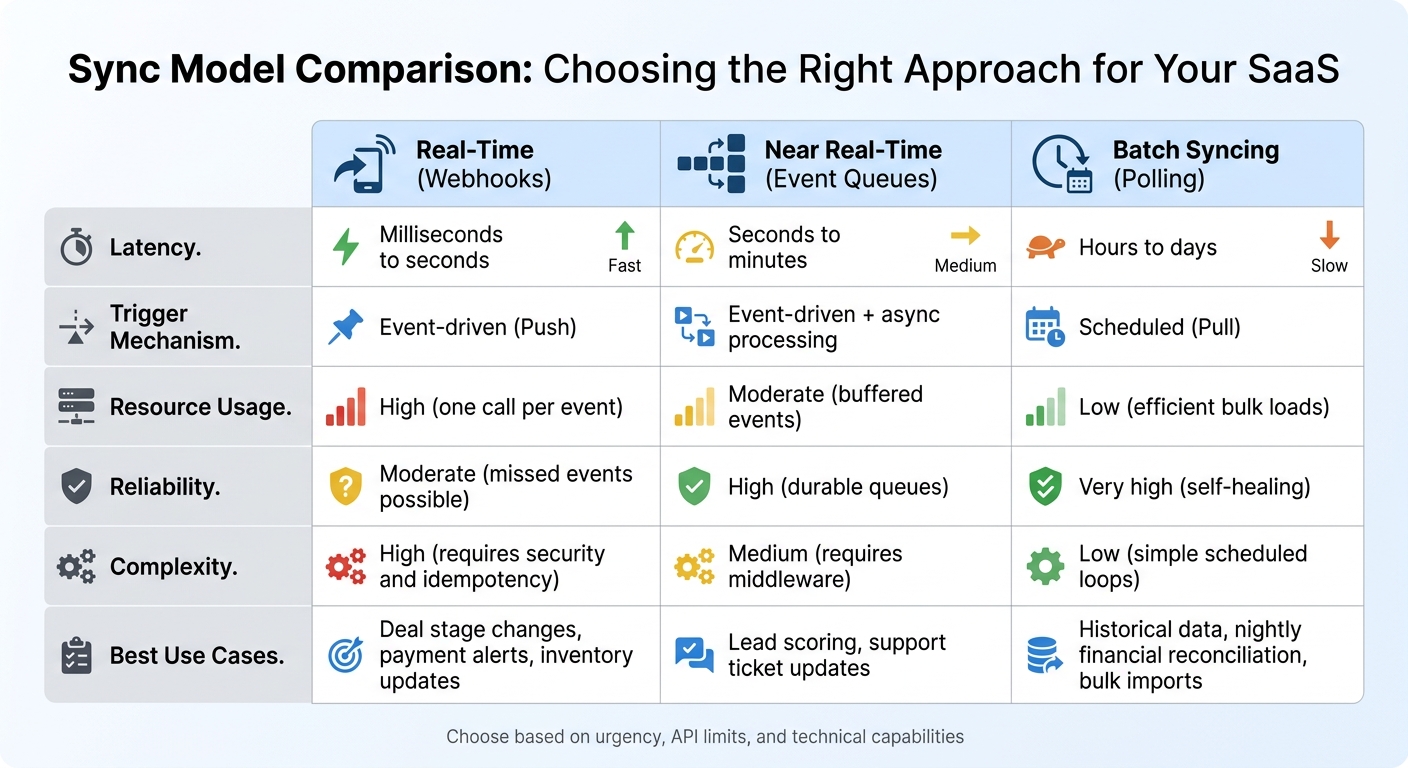
Real-Time vs Batch Data Syncing: Feature Comparison for SaaS
Choosing between real-time and batch syncing isn’t about finding the "better" option - it’s about aligning the sync model with your business needs. Real-time syncing updates data in milliseconds to seconds, making it ideal for time-sensitive tasks like closing deals or adjusting inventory. On the other hand, batch syncing processes data on a set schedule, such as hourly or nightly. This approach works well for large data transfers or historical updates but introduces noticeable delays.
Many enterprise SaaS companies opt for a hybrid approach. Critical data - like deals and leads - is synced in real time, while high-volume or less urgent data, such as invoices or historical logs, is handled in batches. This strategy strikes a balance between speed and efficiency. As Artemii Karkusha, Integration Architect, explains:
"Reliability beats latency in every integration I've ever shipped. Use webhooks for speed, polling for safety, and the hybrid pattern when you can't afford to miss a single event."
Polling 1,000 resources every 5 seconds can result in over 17 million daily requests. Webhooks, while event-driven and more efficient since they don’t generate requests unless triggered, require a robust infrastructure. This includes features like signature validation, idempotency, and asynchronous processing to meet HubSpot’s 5-second timeout.
These trade-offs demonstrate why a hybrid model often suits SaaS businesses best. Below is a comparison of key features across different sync models.
Sync Model Comparison
| Feature | Real-Time (Webhooks) | Near Real-Time (Event Queues) | Batch Syncing (Polling) |
|---|---|---|---|
| Latency | Milliseconds to seconds | Seconds to minutes | Hours to days |
| Trigger Mechanism | Event-driven (Push) | Event-driven + async processing | Scheduled (Pull) |
| Resource Usage | High (one call per event) | Moderate (buffered events) | Low (efficient bulk loads) |
| Reliability | Moderate (missed events possible) | High (durable queues) | Very high (self-healing) |
| Complexity | High (requires security and idempotency) | Medium (requires middleware) | Low (simple scheduled loops) |
| Best Use Cases | Deal stage changes, payment alerts, inventory updates | Lead scoring, support ticket updates | Historical data, nightly financial reconciliation, bulk imports |
When deciding on a sync model, think about how urgent the data is, your API rate limits (HubSpot Enterprise accounts typically allow 500,000 daily calls and 100 calls per second), and your team’s technical capabilities. Webhooks demand advanced error handling, while batch syncing is easier to implement but unsuitable for workflows that require immediate updates.
Security, Reliability, and Scalability in Real-Time Syncs
Real-time syncing comes with its own set of challenges, particularly when it comes to protecting data, ensuring uptime, and maintaining performance. A single misstep - like a poorly configured webhook or an insecure token - can lead to exposed customer data or even bring your sync processes to a grinding halt. Thankfully, there are established practices that can help you avoid these pitfalls.
Security Measures for Real-Time Syncing
Use OAuth 2.0 for secure authentication. HubSpot’s OAuth 2.0 provides scoped, delegated access, which is far safer than relying on static API keys. In fact, systems using OAuth experience 30% fewer breaches than those relying on traditional username-password combinations. Always apply the principle of least privilege - granting only the minimum access needed. This approach can reduce the risk of data exposure by up to 75%.
Verify webhook signatures. Every webhook from HubSpot includes an X-HubSpot-Signature-v3 header. Use HMAC-SHA256 to validate the signature and ensure the request is authentic and untampered. Additionally, check the X-HubSpot-Request-Timestamp header and reject requests older than five minutes. This simple step thwarts replay attacks, where attackers reuse intercepted webhook payloads.
Manage secrets securely and rotate them regularly. Store sensitive data like API keys and client secrets in tools like HashiCorp Vault or AWS Secrets Manager. Avoid hardcoding them into your codebase. Rotate API keys every 30 days, and when verifying webhook signatures, use timing-safe comparison functions (e.g., crypto.timingSafeEqual() in Node.js or hmac.compare_digest() in Python) to avoid timing attacks.
Enforce strong encryption standards. Use TLS 1.2 (or ideally TLS 1.3) for data in transit and AES-256 for data stored at rest. Weak or stolen credentials are behind 81% of hacking-related breaches, and 60% of data breaches involve credential theft. Adding multi-factor authentication (MFA) can block 99.9% of automated attacks.
Once your security measures are solid, the next challenge is ensuring your syncing processes are both reliable and scalable.
Building Reliable and Scalable Sync Processes
Prioritize reliability over speed. Real-time syncing requires processes that can handle HubSpot’s 5-second webhook timeout. If your system doesn’t respond within this window, HubSpot retries the request up to 10 times over 24 hours. To prevent delays, use asynchronous processing: respond with a 200 OK status immediately, then queue the payload for background tasks like API calls or database updates. This keeps your webhook endpoint responsive.
Address duplicate data with idempotency. HubSpot uses an at-least-once delivery model for webhooks, meaning you might receive the same event multiple times. To avoid duplicates, use the eventId from the webhook payload as a deduplication key. In environments with multiple servers, implement distributed locking (e.g., with Redis) to prevent race conditions, such as two servers trying to refresh the same OAuth token or update the same record at the same time.
Proactively manage tokens to avoid downtime. HubSpot’s OAuth tokens expire every 30 minutes, so refresh them 5–10 minutes before expiration to prevent 401 errors during syncing. Monitor the X-RateLimit-Remaining and X-RateLimit-Reset headers to pace your requests and avoid hitting rate limits, which can result in 429 errors.
Real-time syncing isn’t always instantaneous. As Roopendra Talekar, CEO of Truto, notes:
"Real-time is not the same as instant. Between CRM event delivery, your internal message queue, retries, and rate-limit backoff, 'real-time' usually means seconds, sometimes minutes."
To ensure no updates are missed, supplement real-time webhooks with periodic reconciliation jobs - every 15 minutes or nightly. These scheduled "truth passes" help catch any events that might have been lost due to network issues or dropped webhooks. Combining real-time syncing with these periodic checks creates a more dependable system.
How Vestal Hub Supports Custom Real-Time Data Syncing
Real-time data syncing isn’t a one-size-fits-all solution. Vestal Hub, a HubSpot Gold Solutions Partner with over 12 years of experience and more than 100 completed projects, specializes in creating unified data architectures and custom API development. Their approach starts with a technical scoping call to understand your system's architecture and growth objectives. From there, they follow three main phases: Discovery & Assessment, Strategy & Planning, and Execution & Delivery. This tailored process ensures that their solutions are designed specifically for your SaaS ecosystem.
Vestal Hub uses best practices to map your data flows and align them with your business goals. During the initial scoping phase, the team builds custom data models and mappings to connect HubSpot with your entire tech stack, creating a single source of truth. For businesses requiring complex real-time syncing - like sub-minute latency or intricate field transformations - they rely on custom code and API integrations. These advanced features are included in their Enterprise Plan, priced at $4,900 per month.
"We developed an advanced intent-signals-based lead system... This has substantially reduced our close times and increased our ACV. We have doubled in size month over month." – Travis Murdock, Head of GTM, SEED
Vestal Hub also focuses on proactive optimization. They resolve most task requests within two days, handling both quick adjustments and larger strategic projects. Their expertise in designing intelligent workflows and lifecycle automation eliminates manual tasks, ensuring your real-time syncing solutions can scale alongside your business.
For SaaS companies juggling multiple CRM systems, Vestal Hub’s integration expertise is a game-changer. Jennifer Sales, Chief Revenue Officer at Bootstrapped, highlights their impact:
"They've helped us setup countless integrations between our HubSpot CRM and our clients varying CRMs."
Vestal Hub’s custom development approach pushes the boundaries of HubSpot’s capabilities, ensuring their solutions align perfectly with your specific needs. This personalized approach works hand-in-hand with the real-time syncing strategies they implement, delivering seamless and scalable results.
Conclusion
Creating a reliable real-time syncing system goes beyond just ensuring fast updates - it requires a well-thought-out architecture. Such systems provide a strong backbone that not only prevents revenue loss but also keeps teams aligned. Poor CRM data quality can have a significant financial impact, leading to missed opportunities, wasted sales efforts, and dissatisfied customers.
The strategies discussed earlier highlight the importance of clear ownership, robust error handling, and efficient API usage in achieving effective integration. By implementing event-driven systems with message queues, using origin tagging to avoid infinite loops, and clearly defining field ownership between HubSpot and your SaaS application, you can ensure your system operates smoothly. Techniques like origin tagging and idempotency play a critical role in maintaining security and reliability.
Periodic reconciliation is another key aspect. Real-time webhooks can sometimes miss updates due to network issues, so scheduling reconciliation jobs helps capture any data that might slip through.
To optimize API usage, take advantage of HubSpot’s batch endpoints, which allow up to 100 records per call, reducing API requests by as much as 97%. Protect your system by validating webhook signatures with HMAC SHA-256 to block unauthorized access. Additionally, use tools like Redis to deduplicate events with a 24-hour TTL, minimizing the risk of problems like the "vampire record" issue, which can unnecessarily drain API quotas.
Keep in mind that due to factors like webhook delivery, queue processing, retries, and rate-limit backoff, delays of a few seconds to minutes are common. It’s important to set realistic expectations with stakeholders and design your sync logic to handle these delays effectively.
For businesses seeking tailored and scalable solutions, Vestal Hub offers expertise in unifying data architectures and creating intelligent workflows. Their specialized services help transform complex technical challenges into seamless systems that align with your business goals and support growth.
FAQs
Which system should be the source of truth for each field?
The system of record for each field needs to align with how data flows and the context in which it operates. To keep things consistent across platforms, rely on the system that holds the most accurate and current data. For example, use the CRM (like HubSpot) for tracking customer interactions and the application database for managing transactional data.
How do I prevent infinite sync loops and duplicate updates?
To keep real-time data syncing smooth and avoid issues like infinite loops or duplicate updates, here are some practical tips:
- Assign unique identifiers (like idempotency keys) to events to stop duplicate triggers in their tracks.
- Verify webhook signatures to confirm authenticity and address potential conflicts.
- Handle events asynchronously to manage delays and out-of-sequence updates effectively.
- Control triggers and API call rates to avoid excessive updates bouncing back and forth.
These steps help maintain reliable and precise data synchronization.
When should I use webhooks vs WebSockets vs CDC?
Webhooks are perfect for sending instant notifications when specific events happen, making them a go-to for tasks like triggering workflows or updating a CRM. If you're looking for continuous, two-way communication, WebSockets are the right fit - think live chat applications or real-time dashboards. For scenarios involving large-scale data replication, CDC (Change Data Capture) is the way to go. It captures database changes to help sync systems or update data warehouses almost in real time. The best choice depends on how responsive your system needs to be and how data flows within it.