

Get insights like this delivered to your inbox
Join 2,500+ GTM professionals. No spam, unsubscribe anytime.
Subscribe to NewsletterCustom HubSpot integrations can transform how SaaS businesses manage data across tools. By syncing systems like billing, support, and product usage with HubSpot, you minimize manual work, reduce errors, and unlock automation for workflows like onboarding or sales follow-ups. HubSpot’s REST API (v3), webhooks, and custom objects enable tailored solutions to meet specific business needs, especially for complex operations like multi-tier subscriptions or real-time notifications.
Key takeaways:
- Integration Types: Use private apps for single portals or OAuth for multi-client setups.
- Sync Patterns: Leverage batch APIs for high-volume data and webhooks for real-time updates.
- API Rate Limits: Manage with pagination, delta syncs, and exponential backoff for retries.
- Automation: Trigger workflows using synced data, like product usage metrics or lifecycle stage updates.
- Advanced Tools: Middleware and iPaaS platforms can streamline data flow and scalability.
Custom integrations are essential for SaaS companies to stay competitive, offering smoother workflows and better customer experiences.
How To Use HubSpot API in 2026 (Step-by-Step Guide)
sbb-itb-69c96d1
Prerequisites for Building HubSpot Integrations
To get started with HubSpot integrations, you’ll need the right tools, skills, and a clear understanding of your goals. HubSpot provides free developer accounts that include test portals preloaded with sample contacts, companies, and deals. This allows you to experiment freely without risking live data.
Setting Up HubSpot Developer Tools
First, create a free HubSpot developer account. This gives you access to the HubSpot CLI, which simplifies deployment. After installing Node.js, you can use the hs get-started command in your terminal. This guided setup handles authentication and deploys a basic "hello world" project in just a few minutes.
When building integrations, you’ll choose between two options:
- Private Apps: Use static tokens for single-portal integrations.
- OAuth 2.0 Apps: Ideal for multi-client or HubSpot Marketplace solutions.
The HubSpot CLI supports both options with commands like hs init and hs project create.
Required Knowledge and Tools
To build effective integrations, you’ll need a solid grasp of REST API concepts, including CRUD operations, pagination, and batch processing for handling large data volumes.
On the technical side, here’s what you’ll need:
- Node.js: Used for CLI tools and serverless functions.
- React (TypeScript or JavaScript): Essential for creating UI extensions like custom CRM cards.
- Other Programming Languages: Languages like Python, Go, or Ruby are suitable for backend integrations that handle HTTP requests.
- HMAC SHA-256: Required for validating webhook signatures securely.
For production-ready integrations, focus on robust token management. Use Redis for distributed token caching and a secrets manager like AWS Secrets Manager to securely store credentials.
Once you’ve set up your tools and mastered the basics, the next step is to evaluate your tech stack for integration opportunities.
Auditing Your Tech Stack
With your setup complete, assess your current systems to identify how they’ll interact with HubSpot. Start by mapping the tools you want to integrate. Check HubSpot’s App Marketplace, which features over 1,800 pre-built integrations for platforms like Jira, Shopify, and Slack. If your tool isn’t listed or an existing app doesn’t meet your needs, you’ll need to develop a custom solution.
Determine which HubSpot objects you’ll sync - such as Contacts, Companies, Deals, or Tickets. For unique business data, consider using Custom Objects. Also, decide on the data transfer method:
- Real-Time Webhooks: Best for event-driven updates, like tracking trial signups.
- Batch REST API Calls: Ideal for high-volume data transfers, such as nightly usage syncs.
This discovery phase ensures your integration is purposeful, aligning with specific business goals instead of just moving data for the sake of it.
Common Integration Patterns for SaaS Data Sync
Once you’ve mapped out your tech stack, the next step is selecting the best sync patterns for your SaaS data. The right approach depends on the type of data, its volume, and how quickly it needs to show up in HubSpot.
Syncing Product Usage Data to HubSpot
Product usage metrics - like PQL scores, feature adoption rates, and activation events - are essential for driving sales and customer success. To sync these metrics effectively, start by using the Properties API (GET /crm/v3/properties/contacts) to dynamically discover and map your SaaS-specific metrics to HubSpot custom properties.
To avoid duplicate entries, use the upsert pattern. This means checking for existing records using unique identifiers, such as a contact’s email or a company’s domain, before creating new ones.
Batch APIs can significantly improve sync performance. These allow you to bundle up to 100 contacts (or 1,000 for other objects) into a single API call, cutting down on the number of requests and boosting sync speed by as much as 40%. As you sync usage data, make sure records are properly associated. For example, link a "Product Usage" custom object to both a Contact and a Company using standalone association endpoints.
"Treat HubSpot as a near-real-time replica, not your only database. Keep your own system-of-record for core entities, and sync intentionally." – AgentsAPIs
Establish data ownership rules early on to determine which system has authority over specific properties. This helps avoid sync loops or accidental overwrites of manual CRM edits. These practices are key to maintaining API performance as your data volume grows.
Managing API Pagination and Rate Limits
HubSpot uses cursor-based pagination, which relies on the after parameter. Your integration should loop through pages by extracting the after token from each response until no more pages remain. Avoid using page numbers; stick exclusively to the after token.
The Search API has a 10,000-result limit per query. If you need to sync more than 10,000 records, break your query into smaller timeframes using filters like hs_lastmodifieddate.
Rate limits depend on your subscription level. For instance, public OAuth apps on the Free and Starter tiers are limited to 100 requests every 10 seconds and 250,000 requests daily. Enterprise accounts, however, can handle up to 1,000,000 daily requests. Keep an eye on real-time rate limit headers in API responses: X-HubSpot-RateLimit-Remaining shows the remaining calls in the current window, while X-HubSpot-RateLimit-Daily-Remaining tracks your daily allowance.
If you encounter a 429 (Too Many Requests) error, use exponential backoff with jitter. This method doubles the wait time after each failed attempt (e.g., 1 second, 2 seconds, 4 seconds) and adds randomization to avoid simultaneous retries. Always respect the Retry-After header, which tells you how long to wait before retrying.
To reduce payload sizes and request frequency, implement delta synchronization. Use timestamp-based filters like updatedAt to sync only records that have changed since your last successful run, cutting bandwidth usage by over 75%. Once pagination and rate limits are under control, real-time event handling becomes the next priority.
Using Real-Time Webhooks for Key Events
Webhooks provide instant notifications for critical events in HubSpot, such as a contact transitioning from trial to paid or a deal stage change. HubSpot supports three main webhook methods: the Webhooks API (available on all tiers), Workflow Extensions (Professional+), and the "Send a webhook" action in workflows (Operations Hub Professional+).
To set up webhooks, you need a publicly accessible HTTPS endpoint to receive POST requests with JSON payloads. Subscribe to specific events like contact.creation or deal.propertyChange through the Developer Portal UI or the Subscriptions API. HubSpot sends webhooks in batches of up to 100 events per request. Secure your endpoint by validating the X-HubSpot-Signature-v3 header using HMAC SHA-256 and the X-HubSpot-Request-Timestamp to prevent replay attacks. Without proper validation, malicious actors could send fake webhook requests to your endpoint.
Make sure your endpoint responds with a 2xx status code within 5 seconds to avoid timeouts and unnecessary retries. Use a queue-first architecture: validate incoming events, enqueue them for processing, and immediately return a 2xx response. Since HubSpot employs an at-least-once delivery model, use the eventId to deduplicate and handle out-of-order events.
To ensure reliability, supplement webhooks with periodic API polling (reconciliation jobs) to catch any missed events due to delivery failures or network issues. This hybrid approach combines the speed of real-time webhooks with the dependability of batch synchronization.
Building Automation with HubSpot Integrations
When your integration ensures reliable data syncing, you can use product activation and usage signals to create automated workflows for onboarding, upselling, and managing the customer lifecycle.
Enrolling Contacts in Workflows Using Synced Data
Once your data sync is reliable, you can use it to automate contact workflows. For example, you can set up workflows to automatically enroll contacts when a webhook matches a unique property in a HubSpot record. Imagine a scenario where a user invites a teammate - this action could trigger a webhook to update their lifecycle stage to "Activated User."
Custom workflow actions allow you to send HTTPS requests to external services during workflow execution. These actions support inputFields for passing user data and outputFields for subsequent steps. Additionally, the Workflows v4 API lets you programmatically create and manage workflows, including setting up complex enrollment rules based on specific events or property changes.
Before automating with synced data, make sure to standardize it. For instance, HubSpot’s hs_additional_emails property stores multiple emails as a semicolon-delimited string, which needs to be split before using it in branching logic or personalization. To avoid issues with partial batch updates, use a custom unique identifier instead of relying solely on email addresses.
"Stale CRM data is a revenue problem, not just an annoyance." – Truto
To prevent infinite loops (known as "vampire records") in bidirectional syncs, use origin tagging. This involves stamping outbound writes with a source identifier property. When the same data returns via a webhook, your integration can skip reprocessing it. Additionally, maintain a short-lived cache of recent outbound writes (including ID, field, and value) as write receipts. This helps suppress redundant workflow triggers if an inbound webhook matches a recent write.
Setting Up Branching Logic for SaaS Lifecycle Stages
With automated workflow enrollment in place, you can refine your SaaS lifecycle stages using branching logic. SaaS workflows often rely on branching based on usage thresholds, customer profiles, and behavioral signals. For simpler cases, use "Value equals" logic to create single-property splits (up to 250 branches). For more complex scenarios, use "AND/OR" logic to filter based on multiple properties or activities (up to 20 branches).
Timing is key for effective branching. For example:
- Add an 80-minute delay before branches that depend on analytics data (like page views) to give HubSpot's systems time to update.
- Use a 5-minute delay for branches based on engagement metrics (e.g., email opens) or property updates from form submissions.
When handling trial signups, branch contacts based on criteria like ideal customer profile (ICP), use case, and company size. This enables personalized onboarding journeys. You can also set up branches to detect when users hit specific milestones, such as completing a setup checklist or meeting usage thresholds, and automatically update their stage to "PQL" (Product-Qualified Lead).
Lifecycle stages should only move forward. Avoid regressing stages (e.g., from "Customer" back to "Lead") as this can disrupt historical funnel data. If a contact becomes inactive or disqualified, update the "Lead Status" property instead of reverting their "Lifecycle Stage". To prevent inconsistencies, enable the "Sync lifecycle stages" setting. This ensures that when a company’s stage changes, all associated contacts are updated, avoiding "Split Lifecycle" errors.
For multi-checkbox properties, don’t use "Value equals" logic, as records with multiple values might not match exactly, leading to a "None met" path. Instead, use if/then logic with "is any of" criteria.
Error Handling and Data Integrity
Effective error handling is critical for maintaining automation reliability. Poor data quality is costly - organizations lose an average of $12.9 million annually due to bad CRM data, with 44% estimating a revenue loss of over 10% per year.
To address integration errors, use workflow branches to divert affected records into a separate corrective action path. For example, integration failures can automatically create tickets in Service Hub, add tasks to designated queues, or leave notes on the affected record for manual review. You can also track sync status using custom objects that log states like "Sync in Progress", "Sync Success", or "Sync Failed", along with error codes and timestamps.
For API errors:
- Use exponential backoff with jitter for 429 errors.
- Wait at least 2 seconds before retrying after a 423 Locked response.
- Leverage HubSpot’s batch read and upsert endpoints to handle up to 100 records per call, reducing API quota usage compared to single-record operations.
HubSpot doesn’t allow the default lifecyclestage property to move backward. To force a backward update, you must first clear the property before setting a new value. Additionally, workflows will fail if an integration tries to create a record with a unique value that already exists, as HubSpot automatically deduplicates contacts by email and companies by domain.
To troubleshoot workflow issues, navigate to Automation > Workflows and click "Review automation issues." This will help identify workflows where enrolled records encountered errors. For added security, validate webhook signatures using the X-HubSpot-Signature-V3 header with HMAC SHA-256 to confirm that incoming data is authentic.
"If you skip the repair path, you're not building sync - you're building a demo." – Truto
Advanced Integration Techniques
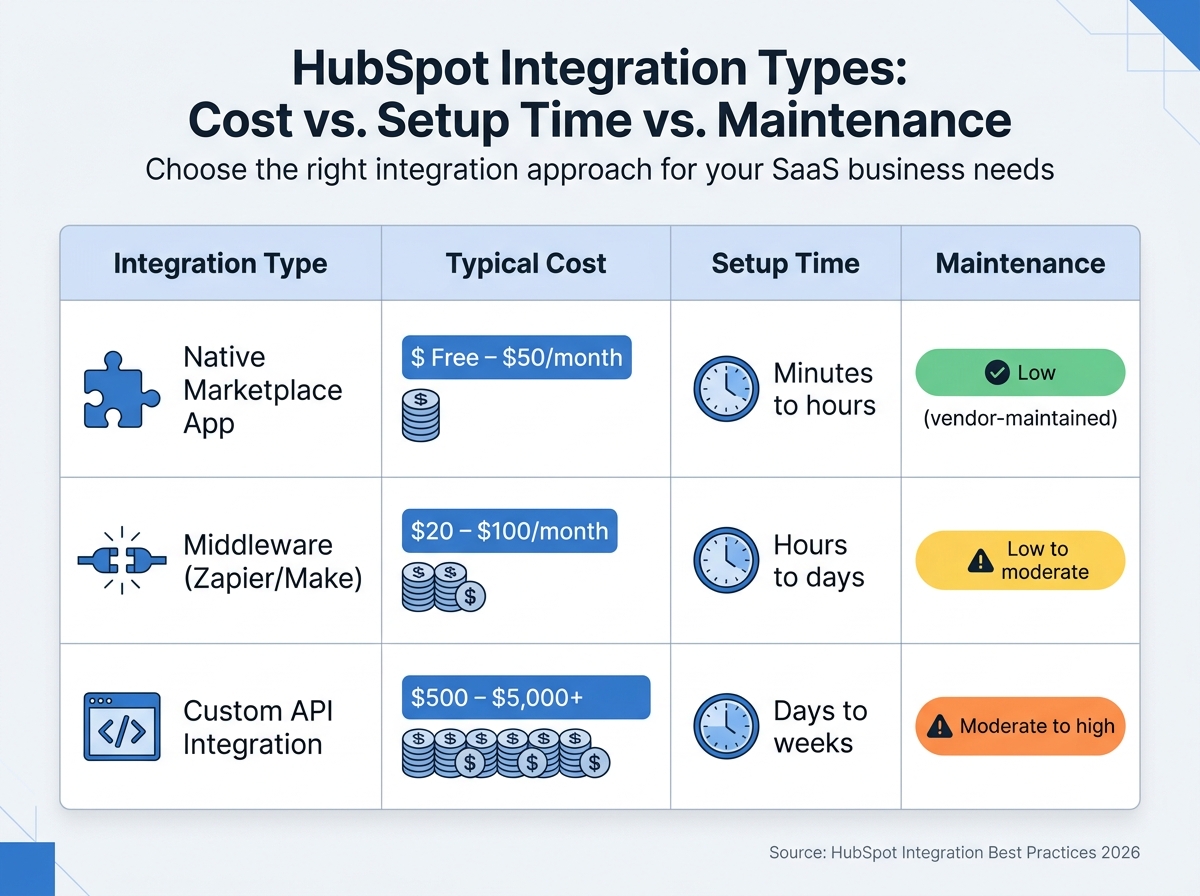
HubSpot Integration Types: Cost, Setup Time, and Maintenance Comparison
Once you have reliable data sync and automation in place, it’s time to explore more advanced strategies. These techniques allow you to handle complex data flows, manage high-volume operations, and implement cross-system reporting. The goal? To move beyond simple point-to-point connections and create a scalable, unified data architecture that grows with your business.
Prototyping with iPaaS Solutions
Before diving into custom code, consider prototyping with iPaaS tools like Zapier or Make. These platforms let you create multi-step automations in just a few hours. For example, in early 2026, Veo automated the migration of tens of thousands of leads per month from social media and email into HubSpot, significantly reducing manual work and preventing lead decay. Similarly, JBGoodwin REALTORS used Zapier, HubSpot, and Gmail to automate applicant data enrichment. This workflow cut recruiter data entry time by 25% and led to a 37% year-over-year increase in recruiting.
iPaaS tools are great for testing data mapping rules, trigger events, and identifying edge cases. If you’re working with HubSpot’s Custom Object API, webhook actions (like those available in Zapier) can help you send and receive data. Once your prototype is operational, monitor for performance issues. If you encounter rate limits, handle massive volumes (10,000+ calls per day), or need advanced data transformations, the logic from your prototype can serve as a blueprint for building custom middleware. Middleware can then refine and optimize your data orchestration.
| Integration Type | Typical Cost | Setup Time | Maintenance |
|---|---|---|---|
| Native Marketplace App | Free – $50/month | Minutes to hours | Low (vendor-maintained) |
| Middleware (Zapier/Make) | $20 – $100/month | Hours to days | Low to moderate |
| Custom API Integration | $500 – $5,000+ | Days to weeks | Moderate to high |
Using Middleware for Unified Data Architecture
Middleware plays a critical role in centralizing data flow between HubSpot and other systems like ERPs, data warehouses, or proprietary SaaS applications. Instead of relying on a tangled web of point-to-point connections, middleware consolidates transformation logic, error recovery, and synchronization in one place. For example, middleware ensures that company records sync before contacts and contacts sync before deals, avoiding dependency conflicts.
It also prevents duplicate syncs by using origin tagging and write receipts. Middleware can help manage HubSpot’s rate limits by batching requests, leveraging HubSpot’s batch endpoints to reduce API call volume by up to 90% compared to single-item queries. For large-scale operations, combining private apps with serverless functions like AWS Lambda or Google Cloud functions can handle complex transformations that iPaaS tools may struggle with.
"Good middleware is invisible when it works and invaluable when problems arise." – San Karunanithy, Solution Architect
Middleware also enables the creation of a Master Customer Record (MCR), consolidating data from multiple sources into a single HubSpot view. This gives your sales, marketing, and customer success teams a complete picture of each customer. Once data flow is streamlined, you can focus on structuring data for actionable reporting.
Custom Properties and Cross-Object Reporting
Advanced reporting starts with correctly mapping custom properties. Internal property names are permanent and used across APIs, workflows, and integrations, so treat naming as a key architectural decision. A standardized naming format like [object]_[category]_[descriptor] (e.g., contact_marketing_lead_source) ensures clarity and scalability.
To maintain data consistency and minimize reporting errors, always use dropdown or radio select field types for properties intended for reporting. For properties requiring unique values (like external system IDs), set hasUniqueValue to true when creating them via the API. HubSpot allows up to 10 unique identifier properties per object. Additionally, calculation properties (using the calculation_equation field type) can derive values like total contract value or days since last activity.
When creating cross-object reports, define association labels (e.g., "Decision Maker" or "Influencer") to simplify filtering and segmentation across contacts, companies, and deals. To prevent property overload, limit property creation permissions to specific admins or power users. Research shows teams often create over 200 custom properties, but through deduplication, this can typically be reduced by 30–40%.
HubSpot’s Breeze AI uses property names and descriptions for context, so poorly named properties (e.g., ls_orig_v2) can lead to subpar AI outputs compared to descriptive names like contact_marketing_lead_source. Always complete the description field for every property to explain its purpose, who populates it, and which reports or workflows rely on it.
Testing, Deployment, and Scaling Best Practices
Creating a solid integration is just the beginning. To handle the demands of high-volume SaaS operations, you need to focus on rigorous testing, smart deployment strategies, and proactive monitoring. These steps help transform a functioning prototype into a production-ready system capable of processing thousands of API calls daily without breaking.
Testing API Calls and Webhooks
Start by isolating your test environment. Use a free HubSpot developer account, which allows up to 10,000 daily calls, to keep testing data separate from production. A multi-layered testing approach - combining unit tests, integration tests, and exploratory tests for edge cases - can reduce production bugs by 40%.
Mock services like WireMock or Mockoon can simulate API responses, cutting testing time by up to 50%. For webhooks, tools like local tunneling can help you receive and inspect real-time payloads during development.
Don’t overlook security. Always validate the X-HubSpot-Signature in webhook headers. In fact, 74% of security breaches in webhook integrations stem from missing signature verification. Use X-HubSpot-Signature-v3 and reject requests with timestamps older than 5 minutes. Build retry logic for errors like 429 (rate limit) and 5xx (server issues) using exponential backoff - doubling wait intervals (e.g., 1, 2, 4 seconds) up to 10 retries. Make sure webhook endpoints return a 200 OK response within 200ms to 5 seconds to avoid unnecessary retries.
| Error Type | HTTP Status Code | Recommended Action |
|---|---|---|
| Authentication Error | 401 / 403 | Verify credentials; prompt for re-authorization |
| Rate Limit Exceeded | 429 | Implement exponential backoff; respect Retry-After header |
| Bad Request | 400 | Validate payload schema and required fields |
| Server Error | 500 / 503 | Retry with backoff; monitor infrastructure health |
Once testing is complete, you’re ready to deploy and scale your integration.
Scaling Integrations for High-Volume SaaS
Switching from polling to webhooks can reduce API calls by over 95%. Instead of constantly checking for updates, webhooks push data to your system in real time. Batch processing is another key strategy - use batch endpoints to handle up to 100 records per request, minimizing transaction overhead and avoiding burst caps (typically 100 requests per 10 seconds).
Adopt a "verify–enqueue–acknowledge" pattern for webhooks. This means acknowledging receipt with a 200 status immediately, then processing the payload asynchronously using message queues like RabbitMQ or AWS SQS. This approach prevents timeouts and unnecessary retries. For large datasets, use the CRM Search API to perform incremental syncs (e.g., "records updated after timestamp") instead of fetching all records at once.
Monitoring API usage is crucial. Track headers like X-HubSpot-RateLimit-Remaining and X-HubSpot-RateLimit-Daily to dynamically adjust request frequency, which can lower error rates by 37%. Use exponential backoff with jitter - adding randomization to wait intervals - to reduce repeated failures by 60–80% compared to fixed retry intervals.
Scaling efficiently ensures smooth operations, but proactive monitoring is what keeps everything running reliably.
Monitoring and Maintenance
Centralized observability is a must for long-term success. Use tools like Datadog, Grafana, or New Relic to aggregate logs and detect anomalies. Teams that audit error logs weekly report a 28% reduction in quota-related incidents. Set up real-time alerts for when API usage exceeds 80% or 95% of available quotas - 74% of organizations see reduced downtime with proactive monitoring.
"The gap between a working integration and a production-ready one usually comes down to how well you handle tokens." – HubSpot Developer Blog
Refresh HubSpot access tokens 5 minutes before they expire (every 30 minutes). In multi-server setups, use distributed locking (e.g., Redis or Redlock) to avoid race conditions where multiple nodes try to refresh the same token. Store tokens securely using AES-256 encryption or a secrets manager like AWS Secrets Manager.
For webhooks, use idempotency keys - such as combining portalId, eventId, and attemptNumber - to prevent duplicate events. Filter out updates triggered by your own integration using the changeSource field to avoid infinite loops. Since webhook delivery order isn’t guaranteed, rely on the occurredAt timestamp to ensure the latest data is applied. Always test updates in a HubSpot sandbox environment before deploying changes to production to prevent data corruption.
Conclusion
Tying together the strategies and techniques we've covered, building custom HubSpot integrations for SaaS automation is not just a project - it’s an ongoing process that supports sustainable growth. Whether it’s setting up OAuth flows to refresh tokens every 30 minutes or creating webhook-driven workflows that adapt to user behavior in real time, every step contributes to measurable outcomes for your business.
The first step is to audit your tech stack and determine which system owns each data domain. This audit ensures your integration aligns with your business needs. From there, you can choose the right integration patterns - real-time webhooks for activation triggers, batch processing for syncing large volumes of data, or custom objects for handling complex SaaS data like subscription details and usage metrics. HubSpot isn’t just a plug-and-play tool; its real power lies in its ability to be tailored for mid-market and enterprise needs, offering deeper value through custom CRM architecture.
Scaling effectively requires discipline. Use techniques like exponential backoff with jitter to handle rate limits, asynchronous processes to avoid webhook timeouts, and circuit breakers to manage recurring errors. Pair these with vigilant API monitoring to stay ahead of quota limits and ensure long-term system reliability.
The leap from a functional prototype to a production-ready integration hinges on security, monitoring, and maintenance. Validate webhook signatures to ensure data integrity, use idempotency keys to avoid processing duplicate events, and implement observability tools for better system insights. Always test changes in a sandbox environment before applying them to live systems. Proactive monitoring and maintenance are essential to keeping your integrations running smoothly.
For SaaS companies managing large customer bases and millions of API calls, custom integrations are the backbone of a unified data system. They eliminate manual processes, drive product-led growth, and deliver strong ROI by saving labor costs and preventing revenue leaks. These integrations aren’t just tools - they’re strategic assets that fuel long-term success.
FAQs
When should I use a private app vs OAuth?
When deciding how to access HubSpot data, consider your goals. Private apps are best for accessing specific data within a single HubSpot account, especially when scoped permissions are needed. On the other hand, OAuth is the way to go if you need a solution that allows multiple users or clients to authorize access through simple, one-click connections. In short, private apps are tailored for individual account needs, while OAuth works well for broader, multi-user integrations.
How do I prevent bidirectional sync loops?
To keep bidirectional sync loops in HubSpot under control, it's crucial to follow certain architectural approaches that stop infinite webhook echoing. Here are some effective strategies:
- Implement deduplication layers: Use idempotency keys to ensure that the same event isn't processed multiple times.
- Validate webhook signatures: Verify webhook signatures on the server side to confirm events are authentic and not duplicates.
- Use external ID matching: This helps prevent orphaned records by aligning data between systems accurately.
- Design delta sync strategies: Focus on syncing only the changes, rather than entire records, to reduce unnecessary updates.
- Establish conflict resolution mechanisms: Define clear rules to handle data discrepancies between systems.
- Adopt asynchronous processing: Handle webhook events in a way that manages high volumes efficiently and avoids triggering endless updates.
By incorporating these practices, you can minimize the risk of sync loops and maintain smooth data integration.
What’s the best mix of webhooks and batch syncs?
Balancing real-time updates with system efficiency is key to finding the right mix. Webhooks are perfect for event-driven actions that need immediate responses, such as triggering workflows or sending notifications. On the other hand, batch syncs are ideal for handling larger data sets or periodic updates, as they help lower API load and enhance stability. Combining the two - a hybrid approach - uses webhooks for critical events and batch syncs for bulk updates, ensuring data stays consistent while avoiding system strain.