Get insights like this delivered to your inbox
Join 2,500+ GTM professionals. No spam, unsubscribe anytime.
Subscribe to NewsletterBehavioral data is the backbone of effective email triggers in SaaS. It uses user actions - like clicks, logins, and purchases - to send emails at the right time, boosting engagement and conversions. Here’s why it works:
- Higher Engagement: Behavioral emails see 45–65% open rates, compared to 18–25% for scheduled blasts.
- Better Conversions: Triggered emails convert 5–15% of users, far surpassing the 0.5–2% rates of batch campaigns.
- Revenue Impact: Despite being just 2% of email volume, triggered emails drive 30% of email revenue.
Here’s how clicks, logins, and purchases power these triggers:
- Clicks: Show interest and work well for mid-funnel engagement. Quick responses (within 5 minutes) improve outcomes significantly.
- Logins: Reflect deeper engagement. Triggers based on inactivity (e.g., 7 days without logging in) help reduce churn.
- Purchases: Indicate strong intent. Post-purchase and upsell emails perform best, converting users at rates of 5–15%.
The key is timing, relevance, and using tools like HubSpot or Vestal Hub to automate workflows. Start small with 3–5 triggers targeting user activity, inactivity, and purchase behavior to maximize results.
Create a Trigger-Based Email Onboarding Flow for Your SaaS. The Step-by-Step Guid
sbb-itb-69c96d1
1. Clicks
Click data gives valuable insight into users during the research phase - that critical time when they’re exploring your product but haven’t yet committed. If someone clicks through to your pricing page or watches a feature demo, they're signaling interest, even if they don’t convert right away. These clicks act as a bridge between casual browsing and more decisive actions, like making a purchase.
Trigger Effectiveness
Emails triggered by clicks consistently outperform scheduled campaigns. For example, click-triggered emails average a 5.58% open rate (with top-performing flows hitting 10.48%), compared to just 1.69% for batch sends. Browse abandonment emails - those sent when users click on specific pages - often see open rates of 20–25%, with click rates ranging from 10–25%. Timing is key: responding within five minutes makes a connection 100 times more likely than waiting an hour.
However, not every click should trigger an email. Setting thresholds - like requiring at least two page views or engagement lasting longer than 30 seconds - helps ensure relevance. This prevents overcommunication and keeps your messages meaningful. As KISSmetrics explains:
"The best email is not the one with the best subject line. It is the one that arrives at the exact moment the user needs it, because their behavior told you they needed it."
Impact on Conversion Rates
Click-triggered emails convert 13 times better than batch campaigns. Behavioral emails, in particular, achieve conversion rates of 3–5%, compared to just 0.1% for scheduled sends. Personalization makes a big difference here. Instead of sending a generic "Check out our features" email, reference the user’s specific actions. For example, "Your dashboard is 80% set up" shows you’re paying attention.
While clicks generate a lot of engagement, they don’t always indicate strong purchase intent. For instance, someone clicking on a blog post is likely just exploring, whereas someone abandoning a cart is much closer to buying. This makes click-based triggers ideal for mid-funnel engagement, nurturing users who are still gathering information before making a decision.
Ease of Implementation
Capturing click data is straightforward. Platforms like HubSpot, Klaviyo, and ActiveCampaign can track pageviews and link clicks automatically through web analytics or tracking scripts. These tools make it easy to integrate click events into workflows without requiring heavy backend development. Vestal Hub, for example, simplifies this process by connecting click data to automated workflows, eliminating the need for complex custom setups.
To avoid overwhelming users, set frequency caps - limit behavioral emails to one per 24 hours or two to three per week. Also, keep each email focused with a single, clear call to action.
Up next, we’ll dive into Login behaviors to explore how consistent engagement fosters deeper product adoption.
2. Logins
Login data provides a clear picture of user engagement. Unlike clicks, which measure interest, logins reflect a deeper level of involvement. For instance, a user logging in three times a week is likely building a habit, while someone who hasn’t logged in for seven days might be drifting away. Both cases offer opportunities for targeted, timely communication.
While click data captures initial curiosity, login behavior reveals patterns of sustained engagement, making it a powerful tool for understanding user habits.
Trigger Effectiveness
Emails triggered by login behavior tend to perform exceptionally well, with open rates ranging from 45–65% - a significant improvement over traditional batch campaigns. These emails are effective because they reach users at the right moment. For example, sending a prompt after 24 hours of inactivity can recover 10–20% of users who might otherwise churn. Similarly, re-engagement emails sent around the 7-day mark often yield the best results, striking a balance before users become fully disengaged.
Login-based triggers can be proactive or reactive. Proactive triggers are activated when users log in and can be used to introduce new features or encourage further engagement after multiple sessions. Reactive triggers, on the other hand, are set off by missed logins, allowing teams to address potential churn immediately. For example, a login without subsequent action can indicate friction, signaling the need for quick intervention.
To maximize impact, analyze login patterns and time emails to align with user activity. For daily-use products, re-engagement emails might be sent after 3–5 days of inactivity, while for weekly-use products, a longer window of 10–14 days may be more effective. These timeframes should reflect natural usage behaviors rather than arbitrary schedules.
Impact on Conversion Rates
Login-based triggers consistently outperform scheduled campaigns, with conversion rates of 5–15%, compared to just 0.5–2% for traditional email blasts. While purchase triggers drive immediate revenue, login triggers focus on habit-building and churn prevention, both of which are essential for long-term customer retention. Re-engagement campaigns targeting users inactive for 30–60 days are three times more likely to succeed than those aimed at users dormant for six months. In fact, final re-engagement attempts can reactivate up to 45% of recipients who interact with the email.
When crafting these emails, it’s important to avoid guilt-inducing language like "We miss you" or "Your account is gathering dust." Instead, highlight updates or new features that add value, ensuring your message feels helpful rather than intrusive. As Atticus Li, Experimentation and Growth Leader, explains:
"A time-based sequence assumes a linear commitment curve. A behavioral sequence adapts to the actual curve each user is following."
Ease of Implementation
Tracking logins is relatively straightforward, as most authentication systems already log this data. The real challenge lies in setting up inactivity triggers, which require identifying the absence of an event rather than its occurrence. This can be managed by querying the database regularly to flag users whose "last login" timestamp exceeds a specified threshold.
When multiple triggers occur at once, prioritize those with the highest impact, such as payment failures, over less critical actions like feature recommendations. Tools like Vestal Hub simplify this process by integrating login data with automated workflows, eliminating the need for complex backend configurations and making inactivity tracking more efficient.
Next: Explore how purchase behavior drives revenue-focused email campaigns.
3. Purchases
Purchases, like clicks and logins, are a key behavioral signal, but they go a step further - they signify a firm commitment. Whether it's a first-time subscription, an upgrade, or a renewal, each purchase opens the door to opportunities for retention and growth.
Trigger Effectiveness
Post-purchase triggers are especially effective because they engage customers when satisfaction is at its peak. For instance, emails sent 48 hours after a purchase often see open rates exceeding 40% and click rates above 10%. Those sent within minutes of the purchase can generate engagement levels 3–5 times higher.
The best triggers focus on specific user behavior. For example, when users reach a plan limit, upgrade emails convert at rates between 10% and 20%. Positioning the upgrade as a solution to an immediate need - like resolving a limitation - makes it feel like the natural next step. Similarly, cancellation prevention emails, sent to users who’ve started but not completed the cancellation process, can retain 10–20% of those users.
Another factor working in favor of purchase triggers is the psychological principle known as the endowment effect. Once users have invested their time or data into a product, they tend to value it more. This makes them more likely to upgrade to avoid losing their progress.
By leveraging these behavioral and psychological insights, purchase triggers can drive strong revenue growth.
Impact on Conversion Rates
Compared to batch campaigns, which typically convert at a modest 0.5–2%, purchase-triggered emails deliver much stronger results, with conversion rates ranging from 5% to 15%. Win-back campaigns, designed to recover churned users, also perform well, bringing back 5–15% of those customers.
A key strategy to boost conversions is maintaining a balance: for every email asking for an action, send three that deliver value. Additionally, framing upgrades as a way to "unlock the next level" often resonates with users, encouraging them to take action.
Ease of Implementation
Setting up purchase-based triggers involves tracking key events like purchase confirmations, plan limits, and subscription changes. Fortunately, many modern SaaS tools, such as Mixpanel and Segment, integrate seamlessly with email platforms using APIs or webhooks. For businesses with smaller product catalogs, simple rule-based recommendations - such as suggesting a complementary product after a purchase - can often outperform more complex machine learning systems.
The real challenge lies in aligning the strategy with the data. As Ronald Davenport, a Lifecycle Architect, puts it:
"The platform isn't the bottleneck. The strategy is."
A good starting point is to implement a high-impact trigger, like a renewal reminder sent one week before a subscription expires. From there, you can expand into more complex, multi-step workflows. To avoid overwhelming users, it's essential to set frequency caps for these triggers.
Tools like Vestal Hub simplify this entire process. By integrating purchase data directly into automated workflows in platforms like HubSpot, businesses can eliminate the need for manual data syncing. This makes it easy to track events like "Plan Limit Reached" or "Subscription Canceled" without requiring extensive backend development. With this streamlined approach, purchase-based triggers can deliver strong results while keeping operations efficient.
Pros and Cons
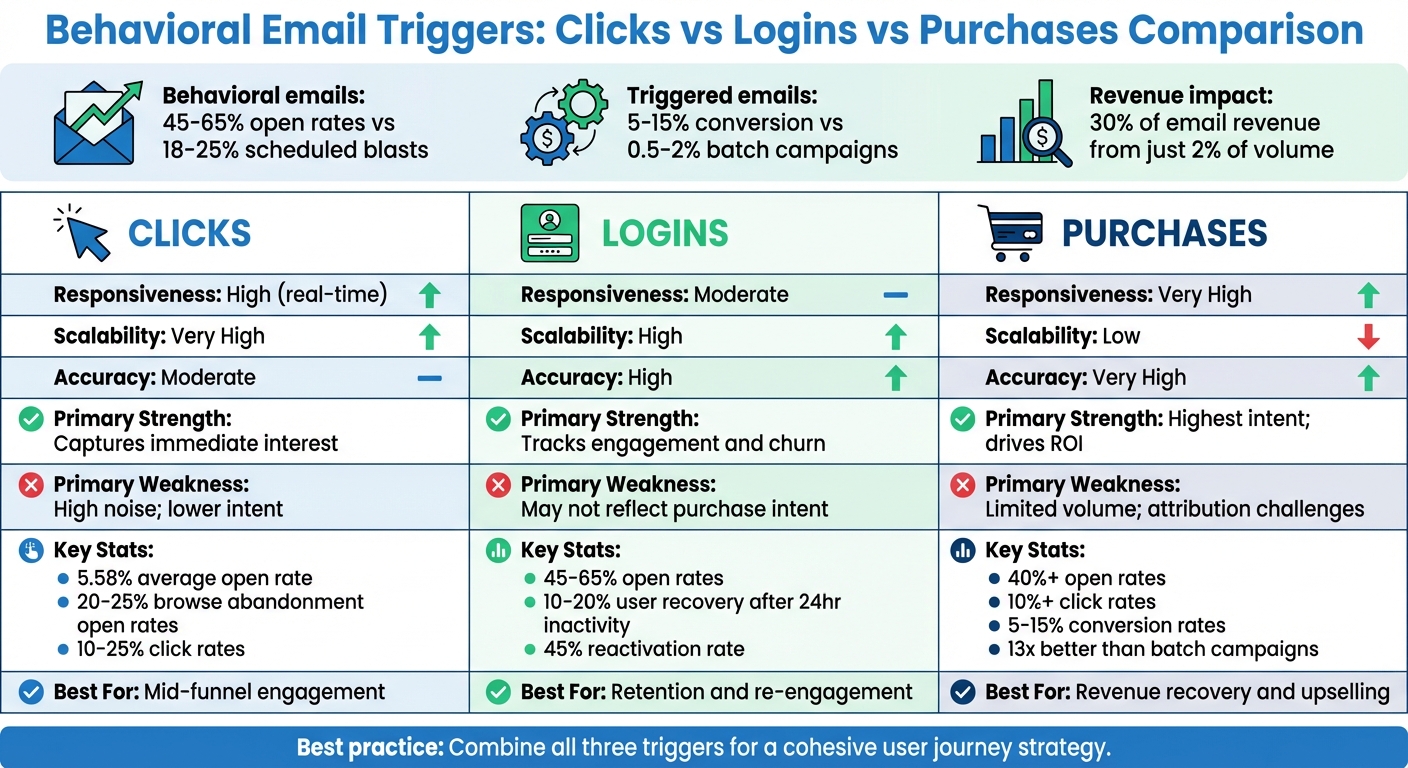
Behavioral Email Triggers Comparison: Clicks vs Logins vs Purchases
When it comes to email triggers, behavioral signals like clicks, logins, and purchases each have their own strengths and weaknesses. Understanding these trade-offs can help you pick the right triggers to optimize your SaaS email campaigns.
Clicks are great for capturing immediate user interest. They allow you to respond quickly - often within minutes - which significantly boosts the chances of connecting with users. Automated tracking tools can monitor thousands of interactions, making clicks highly scalable. However, clicks can also generate a lot of noise. Not every page view or interaction reflects genuine intent, and relying too heavily on clicks could lead to irrelevant messaging. As one source notes:
"Properties accurately represent the current state, unlike transient events".
Another drawback is that click data may be lost during system migrations, which can make it unreliable for long-term tracking.
Logins provide a more accurate picture of user engagement. They are binary events - either a user logs in or they don’t - making them easy to track and highly reliable. Logins are particularly useful for identifying churn risks, especially if a user hasn’t logged in for 7–14 days. However, not every login signals intent to make a purchase. A user might log in without taking meaningful action, which limits their effectiveness as a trigger for driving revenue.
Purchases are the clearest indicator of intent and accuracy. As financial transactions, they reflect a strong commitment and are highly effective for driving conversions - 13 times more than batch campaigns. Post-purchase emails also perform well, with open rates exceeding 40% and click rates above 10%. However, purchase events happen far less frequently than clicks or logins, making them harder to scale. Attribution is another challenge; without holdout groups, it can be tough to determine whether the email trigger directly caused the purchase or if the user would have bought anyway.
| Data Type | Responsiveness | Scalability | Accuracy | Primary Strength | Primary Weakness |
|---|---|---|---|---|---|
| Clicks | High (real-time) | Very High | Moderate | Captures immediate interest | High noise; lower intent |
| Logins | Moderate | High | High | Tracks engagement and churn | May not reflect purchase intent |
| Purchases | Very High | Low | Very High | Highest intent; drives ROI | Limited volume; attribution challenges |
For best results, use clicks to engage users early in their journey, logins to monitor retention and re-engagement, and purchases to drive revenue recovery and upselling. Regardless of the trigger, it’s essential to set frequency caps to prevent overwhelming users with too many emails.
Aligning the right trigger with user behavior ensures your emails are timely, relevant, and effective at boosting engagement and conversions.
Conclusion
Behavioral triggers work best when tailored to different stages of the user journey. For example, clicks reveal immediate intent, especially when users interact with high-value areas like pricing pages. Logins help reduce churn by catching early signs of disengagement, typically within 7–14 days of inactivity. Meanwhile, purchases drive revenue, with triggered emails converting 19 times better than broadcast campaigns and accounting for 30% of email revenue despite representing just 2% of total send volume.
The key is combining these triggers into a cohesive strategy. Use clicks to detect intent and inform timely sales outreach. Monitor logins to initiate onboarding flows, guiding users to their "First Value Experience" - that moment when they see the true benefit of your product. For purchases or usage limits, set triggers to encourage upgrades when users reach 80% of their storage or feature capacity. This integrated approach creates a seamless workflow, ensuring every trigger aligns with your broader goals.
HubSpot's Workflows act as the central hub for this system, leveraging contact properties to track website activity and email engagement while triggering the right actions at the right time. To execute these triggers effectively, you’ll need clean data, tools for identifying anonymous B2B buyers (who make up 73% of researchers), and proper coordination across your tech stack. RevOps teams play a critical role in fine-tuning this process, ensuring every trigger performs as intended.
Vestal Hub simplifies this entire setup for B2B SaaS companies. They specialize in unifying data, automating workflows, and optimizing performance. From HubSpot implementations and custom integrations to lifecycle automation and advanced reporting, their technical teams build the infrastructure needed for behavioral email systems. Whether you require one-time project assistance or ongoing optimization via a monthly retainer, they focus on precision and scalability to ensure your triggers align with real-time user behavior.
Start small with 3–5 impactful triggers targeting activation, engagement milestones, and signs of inactivity. To avoid overwhelming users, limit emails to one per 24 hours and no more than three per week. Maintain a 3:1 balance of value-driven to promotional content to foster long-term engagement. With clean data, thoughtful implementation, and the right triggers, you can achieve the impressive results behavioral emails are known for - 2–3x higher open rates and 5–10x higher conversion rates.
FAQs
Which 3–5 triggers should I launch first for my SaaS?
The best starting points for SaaS email campaigns are triggers based on user behavior that signal engagement or intent. Here are a few key examples:
- Onboarding completion: Send emails to help new users navigate your product and get the most out of it early on.
- Usage milestones: Celebrate achievements or highlight progress to encourage upsells or offer additional support.
- Inactivity or failed logins: Reconnect with users who may be at risk of dropping off by addressing their challenges or offering assistance.
These types of triggers lay the groundwork for behavior-based email sequences, helping to keep users engaged and improving retention.
How do I set click thresholds so I don’t email on every pageview?
To keep your emails relevant and avoid overwhelming users, adjust your email automation settings to trigger messages only after users reach certain engagement milestones. For instance, instead of sending an email after a single pageview, wait until they’ve reached a more meaningful level of interaction, like five clicks. This approach ensures your emails align with genuine user interest while minimizing unnecessary communication.
How can I measure if triggers actually caused conversions?
To determine if triggers are driving conversions, monitor user actions and behavior data as they happen. Use analytics and automation tools to study how triggered emails influence user conversions, like sign-ups or purchases. Pay close attention to patterns that connect specific triggers with clear, measurable results.